
MCP Use Cases for Small Businesses, Plus a Readiness Check
MCP use cases for a small business, by department, with what official servers from HubSpot, Intercom and Stripe let an AI app read, change or leave to a person.
A good first MCP connection answers one question your team asks every week, from one system, with read access only, before it is allowed to change a record.
Vendor servers differ in what an AI app may change: Intercom's note tool cannot reply to a customer, and Stripe holds refunds and money transfers for a person.

How to choose a first MCP use case
MCP pays off where people already ask an AI app for help and the answer sits in another tool. The first use case should be small enough to build, test and judge in a few weeks.
One team, one system, one repeated question
Start from a question someone asks out loud, in their own words, several times a week. If the answer lives in one system, a single MCP server can reach it. If the answer needs three systems and a judgment call, it is a second or third project. A narrow first connection is cheap to build, simple to test against real examples and quick to show whether it saves time.
Read access first, actions later
The MCP specification says there should always be a human in the loop with the ability to deny tool invocations, and that AI apps should show which tools are exposed and ask for confirmation. A first connection that only reads keeps that rule simple to follow. Our post on MCP security and permissions covers approval settings in detail.
Sales: answers from the CRM in the chat
Sales teams ask the same account questions before every call and after every meeting. A CRM connection lets the AI app answer them from the record instead of from memory or a copied note.
Example: the stalled-deal check
A rep asks, "Which of my open deals have not changed stage in the last 30 days?" The AI app reads the deal records, lists the stalled deals with their stage and amount, and names the contact on each. The weekly pipeline review starts from that list. A later step could let the AI draft a follow-up task, with the rep confirming it before it is saved.
What HubSpot documents about its server
HubSpot's remote MCP server reads CRM records such as contacts, companies, deals, tickets and leads, and it can create and edit several of those record types. Its documentation states that users can only view and modify records they have access to in HubSpot, so each rep's existing permissions carry over. If an account has HubSpot's Sensitive Data setting turned on, conversation data is blocked from access through the server. HubSpot suggests running a tool called get_user_details after connecting to see which tools and objects your account can use, which is a quick way to confirm the connection is scoped the way you planned.
Support: context before the reply
Support agents lose time asking customers to repeat what they already said. A help desk connection puts that history in front of the agent before the reply, and the agent still sends it.
Example: a customer writes in again
An agent asks, "Has this customer contacted us before, and what did we tell them?" With read access to conversations and contacts, the AI app pulls the earlier threads and the contact's details, then summarizes what was promised. The agent answers with the full picture instead of asking the customer to start over.
What Intercom's server can and cannot do
Intercom's tool reference lists tools that read conversations and contacts, and one, add_internal_note, that writes a note only teammates see and cannot send a reply to the customer.
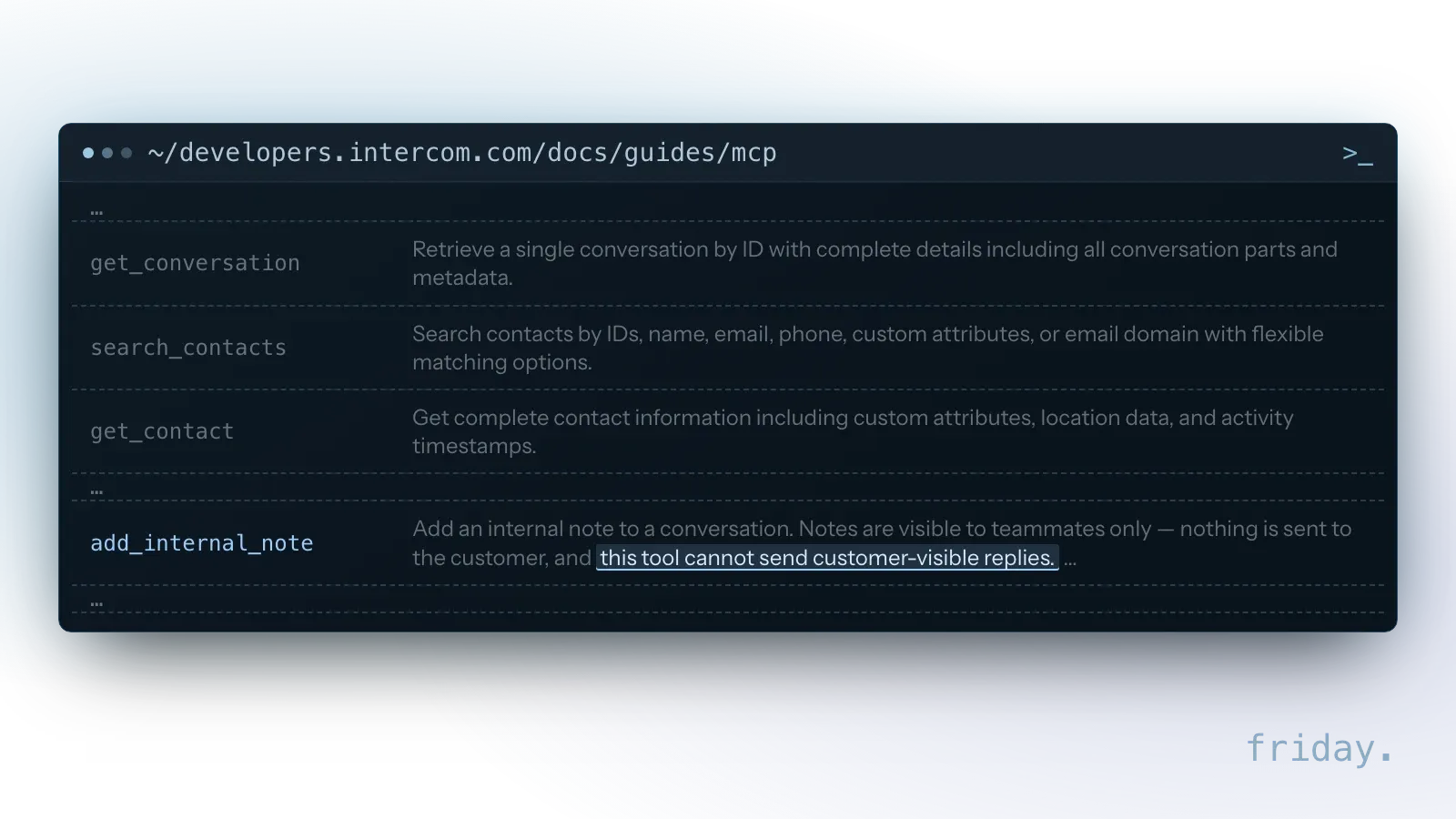
The server is not read-only, though. Intercom lists 16 tools, including ones that create and update Help Center articles, and OAuth connections in workspaces with Fin Operator get extra tools that can apply changes to the workspace's live configuration. The server is available for US and EU hosted workspaces; AU hosted workspaces are not yet supported. During OAuth, Intercom's consent page names the application asking to connect, and Intercom notes that the application name is supplied by the application itself and is not verified. Check the redirect address on that page before you choose Allow.
Operations: orders and inventory on request
Operations questions repeat on a schedule: what is late, what is short, what ships today. A connection turns a morning of filtering screens by hand into one question and a list to act on.
Example: the morning late-order check
An operations lead asks, "Which orders are past their ship date, and do we have stock to send them?" With read access to orders and inventory in the ecommerce platform, the AI app lists the late orders and flags the ones with no stock on hand. Changing an order's status stays a manual step until the read-only answers have proven reliable.
When the data lives in a spreadsheet or folder
If your stock counts and schedules live in shared spreadsheets and folders, check which server can reach them. The official MCP servers repository includes a Filesystem server for file operations with configurable access controls, but the repository describes its servers as reference implementations meant as educational examples for developers, and warns that they are not production-ready. For files that run the business, use a server your spreadsheet or storage vendor publishes and supports, or have one built and tested for your setup.
Finance: summaries before transactions
Finance work mixes lookups that are safe to automate with actions that move money. A first finance connection answers questions about invoices and payments and leaves transactions to a person.
Example: the overdue-invoice list
An owner asks, "Which invoices are more than 30 days overdue, and who should we call first?" With read access to invoices, the AI app returns the list with amounts and due dates, sorted by age. Collection follow-ups start from an accurate list, and nobody exports a report to build it.
How Stripe's server separates reads, writes and money
Stripe's tool table exposes much of its API through two general tools, stripe_api_read for GET methods and stripe_api_write for POST, PATCH, PUT and DELETE methods, next to separate tools such as get_stripe_account_info and stripe_analytics. Its Treasury tools, labeled public preview, include send_money and transfer_money, which carry a Human confirmation badge that a person approves in the Stripe Dashboard.
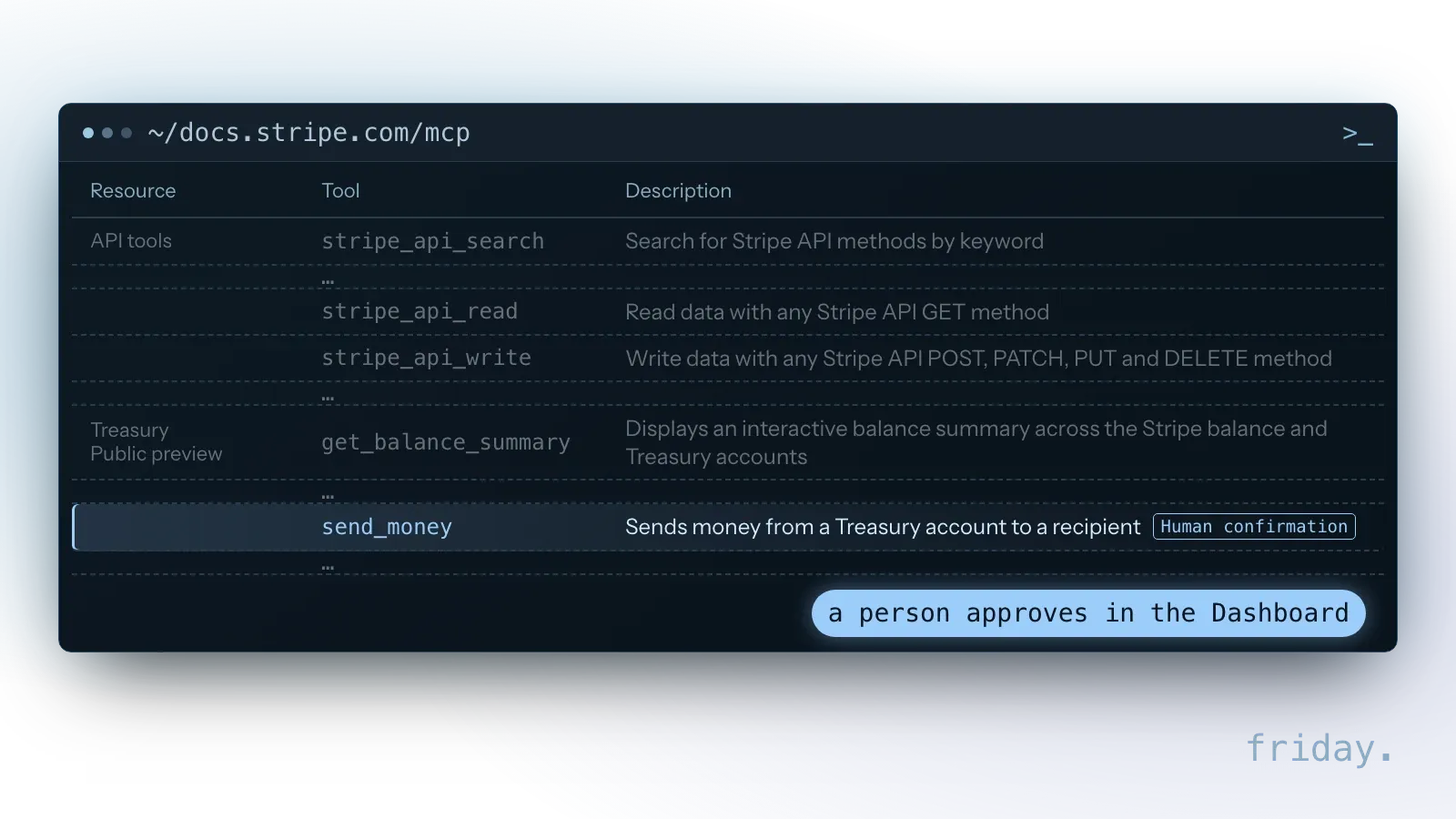
Stripe adds that confirmation depends on the action as well as the tool name: creating a refund goes through stripe_api_write and needs confirmation, while other writes through the same tool, such as voiding an invoice or canceling a subscription, do not, unless account-specific approval rules require review of more actions. After you approve, you tell the agent to retry the operation. An approval request expires if nobody approves it within 24 hours. Stripe also asks you to turn on your AI app's tool-approval setting so you can review tool calls before they run. Administrators can enable or disable MCP access for the whole team in the Dashboard, with separate settings for live mode and sandbox environments, and can revoke a connected app's session from the list of OAuth sessions.
Reporting and internal knowledge
Two more use cases cut across departments: the weekly numbers and the shared know-how. Both depend less on the connection than on whether the data behind it is accurate and kept current.
The weekly numbers without the export
"How did last week's sales compare with the week before, and which products moved?" is a question a payment, ecommerce or point-of-sale connection can answer without anyone exporting and pasting figures. The limit is accuracy. Check an AI summary of numbers against the system's own report until it has matched for several weeks, and keep the system's report as the record.
Policies and how-tos from shared documents
"What is our return policy for opened items?" can be answered from a shared folder or wiki holding the handbook, price list and process notes. New staff get answers without interrupting a manager, and the answer points to the document it came from. Outdated policies produce confident, outdated answers, so name one person who keeps the source folder current.
Checking a vendor's server before the first use case
Before a team connects, confirm who runs the server. The official MCP Registry lists public servers under names tied to a verified GitHub account or domain, which proves the publisher, not safety.
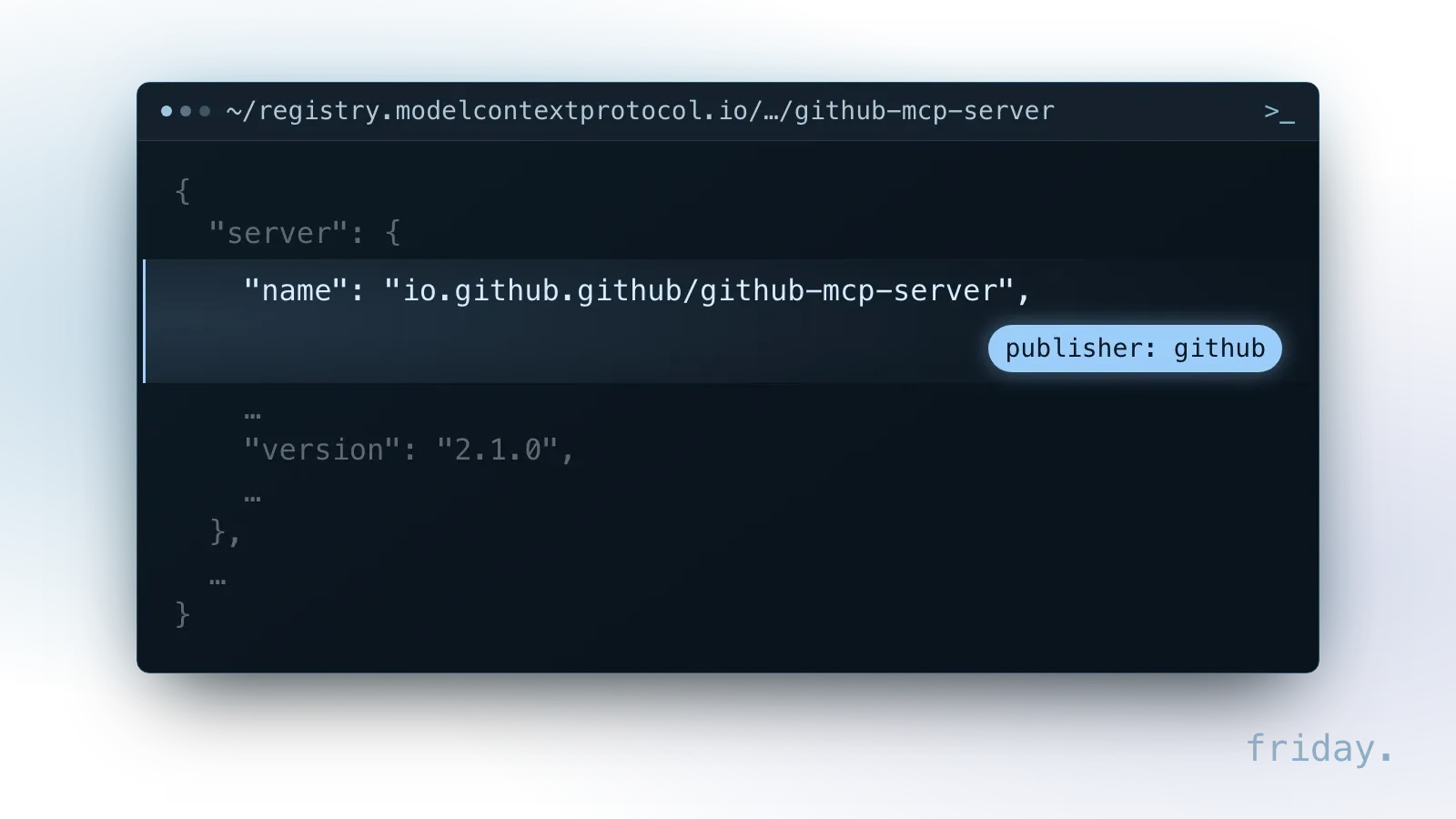
Each entry carries a version number and an update date, which answer part of the upkeep question. The registry is still in preview, and its documentation warns that breaking changes or data resets may occur before general availability. Our explainer on what MCP is covers what else the registry leaves to you.
Three checks before you connect
- The publisher: is it the vendor of the tool, or a third party you would need to trust with your data?
- The tool list: which tools read, which write or send, and can the risky ones be turned off or held for approval?
- The upkeep: when was it last updated, and does the vendor's own documentation describe it?
What a first connection costs to run
The protocol costs nothing; a connection's costs fall into four budget lines, some of which may turn out to be zero. Plan as well for the vendor changing the rules while you run it.
Four lines in the budget
- The AI app: seats or usage on the plan that supports MCP connections.
- The tool's access: some software plans limit or exclude API access, which a server needs.
- Setup and testing: configuring an official server or building a custom one, then checking it against real examples.
- Maintenance: updates when the tool, the AI app or the MCP specification changes, plus someone who reviews the logs.
For a read-only connection to one system with an official server, the cost is mostly setup time and the hours someone spends checking results. Custom servers and write actions shift the balance toward development and ongoing support.
Vendor changes to plan for
Vendors change how their servers connect, and each change lands on whoever maintains the connection. Stripe's MCP documentation, checked November 16, 2026, set November 30, 2026 as the migration deadline: from December 2026, requests with full-access secret keys or restricted API keys without the Agent tag receive a 401 response, and agent API keys or OAuth replace them. HubSpot requires PKCE when an AI app authenticates with its server. Put the vendor's MCP page on someone's calendar to recheck each quarter.
When MCP is the wrong tool
Some tasks look like MCP projects but need something else. Two signs come up before any build starts: nobody is asking a question, or the data behind the answer is incomplete.
Scheduled jobs belong in a workflow
If the work runs on a schedule with no question involved, such as copying new orders into a spreadsheet every hour, an automated workflow on the tool's API is simpler and cheaper to run. MCP earns its place when a person asks something different each time and the AI app needs to look it up.
Messy data stays messy
MCP cannot fix the records it reads. If the CRM notes are incomplete or the inventory counts are a week old, the AI app will answer from incomplete or old data, with the same confident tone. Clean up the source first, or pick a use case whose data the team already trusts.
The readiness checklist
Before you build a first connection, answer six questions about the task, the system and the access. If you cannot answer one of them yet, that missing answer is the first piece of work.
Six questions before you build
- The task: can you write the exact question your team repeats, in their words?
- The frequency: does it come up at least several times a week?
- The system: is the answer in one tool, and does that tool's vendor publish an MCP server?
- The AI app: does the app your team uses support MCP connections on your plan?
- The access: have you decided what the AI may read, and which actions, if any, it may take?
- The test: do you have three real examples with the answers you would accept as correct?
A first scope by department
Each department starts by reading one system, and anything that changes a record, reaches a customer or moves money stays with a person.
| Department | First access | Stays with a person |
|---|---|---|
| Sales | Read deals, contacts and companies in the CRM | Saving follow-up tasks and changing records |
| Support | Read conversations and contacts in the help desk | Every reply to the customer |
| Operations | Read orders and inventory | Changing order status |
| Finance | Read invoices and payments | Payments, refunds and credits |
FAQs About MCP Use Cases
A vendor-published server and an AI app that supports its sign-in cover a first connection without code. A test against three real examples then shows whether it works.
Which department should start first?
The one with the highest count of repeated lookups and the lowest risk. Sales and support are good candidates because their first connection can be read-only and every customer-facing step stays with a person.
Do we need a developer to start?
Not if the vendor publishes a server and your AI app supports its sign-in method (HubSpot, for example, requires OAuth with PKCE); then connecting is closer to authorizing an app. Internal systems, custom rules or answers that combine several systems need development work.
How do we know it is working?
Time the repeated question before and after, and check the answers against your three test examples during the first weeks. If the answers drift from the system's own records, stop and find out why before adding anything.
What if our tool has no MCP server?
Search the official registry and the vendor's developer documentation first. If neither lists one and the tool has an API, a custom server is an option; if it has no API, a server cannot reach it either.
Start with one connection
Pick the use case closest to your own week, answer the six questions and keep the first connection read-only until its answers have matched your records for a few weeks.
Our MCP tools and integrations service sets up and tests one connection to a system you choose. If the task turns out to be a scheduled job, our workflow automation service is the better fit. If you have the task but not all six answers, send us what you have and we will work through the gaps with you.
Last checked: November 16, 2026, against the MCP specification (tools), the MCP Registry documentation, the MCP servers repository, HubSpot's remote MCP server documentation, Intercom's MCP server guide and Stripe's MCP documentation. Vendor tools and plans change; check the linked pages before relying on a detail.
Technical details come from the MCP project, HubSpot, Intercom and Stripe, checked November 16, 2026.