
Gemini Skills Can Now Be Shared and Read Live Drive Files
Google lets Workspace users share Gemini skills and attach live Drive files, Notebooks and Photos. What it means for permissions, admins and who owns the work.
Google announced the change on November 16, 2026. The facts below come from its Workspace Updates post and help pages for users and admins, read November 18.
For owners on Google Workspace, two details matter: a skill can read a live Drive file, and sharing that skill follows the Drive permissions you already set.
November 16: Gemini skills become shareable
Google's post adds two capabilities to Gemini skills in the Gemini app: sharing a skill with other people, and attaching files from Google Drive, Gemini Notebook and Google Photos.
What a skill is in the Gemini app
Google defines skills as "reusable, custom instructions that guide Gemini." Its help page says you can create one from a chat, a task or the Skills page, or upload a SKILL.md file, a folder or a .zip file that contains one. Once a skill is active, Gemini can use it on its own when it fits the request, or a person can call it with / or @ followed by its name. Skills are also replacing Gems, on a timeline covered below.
Sharing with View or Edit access
The post says you can share any skill from the Skills page and grant View or Edit permissions. Recipients are notified by email and can review the skill before installing it. Google's help page for Gemini skills adds the details: only the owner and people with Editor access can share, sharing creates a copy of the skill in Google Drive, and the owner can set an access expiration date. A shared skill lands in the recipient's list as inactive until they add it. Viewers can use the skill and read its description, instructions and files. Editors can change the instructions and files and share it onward.
Files from Drive, Notebooks and Photos
When you create or upload a skill by hand, you can now include files from Google Drive, Gemini Notebook and Google Photos next to files from your device. Google says "Drive files and Notebooks update in real time," so the skill reads the latest version each time it runs. Google's own example is a marketing team sharing a brand-voice skill that points to its brand guidelines doc in Drive. Uploaded files are capped at 100 MB per skill, and the help page says scripts that need internet access are not supported, so a skill cannot call outside websites.
Who gets skill sharing, and how fast
The rollout started on November 12, before the post went up, and Google lists it for every Workspace customer. Editions, age rules and the move from Gems to skills need a closer look.
Editions and the age rule
The November 16 post lists the feature as available to all Google Workspace customers and to people with personal Google accounts. The admin help page for the skill sharing switch lists Business Starter, Standard and Plus, Enterprise Standard and Plus, and Google AI Pro for Education. On age, Google's pages disagree: the admin page on the Gems to skills transition says Gemini app skills are open to users of all ages, while the Gemini Apps help page lists "Be 18 or over" under what you need. If you have staff under 18, check with Google support before you rely on either page.
A rollout of up to 15 days
Google says the gradual rollout started on November 12, 2026, for both Rapid Release and Scheduled Release domains, with up to 15 days for the feature to become visible. In practice, one employee may see the Share option before a colleague does, and that is expected during the rollout window. For now, sharing and managing access work only in the Gemini app on the web, at gemini.google.com, and not in the Gemini mobile app.
Two kinds of Gemini skills that do not sync
Google runs two skill products. Gemini skills in the Gemini app are the subject of this post. Skills in Google Workspace, inside Gmail, Docs, Slides, Drive, Chat and Workspace Studio, began rolling out on November 9 for Rapid Release domains, with Scheduled Release domains starting November 30. Google says skills created in Workspace do not sync with skills or Gems in the Gemini app. Because both use the SKILL.md format, you can copy instructions between them by hand. Workspace skills support English prompts only and are not yet in Sheets or Meet.
The Gems to skills timeline
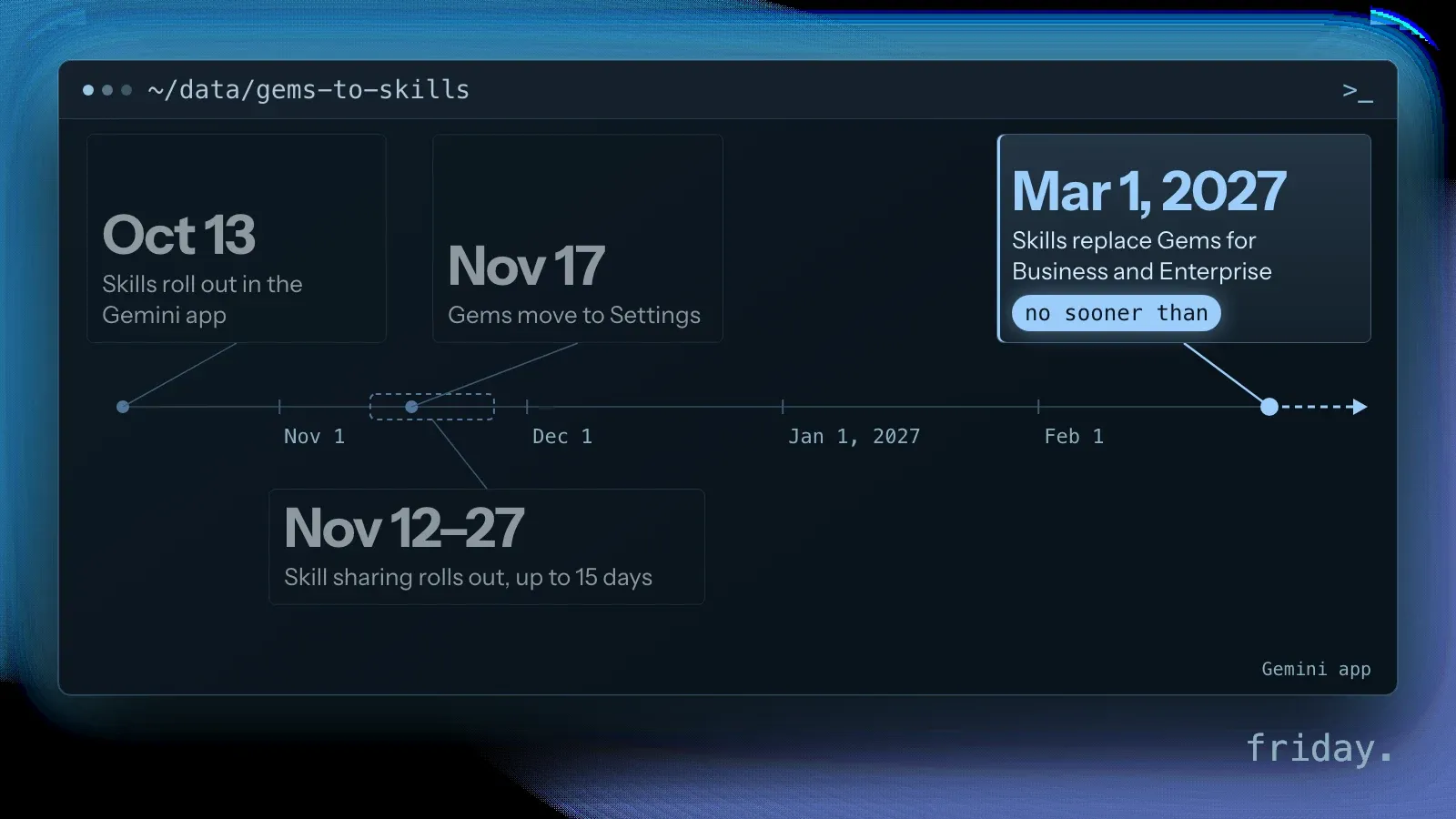
Google's admin page sets out the Gems to skills move. Skills began rolling out in the Gemini app on October 13. On November 17, Gems move to Settings, where they still work. No sooner than March 1, 2027, skills fully replace Gems for Business and Enterprise customers, and remaining Gems migrate to draft skills only in the Gemini app, not in Workspace. Google asks admins to have users delete unused Gems first. In Friday's view, the Gems to skills switch is the moment to decide where your instructions live.
What admins control and what they do not
Skill sharing is on by default for every organization. Admins get one switch, plus the Drive rules they already have, and nothing at all for the files a user attaches to Gemini skills.
The skill sharing switch in the Admin console
According to the admin help page, the setting sits under Generative AI, then Gemini app, then Sharing in the Google Admin console, and it requires the Gemini Settings administrator privilege. You can set Skill sharing to On or Off for the whole domain, or apply it to one organizational unit or configuration group. Google says changes can take up to 24 hours. On October 13 Google had written that there were no admin controls for skills in the Gemini app, so this switch is new with skill sharing.
Drive rules decide external sharing
Shared skills are stored in Google Drive as ZIP files, so the Drive sharing settings you already have apply to them. If your users can share Drive files outside the company, they can also share skills outside it. The same page says Drive's data loss prevention rules can control how skill files are shared, and Drive's download and copy restrictions can stop users from downloading or copying shared skills. In Friday's view, for a small business that makes the Drive external sharing setting the control for external sharing.
No admin control over attached files
The November 16 post states plainly: "There are no admin controls for adding files to skills in the Gemini app." An admin cannot stop a user from attaching a Drive file, a notebook or a photo to a skill. What protects that file is its own Drive permission, which a recipient still needs before the skill can read it. For Workspace skills, Google added audit through Workspace Studio log events. The Gemini app pages read for this post do not describe an equivalent log for skill sharing.
Live Drive files turn Gemini skills into a permissions question
A skill that reads a live Drive file is only as useful as the Drive permission behind it, and that cuts both ways: recipients may lack access, or see more than the owner meant to show them.
Recipients need the files too
Google's post says that if a skill includes Drive files, "you'll also need to share access to those files." Sharing the skill does not share the file. For example, a five-person bookkeeping firm builds a client-onboarding skill that reads its fee schedule in Drive. If the owner shares the skill with a new hire but forgets the Drive file, the skill cannot read that file for them. If the owner shares the fee schedule with a contractor to make the skill work, the contractor can now open the file itself, outside Gemini.
Keep Activity and the Drive link
The help page says skills work with Keep Activity off, but features that need it, like Connected Apps, do not. Its example is direct: skills cannot reach Google Calendar or Google Drive while Keep Activity is off. Picture an employee who turned that setting off for privacy. Shared Gemini skills built on live Drive files will not read those files for them. Before you roll a skill out to a team, test it from an account with the same settings your staff use.
When the owner deletes or stops sharing
Ownership matters more once a skill is shared. The admin help page says that if a user stops sharing a skill or deletes it from Drive, other users can no longer use it in Gemini. The help page adds that if the owner deletes a shared skill, it is "permanently removed for everyone." Owners can transfer ownership to anyone the skill was shared with. Friday's recommendation: when an employee leaves, move their shared skills to a company account before their account is closed, as you would with their Drive files.
Downloads leave the live files behind
You can download a skill as a .zip file, but Google says Drive files and notebooks in the skill "aren't included in the download to maintain their live, real-time connection." A downloaded skill is the instructions plus any uploaded files, without the live documents it reads. Updating uploaded files also means uploading the whole skill again with its reference files. If a recipient already has a skill with the same name, one option is to save a copy, and Google says copies do not sync when the original changes.
Gemini skills, Claude's Agent Skills and who owns the file
Google and Anthropic both build on SKILL.md but share skills in different ways. In Friday's view, that common format is the reason to keep your Gemini skills as files your company owns.
Sharing in Claude: view-only and updated
Anthropic's help pages describe Agent Skills as folders of instructions, scripts and resources. They are available on the Free, Pro, Max, Ultra, Team and Enterprise plans and require code execution. Sharing with colleagues works on Team and Enterprise. Shared Agent Skills are view-only, and recipients automatically get the updated version at next use. Admins can see a skill's name and sharing status but not its files. In the Gemini app, Editors can change a shared skill, and a saved copy does not follow the original.
One file format for Agent Skills and Gemini skills
Both vendors point to the same format. Anthropic says the Agent Skills specification is an open standard at agentskills.io, so skills "aren't locked to Claude." Google's admin page says SKILL.md lets users move instructions "without platform lock-in." The spec says a skill is a folder with at least a SKILL.md file, which holds YAML frontmatter and then Markdown. Its minimal example:
---
name: skill-name
description: A description of what this skill does and when to use it.
---
Source: Agent Skills specification, agentskills.io, checked November 18, 2026. The spec caps the name at 64 characters, using only lowercase letters, numbers and hyphens, with no hyphen at the start or end, and caps the description at 1,024 characters. Google's help page asks for the same lowercase, hyphenated name in Gemini skills.
Keep the master copy outside the app
Friday's recommendation: keep each skill's SKILL.md and its reference files in a folder your company owns, with a named owner and a date on every change. Upload that folder as Gemini skills or to Claude, and treat each app copy as a deployment. Google's own download leaves out live Drive files, so the master folder should list which Drive documents each skill reads. If you leave Gemini later, or add Claude, the instructions move with you and the Drive list tells you what to re-link.
Where the hidden work sits
Google's post lists no separate price for Gemini skills. The cost sits elsewhere: someone has to review Drive permissions, track who edits each skill, and review Gems before the Gems to skills migration, which comes no sooner than March 1, 2027. In Friday's view, an agency that writes your skills inside its own accounts leaves you renting your own process. Ask for the SKILL.md files and the Drive list in writing.
Where a skill stops and an agent starts
For a team of five, a few well-written skills and clean Drive sharing may be all you need. When a skill has to take action, such as updating a CRM, sending invoices or moving files between tools, Google's help page says Gemini app skill scripts cannot act on outside websites. That is where agents and skills built around your own files fit. Our explainer on agent skills versus agents covers where a skill ends and an agent begins.
Before you share your first skill
Gemini skills are now easy to pass around, and the Drive file behind each one decides who sees what. A short review before the first share keeps that under control.
Check the skill sharing switch and your Drive external sharing setting, share the Drive files on purpose, move departing staff's skills to a company owner, plan the Gems to skills migration, and keep the SKILL.md files in a folder you own. If you want help turning your team's routines into portable skills, tell us which tasks you repeat each week.
Last checked: November 18, 2026, against the Google Workspace Updates posts of October 13, November 10 and November 16, 2026, Google's Gemini Apps Help and Workspace Admin Help pages, Anthropic's Claude Help Center and the Agent Skills specification.
Product details come from Google and Anthropic help pages and announcements, which are the primary sources, checked November 18, 2026. Friday has no relationship with Google or Anthropic. Statements marked as Friday's view or Friday's recommendation are opinion.