
GPT-6.2 Astra and Sol: What OpenAI's New Models Cost You
OpenAI released GPT-6.2 Astra and Sol on November 17, 2026. Here is what each costs per task, which plans include them, and what to test before you switch.
The top-ranking launch pages we checked lean on OpenAI's benchmarks. This piece turns GPT-6.2 pricing into dollars for one ordinary task, with OpenAI's prices.
It also covers what a small business pays for later: cache write fees, where the models appear in ChatGPT, and which plans keep business data out of training.
What OpenAI released on November 17
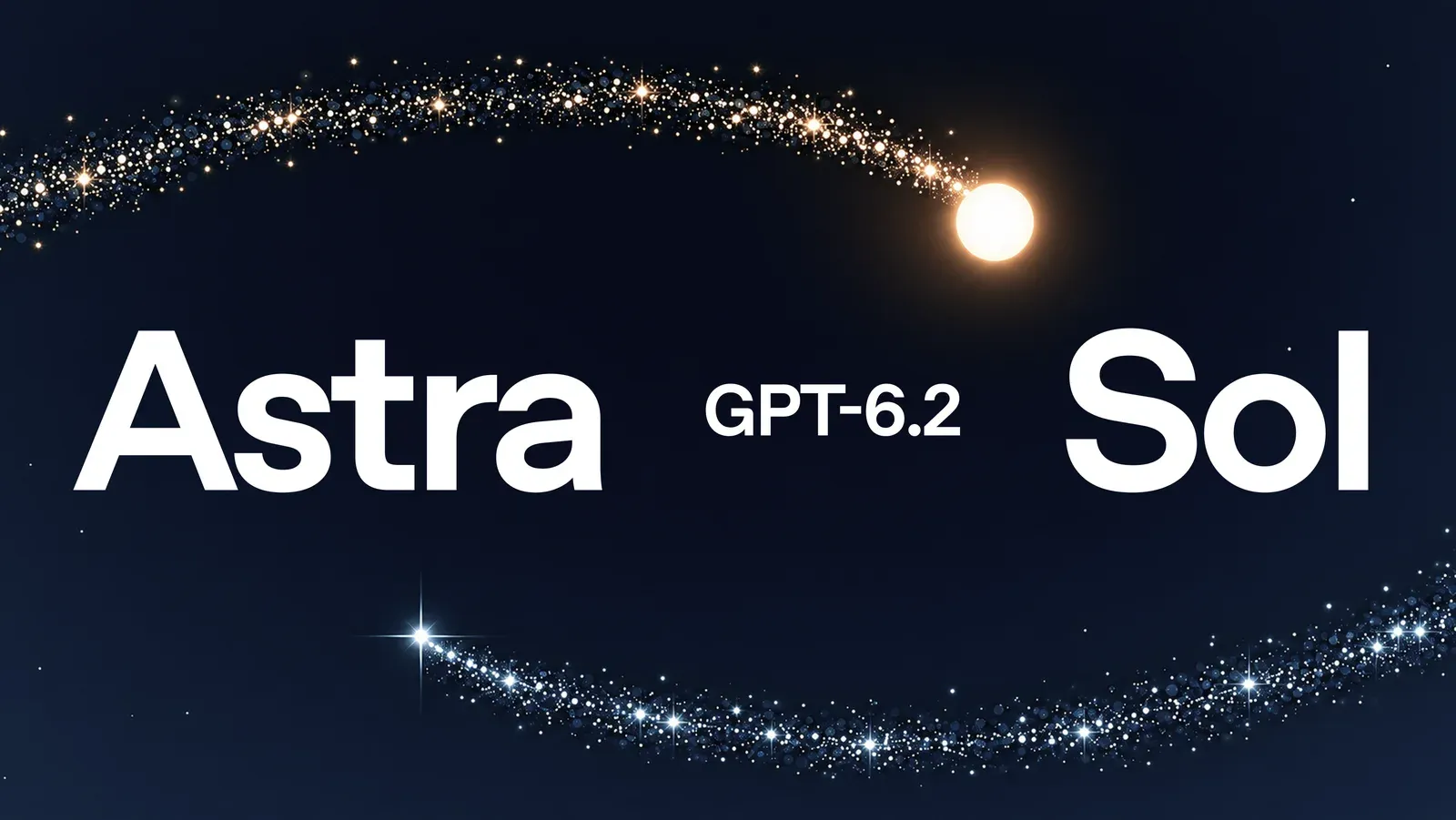
The release has two models: Astra for hard, long projects and Sol for everyday work. Both began rolling out on November 17, 2026, in ChatGPT Work, Codex and the OpenAI API.
GPT-6.2 Astra and Sol
OpenAI's launch post calls GPT-6.2 Astra "our new frontier model for your hardest projects" and Sol "our efficient, versatile model for everyday work." The announcement page shows only the year; OpenAI's system card says "Published November 17, 2026."
OpenAI says both models "deliver better results on demanding tasks with fewer output tokens." That claim matters for cost, because output tokens carry the highest per-token price in each request, as the pricing below shows.
What OpenAI's own report says to watch
OpenAI says Astra scored 5.5 points ahead of Claude Fable 5.2 on Agents' Last Exam "at just 5% of the cost," and notes that the leaderboard results for Fable 5.2 "exclude nine tasks that used a fallback model." These are OpenAI's tests on OpenAI's setup, and in Friday's view they show a direction; they cannot tell you what your own documents will cost or how often the answers will be right.
The system card reports "regressions on model-only evaluations" that measure whether models disclose obstacles they hit, and says the Codex developer prompt "substantially reduces these omissions." In those evaluations, it adds, both models took improper actions "about half as often as their respective predecessors." Friday's recommendation: outside Codex, add a check that a workflow reports missing inputs instead of quietly working around them.
Where Astra and Sol show up in ChatGPT
The new models do not appear everywhere a team uses ChatGPT. Which plan you have, and which part of ChatGPT you open, decides whether you see them and how fast they run.
Work and Codex only
The announcement lists Plus, Pro, Enterprise and Edu users in ChatGPT Work and Codex. OpenAI's Help Center article on Work and Codex adds Business and says, "This rollout does not add either model to regular Chat." If your team works in the regular chat window, it will not see the new models there.
Ultrafast by plan
Ultrafast is not on every plan. The Help Center says it "remains unavailable on Plus, Pro $100 and Business, including through credits," and that on Pro $500 it uses the included allowance "at 6× the Standard rate for the selected model." Developers can also reach both models through the GPT-6.2 API, where OpenAI says Ultrafast is available for both models at launch. In Friday's view, a small team on Business should plan around Standard speed and judge the models on that.
GPT-6.2 pricing in the API
Outside ChatGPT, GPT-6.2 pricing in the API is per million tokens, with separate rates for input, output, cached input and cache writes. The top launch pages we checked skip cache writes.
Token prices next to GPT-6 Astra
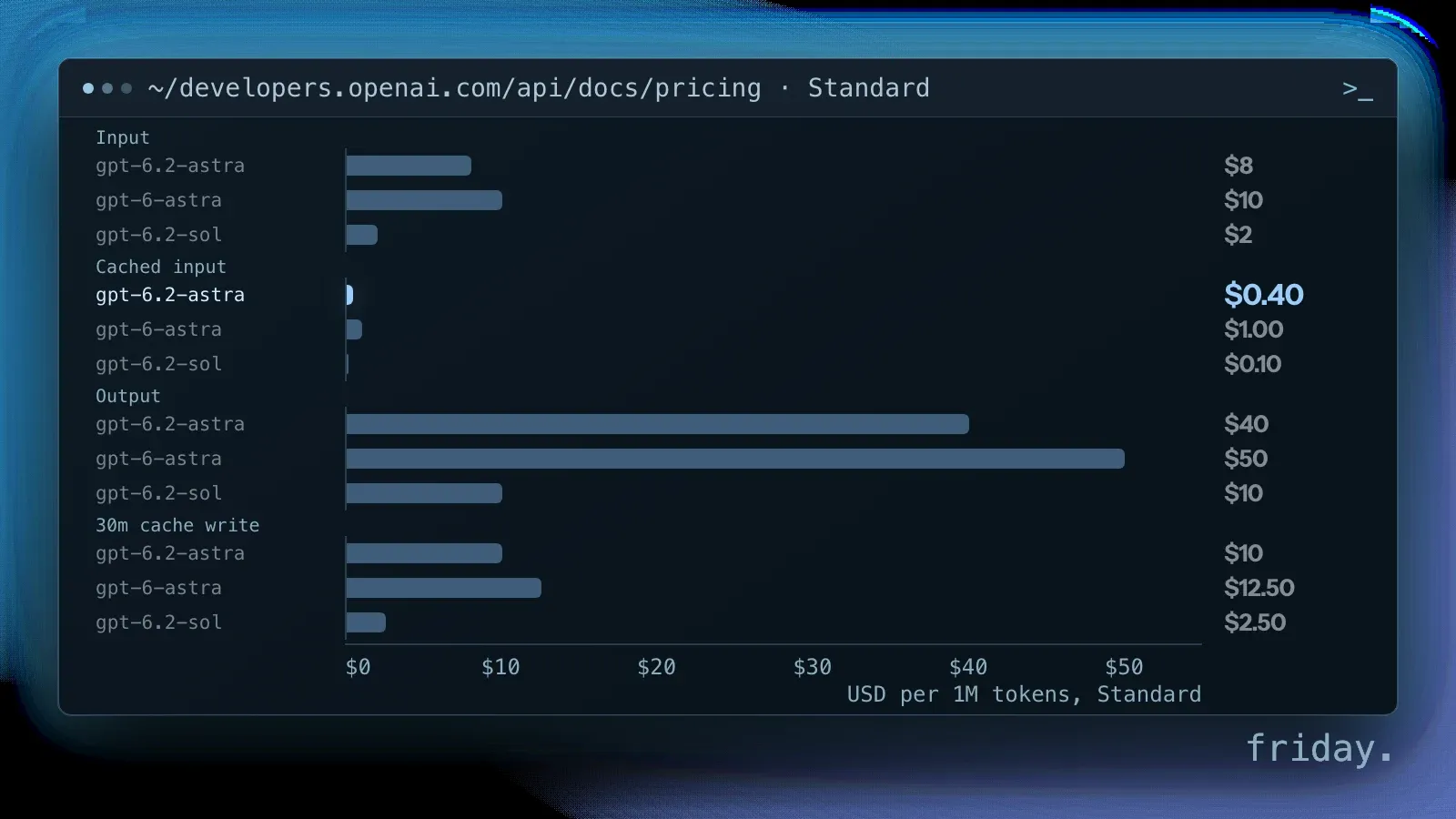
OpenAI lists GPT-6.2 Astra at $8 per million input tokens, $0.40 for cached input and $40 for output. Sol keeps GPT-6.1 Sol's rates: $2 for input, $0.10 for cached input and $10 for output. On OpenAI's API pricing page, GPT-6 Astra lists $10 for input, $1 for cached input and $50 for output, so Astra's new price is 20% lower on input and output, as OpenAI says, and cached input drops from $1 to $0.40.
Cache writes cost more than input
The cached-input rate applies when a request reuses a prompt prefix already stored. Storing it has its own rate: the pricing page lists Astra cache writes at $10 per million tokens for 30 minutes and $20 for 12 hours, above the $8 input rate. OpenAI recommends "keeping prompt prefixes unchanged and appending new instructions" to get cache reuse. In Friday's view, a workflow that rewrites its instructions on every run pays write rates and gets little of the discount.
Discounts for work that can wait
OpenAI's pricing page says token rates for eligible background requests on both models are 30% below Standard for a 2-hour completion window and 40% below for an 8-hour window. Overnight reports and batch summaries fit there; in Friday's view, a report nobody reads until morning does not need the faster, full-price answer. The same page lists a separate long-context rate above 272K input tokens and a 10% uplift for regional data-residency endpoints.
What one GPT-6.2 task costs
Those per-token prices are hard to judge on their own. The worked example below applies GPT-6.2 pricing to one task size we chose; your own token counts will differ, so treat it as a template.
One task at list prices
Worked example: a task that sends 20,000 input tokens, such as a policy document and a question, and gets 2,000 output tokens back. On Astra that is $0.16 of input and $0.08 of output, or $0.24 per run. On Sol it is $0.04 plus $0.02, or $0.06 per run.
If 15,000 of those input tokens are a stable prefix already in the cache, an Astra run costs $0.006 for the cached part, $0.04 for the 5,000 new tokens and $0.08 for output, about $0.13. Writing that prefix to the 30-minute cache costs $0.15 at the write rate; the pricing page does not say whether that replaces or adds to the input charge on the first run, so budget for both.
A month of the same task
At 100 runs a working day for 22 days, the uncached example comes to about $528 a month on Astra and $132 on Sol. These are arithmetic on list prices, not measured costs, and they leave out retries, longer answers and tool calls, which all add tokens. The same task on Sol costs a quarter of the Astra run, so test Sol first.
Comparing with Claude Fable 5.2
Anthropic lists Claude Fable 5.2 at $8 per million input tokens and $40 for output, the same sticker as GPT-6.2 Astra, and its cache writes also cost more than input: $10 for a 5-minute write and $16 for 1 hour. Anthropic also notes that "How many tokens the same text produces depends on the model's tokenizer," so equal per-token prices do not mean equal cost per task. Run the same task through both and compare the bills.
GPT-6.2 API or more ChatGPT seats
With a cost per task in hand, the last choice is the channel. A small business can reach the models through ChatGPT seats or the GPT-6.2 API, which bill differently and carry different data terms.
Seats bill by plan, the API by token
OpenAI's Help Center says signing in to Codex with ChatGPT "uses your ChatGPT plan's usage and billing," while "Using your own API key uses API pricing." ChatGPT's pricing page says paid plans are priced per user per month, and its Business plan card says that starting in December, plan usage will share one limit across ChatGPT and Codex.
Upgrades, people. Upgrades. The wait is over, you can now use GPT-6.2 Astra and GPT-6.2 Sol in Codex and the API.
In Friday's view, a repeated job that only two or three people trigger, such as a weekly report or an intake summary, can cost less as a small workflow on the GPT-6.2 API than as extra seats for everyone who touches it. It also keeps the prompt, the logs and the cost per run in your hands. A connected workflow built around one job is where that comparison starts; our Claude vs ChatGPT comparison covers the seat side.
Which plans keep business data out of training
OpenAI's enterprise privacy page says its business-data commitments cover ChatGPT Business, Enterprise, Healthcare, Edu, Teachers and the API Platform, and that "By default, we do not use your business data for training our models." Plus and Pro are not in that list, and for work that involves client records the plan matters more than the model. Friday's view: if client files go into either model, use a business plan or the GPT-6.2 API rather than a personal Plus or Pro account.
Price one real task before you switch
The release lowers Astra's token prices, keeps Sol's, and puts both in Work and Codex. Whether it saves you money depends on your task size, your cache use and your plan.
Take one job you repeat every week, run ten real tasks on Sol and Astra, record tokens, cost and errors, and price it with the GPT-6.2 pricing above. If you want help building that job as a workflow you own, tell us which task you want to price first.
Last checked: November 18, 2026, against OpenAI's announcement, system card, API pricing page, ChatGPT pricing page, Help Center and enterprise privacy page, and Anthropic's API pricing page.
Prices and plan details come from OpenAI's and Anthropic's own pages, checked November 18, 2026. Benchmark figures are OpenAI's own. The cost figures are a worked example on list prices, not measured costs. Friday has no relationship with either vendor.