
Shopify IP Allowlist Deadline: What Store Owners Check Now
Shopify starts delisting public apps without an IP allowlist after November 20. Your installed apps keep working, but some will be flagged in Settings > Apps.
The Shopify IP allowlist deadline is Nov 20, then network access declarations from Dec 1, and delisting of storefront apps without one from January 1, 2027.
In Friday's view, a store owner needs an hour this week: read the flags in Settings > Apps and ask each bespoke app's builder about all three dates, in writing.
Shopify IP allowlist enforcement starts November 20
The Shopify IP allowlist notice is aimed at app developers, yet store owners will see its effects in their own admin. Shopify marked it action required, with a deadline the day after it was posted.
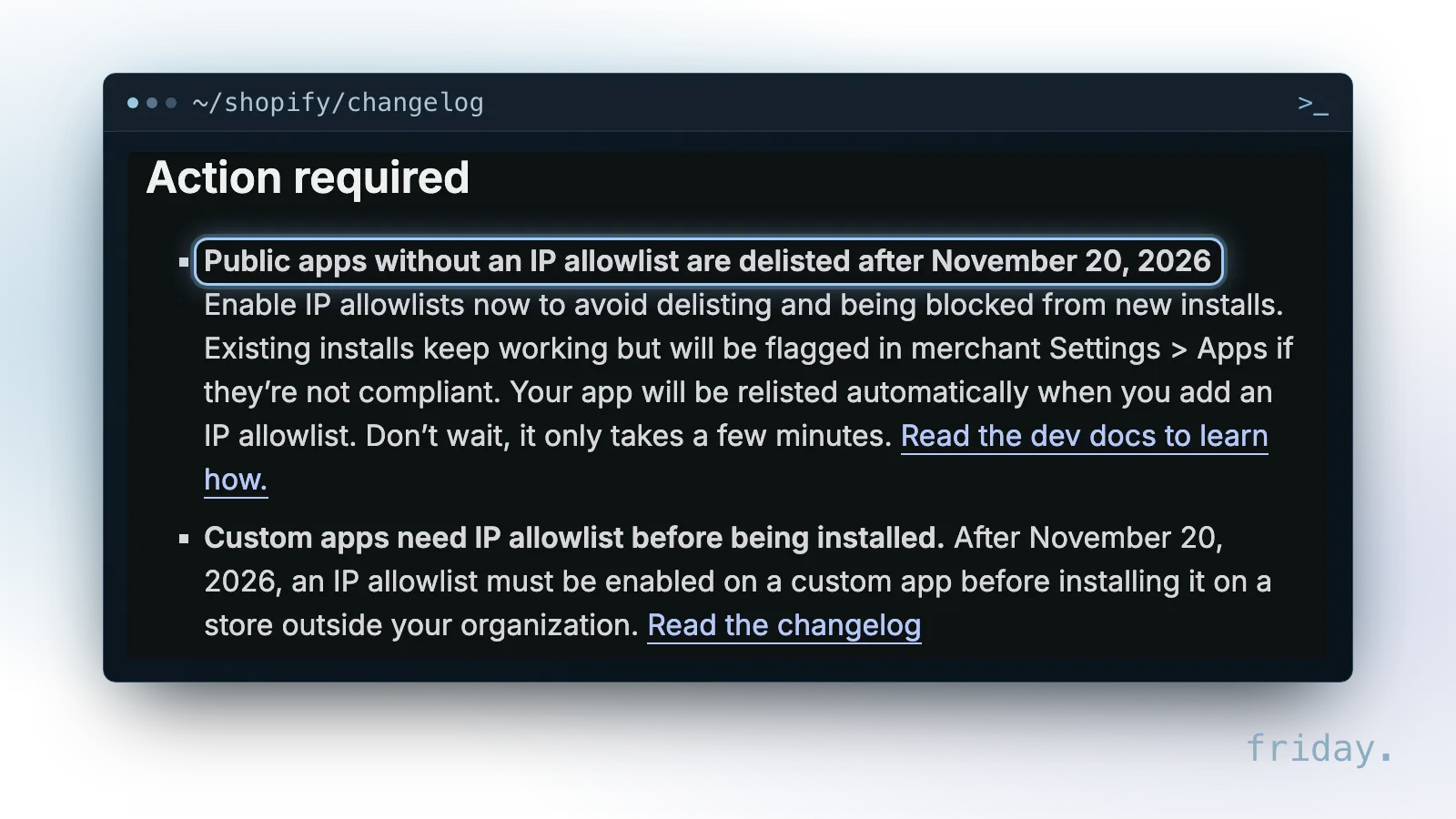
What Shopify posted on November 19
On November 19, 2026, Shopify's developer changelog published "App security updates: IP allowlist due tomorrow", marked New and Action required. Its opening line reads: "IP allowlist enforcement starts tomorrow, November 20. New requirements needed by December 1." The Shopify IP allowlist rule is the first of several dates in the notice, and the rest run into January 2027.
The same notice lists changes to custom apps, access tokens, protected customer data and partner accounts. Each is a developer-side requirement with a date, except the bulk-query permission, which applies to apps a merchant built in the admin or Dev Dashboard.
Friday's view on the timing
Shopify gives one line of context: "The busiest shopping weeks of the year are almost here." In Friday's view, the dates land around Black Friday and the weeks after it, so a store that sells through apps for reviews, upsells, bundles or tracking should check them now instead of in the middle of a sale. A flag found this week is a question for your developer. The same flag found during a promotion is a problem you have no time to handle.
What a delisted app means for your store
Delisted sounds final, but the notice describes a narrower result. The app leaves the Shopify App Store for new installs, while a store that already has it keeps running it with a flag.
Existing installs keep working
Shopify's wording is direct: "Public apps without an IP allowlist are delisted after November 20, 2026." The next sentences set the limits. Developers should enable the allowlist "to avoid delisting and being blocked from new installs," and "Existing installs keep working but will be flagged in merchant Settings > Apps if they're not compliant." So an app that misses the Shopify IP allowlist deadline is delisted and blocked from new installs, and an app you already installed does not stop on November 20.
The Shopify IP allowlist flag in Settings > Apps
The place to look is Settings > Apps in your Shopify admin. Shopify says a public app that misses the Shopify IP allowlist deadline will be flagged there if it is not compliant. Treat any new marker next to an app name in Settings > Apps as the cue to contact that app's developer. The fix sits with the developer as well: "Your app will be relisted automatically when you add an IP allowlist." Existing installs keep working while the developer fixes it.
Apps an agency or freelancer built for you
Apps built just for your store follow a separate line. Shopify says that "After November 20, 2026, an IP allowlist must be enabled on a custom app before installing it on a store outside your organization." If an agency or freelancer builds an app for you in its own Shopify organization and installs it on your store, the IP allowlist has to be on before that install. Ask before you approve a new custom app install.
Network access declarations from December 1
The second deadline covers apps that run code on your online store. Shopify published it as its own changelog post on November 19, with separate dates for public apps and for custom apps.
Which apps need a network access declaration
Shopify's network access post says "Apps that run code on the online store must declare allowed_sources in the [network_access] section of shopify.app.toml." In plain terms, the developer lists the servers the app's storefront code talks to. Shopify names the features that bring an app into scope:
More security updates this week 🔒
Network access declarations will be required by December 1.
Details and tooling to make security easier ↓
- A theme app extension block or app embed.
- Script tags on the online store.
- An app proxy.
- The write_themes access scope.
- A web pixel with the write_open_pixels access scope.
From a store owner's seat, that covers apps that add a block or embed to your theme, use script tags on your storefront, run an app proxy, hold the write_themes scope or run a web pixel with write_open_pixels. If an app adds anything to your theme or storefront, ask its developer whether the network access declaration is done.
Apps outside the rule
Shopify also lists who is not affected: "Apps that only write content, such as metafields, menus, or products," apps with a checkout UI extension and none of the features above, "Custom apps that you install only on stores within your organization," "Apps that merchants create in the Dev Dashboard or in the Shopify admin," and "Web pixels that run in the default strict sandbox." An app you created yourself in the Shopify admin is outside the network access rule.
Why Shopify asks for it
Shopify's reason is storefront security: "Injected scripts can load code onto a storefront from any server. Declaring your app's servers helps Shopify spot suspicious requests, which protects your app and the merchants who use it." In Friday's view, the declaration also gives a store owner something new to ask for: the list of servers an app's storefront code reaches, written down by the developer.
Every Shopify app deadline in one table
Each date applies to specific kinds of app, and the consequences differ. The table puts them side by side, with what Shopify does and what a store owner sees or needs to ask about.
From the Shopify IP allowlist deadline to January 1
Read each row by app type: the same date means different things for public and custom apps.
| Date | Apps covered | What Shopify does | What it means for your store |
|---|---|---|---|
| After Nov 20, 2026 | Public apps without an IP allowlist | Delisted; blocked from new installs; relisted automatically once fixed | Existing installs keep working; flagged in Settings > Apps |
| After Nov 20, 2026 | Custom apps installed outside the developer's organization | IP allowlist required before the install | Ask your builder before a new install |
| Dec 1, 2026 | Public apps that run code on the online store | Rejects deploys and App Store submissions without a network access declaration | A warning in the Shopify admin; existing app versions keep working |
| Dec 1, 2026 | Custom apps installed outside the organization that run code on the online store | Rejects deploys | Your builder cannot ship updates until it is declared |
| Dec 1, 2026 | Every custom app created on or after this date | Requires expiring offline access tokens | Apps created before Dec 1 are outside it |
| Dec 1, 2026 | Public apps that read abandoned checkout recovery URLs | Requires level 2 protected customer data access | Ask any recovery app about it |
| Jan 1, 2027 | Public apps that run code on the online store | Delists those without a network access declaration and blocks new installs | Existing installs keep working |
| Jan 1, 2027 | Custom apps installed outside the organization | Blocks installs outside the organization until every in-scope app declares its network access | New installs from that builder wait for the fix |
| Jan 1, 2027 | Partner custom apps that read abandoned checkout recovery URLs | Requires level 2 protected customer data access | Ask your builder |
Expiring tokens: custom apps created from December 1
One row is easy to misread. Shopify says expiring offline access tokens "will be required for every custom app created on and after December 1, 2026." An app created before that date falls outside this rule, and the notice adds, about apps made in the admin moving to the Dev Dashboard, "Existing tokens keep working." If you plan a new app for December, tell your builder that it starts under the expiring token rule.
Other changes in the same notice
Three smaller items sit in the same notice. "Merchant custom apps created in the Dev Dashboard or the Shopify admin must now request permission to run bulk queries or mutations within the Settings section of the Dev Dashboard." "Multi-factor authentication is now required on every partner account." And apps created in the admin "are now in Dev Dashboard," with access to IP allowlists, API logs and expiring tokens. If you or a staff member built an app in your admin to export or update products in bulk, check that permission in the Dev Dashboard.
Your Shopify IP allowlist checklist for this week
None of these deadlines needs code from you. They need a short list, a few messages to developers and a written answer from each one, all before the busiest shopping weeks.
Check the flags in Settings > Apps
Start with the Shopify IP allowlist flags. Open Settings > Apps and write down every installed app, who makes it, and whether it carries a flag. For each flagged public app, contact the developer through its support channel and ask when the app will meet the Shopify IP allowlist rule. Shopify relists the app automatically once it is, and existing installs keep working in the meantime. Then mark which apps add blocks or embeds to your theme, use script tags, run an app proxy, run a web pixel with write_open_pixels, or hold the write_themes scope, because those are the ones the network access rule reaches on December 1.
Questions for the builder of a custom app
If an agency or freelancer built a custom app for your store, send one message with these questions and keep the reply:
- Is the IP allowlist enabled on our app, and, for any install after November 20, 2026, was it on before the install?
- Does the app run code on our online store, and if so, is the network access declaration in place before December 1, 2026?
- Which servers does it list in allowed_sources, and who controls them?
- Are any new custom apps planned on or after December 1, 2026, and do they use expiring offline access tokens?
- Does the app read abandoned checkout recovery URLs, and is level 2 protected customer data access requested for January 1, 2027?
Shopify's notice also tells developers that if they spot something suspicious, "You're responsible for fixing it and notifying affected merchants." Ask your builder how they would tell you, and to whom.
Friday's view: own the app and the record
In Friday's view, these deadlines are a test of how well a store owner can see into its own apps. An app that lives in a builder's organization, with servers only the builder knows and no written list of what it touches, leaves the owner waiting on someone else during the busiest weeks. Ask for the Dev Dashboard access, the IP allowlist status, the allowed_sources list and the deadline answers to sit with you. Another Shopify app change is covered in our post on the draft order discount change. For a task where a whole app is more than you need, a small workflow you own keeps the record in your name.
After the Shopify IP allowlist deadline
After the November 20 Shopify IP allowlist deadline, public apps without one are delisted, while existing installs keep running with a flag. December 1 and January 1 bring the network access dates.
Check Settings > Apps today, send the five questions to each builder, and keep the answers with your store records. If you want a second look at your app deadlines or a workflow to replace an app, send us the app and what it does.
Last checked: November 20, 2026, against Shopify's November 19, 2026 changelog posts "App security updates: IP allowlist due tomorrow" and "Network access declarations are now required for apps that run on the online store."
Deadlines and requirements come from Shopify's own developer changelog, the primary source, checked November 20, 2026. Friday has no relationship with Shopify or any Shopify app vendor. Statements marked as Friday's view are opinion.