
AI Marketing Tools for Small Business: A Guide by Each Job
AI marketing tools now sit inside the email, ad, store and social apps small businesses already pay for, and each vendor's own help page sets the job's limits.
Six jobs come up for an owner who does their own marketing: social posts, email campaigns, ad copy, product images, search content and customer review replies.
Every feature claim comes from the vendor's own help pages as of November 17, 2026. Friday has no tie to any vendor named, and no tool is a paid placement.
What AI marketing tools for small business cover
AI marketing tools for small business come in two groups: features added to apps you already use, and standalone tools built for one job. The built-in group is the first place to look.
Built-in features and standalone tools
Built-in AI marketing tools for small business live inside your email platform, ad account, store admin or social scheduler, next to your contacts, products and past posts. Standalone AI content creation tools, such as a general chat assistant or a dedicated AI social media post generator, can go deeper on one task, but someone has to copy the result back into the app that sends it.
A small business doing its own marketing has limited hours for new AI marketing tools. When a built-in feature covers the job, that is one less login, one less bill and one less place where prices and brand details drift apart.
What the vendors leave to you
None of the five vendors checked promises correct output from its AI marketing tools for small business. Google calls generative AI experimental technology on its Ads help page, Buffer warns that its assistant may get facts wrong, Shopify tells merchants to review anything an AI tool creates or changes, and Meta makes no warranties about the accuracy of its suggested text. The tool drafts; the owner decides what goes out.
Social posts: what an AI social media post generator does
An AI social media post generator turns a short prompt or an older post into captions sized for each network. Some schedulers now build one in, so drafting and scheduling happen in one place.
What an AI social media post generator drafts
The job is first drafts: a caption for a new product, three angles on one announcement, or a long post cut down for a tighter character limit. Some AI social media post generators, Buffer's among them, also suggest ideas from a short description of your business and audience. None of them knows what happened in your shop this week unless you type it in.
Buffer's AI Assistant, from its help page
Buffer's help center, checked November 17, 2026, lists six known limitations of the AI Assistant built into its composer, and one of them shapes every prompt: the assistant's knowledge is not real-time, so dates, launches and current events have to come from the user.
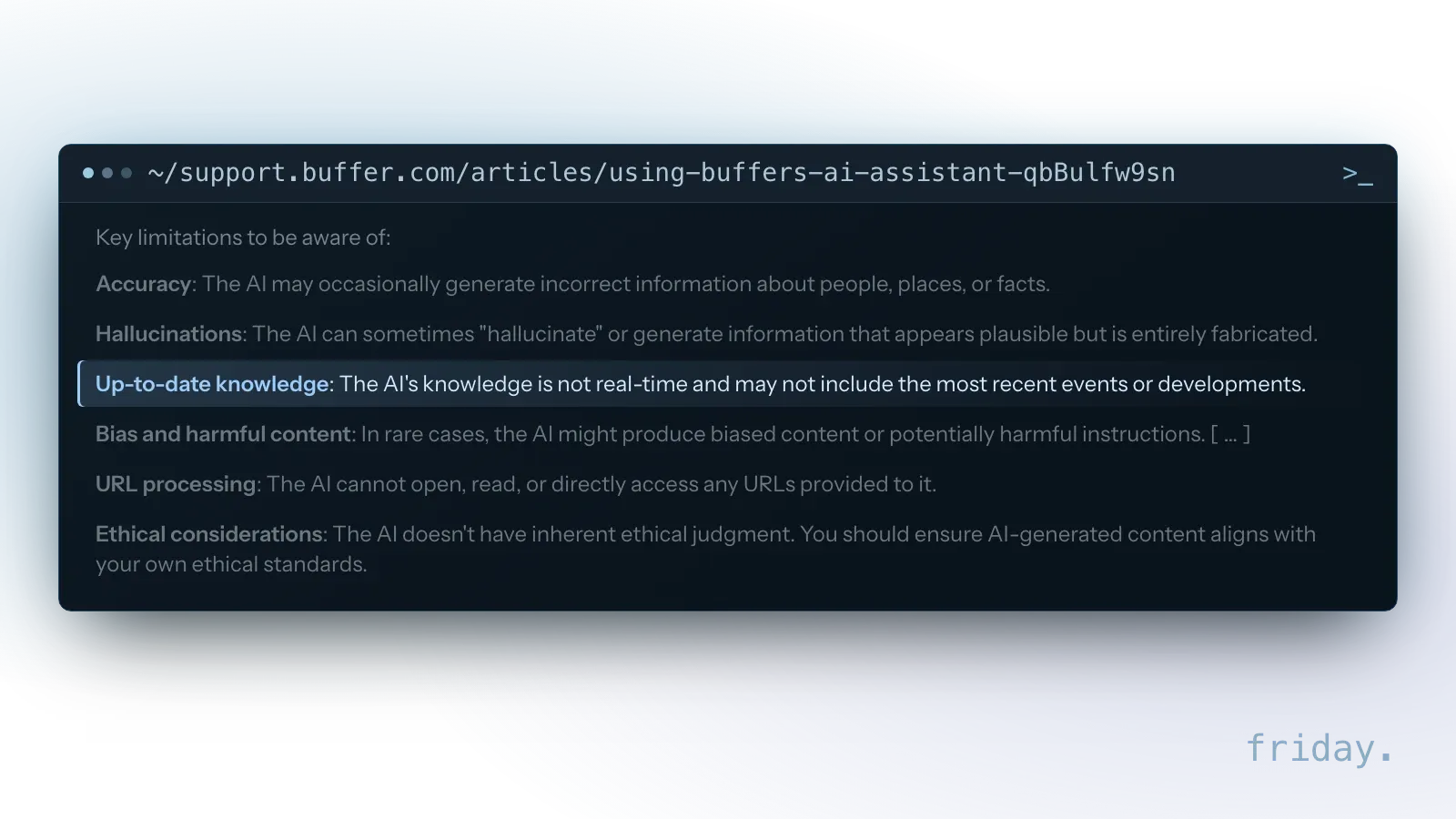
The same page says the assistant is built into the Publishing dashboard and the Create space and takes a prompt of at least 4 words and under 10,000 characters. It offers Regenerate, Rephrase, Shorten and Expand, plus a more casual or more formal tone. In the composer it is channel-aware: for Instagram, Buffer says it keeps a post under the 2,200 character limit. Buffer says the feature is available on its newest plans.
Prompts that give the generator something to work with
An AI social media post generator writes from what you type. A prompt that says "spring sale" and nothing else gives the generator no dates, no items and no discount to put in the caption. Because Buffer says its assistant cannot open URLs, paste the product name, price and dates into the prompt of any AI social media post generator you use.
Checks on a drafted caption
Check every name, date, price and offer against the real promotion. Read the caption on a phone, as a customer would, and cut anything that sounds like a different business. Confirm any person or place the caption mentions, since Buffer names people, places and facts as the spots where its assistant can be wrong.
Email campaigns: AI writing inside your email platform
Email platforms now put AI marketing tools inside the campaign builder, so copy is drafted next to the list it goes to. The conditions sit in plan rules, country rules and a list of restricted topics.
Mailchimp's Write with AI
Mailchimp's help page, checked November 17, 2026, says Write with AI can help you craft unique marketing messages for your contacts, drafting and editing content to align with your brand's voice and tone. It is a beta feature, released first to a small percentage of users, included with the Standard plan or higher, for accounts with a primary mailing address in Australia, Canada, the United Kingdom or the United States. The full conditions are on Mailchimp's Write with AI help page.
Shopify's Sidekick in the store admin
Shopify's help center, checked November 17, 2026, calls Sidekick its AI-powered commerce assistant. When you click the generate text icon, Sidekick writes text for a list of fields that includes product descriptions and Shopify Messaging emails. Shopify says availability can vary by plan, device and language.
Topics Mailchimp's AI terms exclude
Mailchimp lists topics you agree not to create or send with the feature: alcohol, tobacco, weapons, cannabis, vaping, health or financial advice. Breweries, dental offices and bookkeeping firms all touch that list, so they should read it before switching the feature on. Mailchimp also asks users to review its additional terms for Content Generator Beta before sending an email with generated content.
Checks before an AI-drafted campaign is sent
Check the offer, the link targets and the sender details by hand. Confirm the topic is allowed under the platform's AI terms as well as its general rules, and keep its acceptable use policy bookmarked, since Mailchimp points there when content is flagged.
Ad copy: AI marketing tools inside Google Ads and Meta
Google Ads and Meta both write ad text from material you give them, and both put the final check on the advertiser. What each one drafts from, and what it says about approval, differs.
Where each ad platform gets its draft
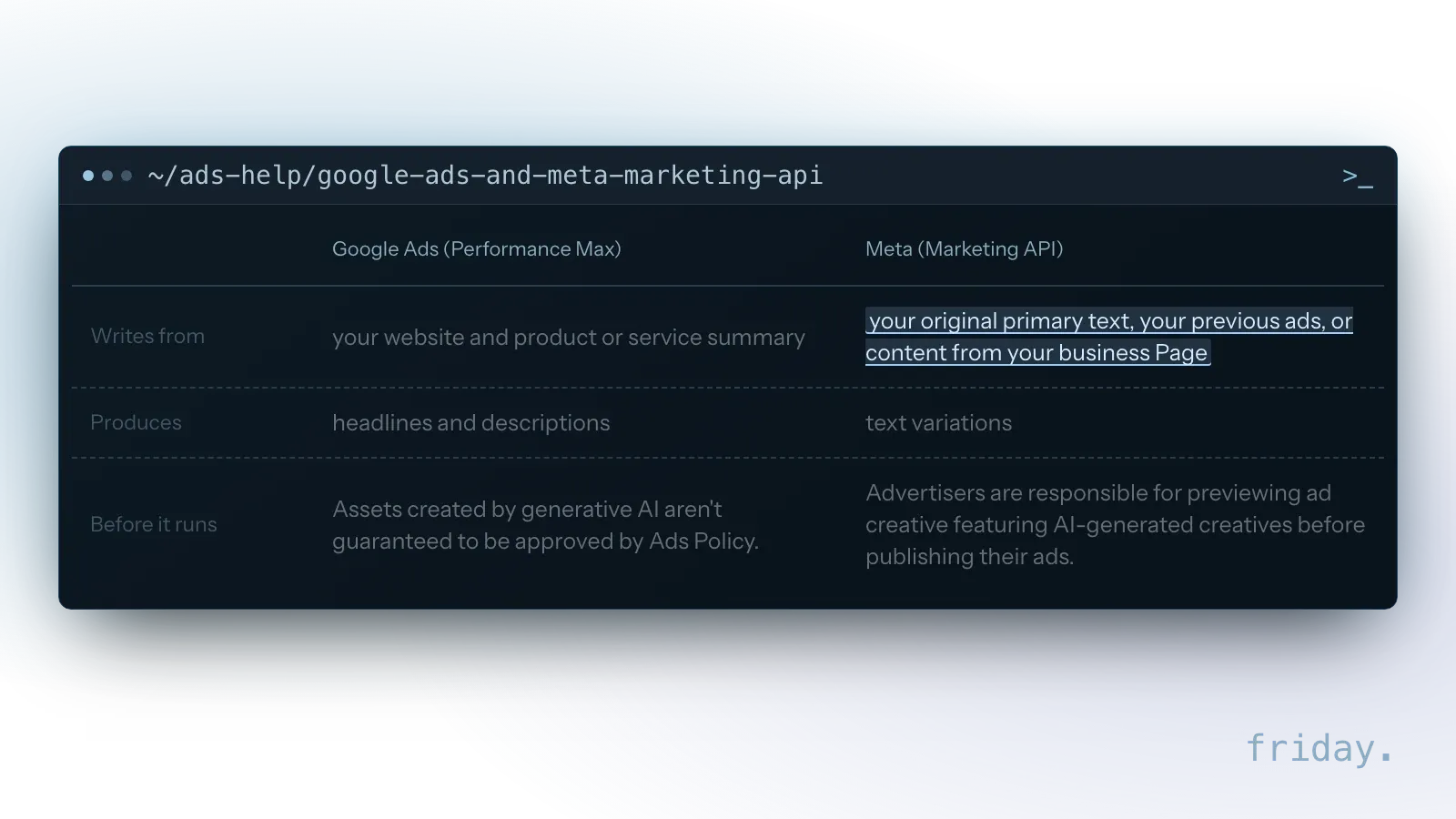
Google drafts from your website and a short summary of what you sell, while Meta can also draw on your earlier ads and your business Page, and both leave the last look to you.
Performance Max asset generation
Google's help page, checked November 17, 2026, says that if you choose to generate assets, you can review all of them and discard any that don't match your business. The Google Ads interface must be in English, Dutch, French, German, Italian, Portuguese or Spanish, and Google calls generative AI experimental technology that may display inaccurate or offensive content. The details are on Google's Performance Max generative AI help page.
Meta's text variations
Meta's Marketing API documentation, checked November 17, 2026, describes a text generation feature that produces variations for an ad. It is developer documentation, so the same options may appear under other names in Ads Manager. Meta adds that it makes no warranties regarding the completeness, reliability and accuracy of the suggested text generations.
Checks on an AI-written ad
Check that every price, guarantee, delivery promise and comparison in a generated headline is true today. If Google's policy review turns a generated asset down, treat that as a reason to reread the text. Remove any line you would not say to a customer in person.
Images: AI content creation tools for product photos
The image features in AI marketing tools are less about inventing scenes and more about adapting product photos you already have: new backgrounds, wider crops and suggested images for an ad.
What the image features do
AI content creation tools for images remove or replace a background, expand a photo to fit a new shape, or pick images from your site for an ad. Standalone generators can create a picture from a prompt, but a real product has to look like the thing the customer receives.
Built-in AI content creation tools in Meta, Google Ads and Shopify
Meta's documentation lists image expansion to fit more placements, and background generation for eligible product images, which currently only works with dynamic product ads or Advantage+ catalog ads on Mobile Feed. Google says Performance Max curates and suggests images based on their relevance and predicted performance. Shopify's file editor can replace the background of an image with a color, and Sidekick can change an image from a text prompt. All three were checked November 17, 2026.
Checks on an edited product photo
View every edited image at full size. Check the product's shape, color, label and size, and that the background does not imply a setting the product was never in. For standalone AI content creation tools, read the plan page for image limits before you build a campaign around them.
SEO content: what AI content creation tools can do for search
AI content creation tools can outline and draft blog posts, product pages and FAQs. Google's guidance draws its line at the purpose of the content and its value to readers, whatever made it.
What Google says about AI content creation tools
Google Search Central's post of February 8, 2023 has a section titled "Rewarding high-quality content, however it is produced." The same post says AI or other automation used mainly to manipulate search rankings breaks Google's spam policies, which define the abuse in more detail.
Where scaled content crosses the line
Google's spam policies define scaled content abuse by its purpose, manipulating search rankings, and only one of the examples Google lists names generative AI tools.
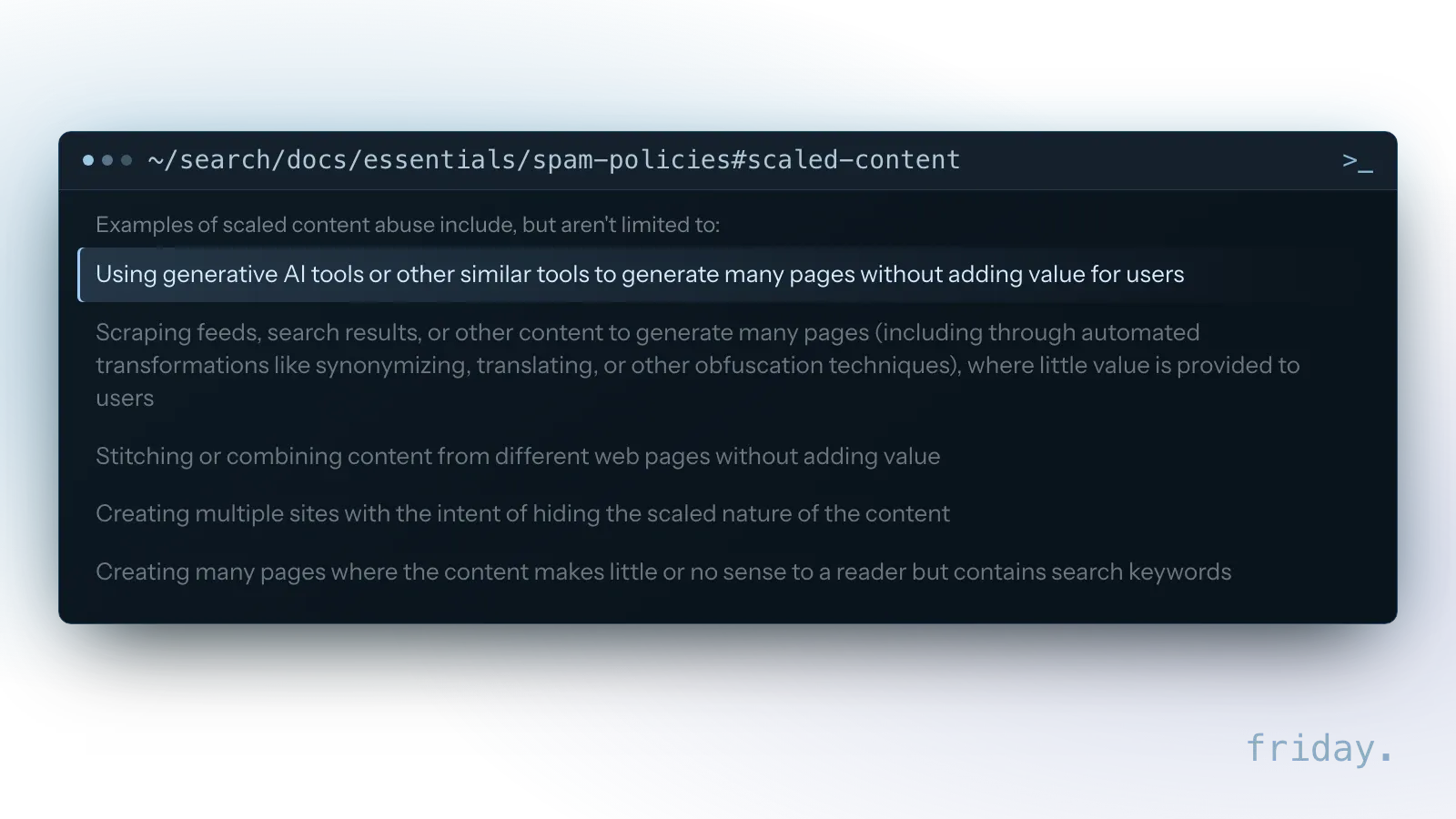
For a local business, the risk is one thin page per town or product variant, drafted by AI content creation tools and published without anything a customer could not find elsewhere. The test Google describes is the purpose of the pages and the value they add for users.
Pages worth publishing from a draft
AI content creation tools are useful for structure and first drafts. They cannot supply what a reader came for: your prices, your process, your photos, what you have seen on the job. Add those, cut anything generic, and make each page answer a real customer question.
Reviews and replies: where AI may help
AI marketing tools can help an owner draft a calm reply to a hard review. They must not write the reviews themselves. Google's reply rules and the FTC's 2024 final rule set the limits for this job.
Replying on Google Business Profile
Google's help page, checked November 17, 2026, says you must verify your business before you can reply to reviews. Google reviews each reply to make sure it follows Google's content policies; it says replies usually take up to 10 minutes to review, but sometimes up to 30 days, and the person who wrote the review is notified when you reply. The page does not mention an AI reply feature, and a reply drafted elsewhere goes through the same review.
What the FTC's 2024 rule covers
The FTC announced its final rule banning fake reviews and testimonials on August 14, 2024. Its announcement names AI-generated fake reviews as an example of reviews by someone who does not exist, and it also covers incentives conditioned on a particular sentiment and insider reviews without a clear disclosure. The FTC's announcement of the final rule lists each practice. This is general information; for your own case, ask counsel.
Checks on a drafted reply
Read the drafted reply against the actual complaint. Remove any customer detail the reviewer did not share, keep it short, and offer a direct contact for a fix. Make sure the reply contains no threat, since the FTC rule also covers threats and intimidation used to suppress reviews. If AI drafted a review request, confirm it asks for honest feedback and offers nothing in return for a positive one.
How AI marketing tools fit into one weekly workflow
Six jobs can mean six apps, each with its own login, prompt and review. Before adding more AI marketing tools to the stack, map the hand-offs between the apps you already have.
One product, one week of hand-offs
For example, picture a bakery that adds a seasonal pie. In one week the pie becomes a caption in the AI social media post generator, a newsletter section drafted in the email builder, an ad headline, and an edited photo in the store admin. If the price changes on Wednesday, it has to change in four places, and the risk is the one place nobody updates.
When a connected workflow is worth it
Keep the source of truth in one place, such as a product sheet or a weekly brief, and let each tool draft from it. When copying between apps takes longer than drafting, a workflow that connects your AI marketing tools can pass the same approved details to each app and stop for a person's approval before anything is sent.
A selection checklist for AI marketing tools
Run through these points before paying for any AI marketing tools or switching on a built-in feature. They apply to the social, email, ad, image, search and review jobs, and to standalone tools.
Before you sign up
- Name the one job the tool must do, and check whether the AI marketing tools for small business in an app you already pay for cover it.
- Read the vendor's own help page for plan, country and language requirements, and note the date you read it.
- Check the list of banned or restricted topics against your industry.
- For AI content creation tools outside your apps, find where the vendor says your inputs go and which outside models it uses.
During the trial
- Give it a real task from this week, with the real details in the prompt.
- Compare its draft with what you would have written, and time both.
- For an AI social media post generator, check that posts stay within each network's limits and your tone.
- Confirm you can edit, discard or pause anything it produces before it goes live.
Before anything goes public
Every vendor of AI marketing tools checked puts the final check on the user. Agree who reviews each kind of output, what counts as a claim that needs proof, and who has the last word before posting, sending or paying for an ad.
FAQs about AI marketing tools
Short answers on choosing AI marketing tools, free options, publishing from a generator and AI-written reviews, with the vendor facts as checked on November 17, 2026.
Which AI marketing tools for small business should I start with?
Start with the built-in feature in the app that already runs the job, such as your email platform or ad account. Then compare a standalone AI content creation tool against it on one real task before paying for a second subscription. The same one-task test works for any AI marketing tools for small business you are weighing.
Are there free AI marketing tools?
Some built-in AI marketing tools for small business cost nothing extra, but they sit behind plan rules. As of November 17, 2026, Shopify says many of its AI features are available at no additional cost, Mailchimp includes Write with AI with the Standard plan or higher, and Buffer offers its assistant on its newest plans.
Can an AI social media post generator publish for me?
Buffer's help page describes drafting only: its assistant opens beside the composer, and you click Insert to add the text to your post. Confirm what your own AI social media post generator does before trusting it to publish.
Can AI write reviews for my business?
No. Fake reviews written by AI fall under the FTC's 2024 final rule. AI can help you draft replies to real reviews.
Start with one job and one tool
A simple way to judge AI marketing tools is one real task. Pick a job that takes hours every week, run it through the built-in feature first, and keep the review step in place.
Write down what you changed in the draft and how long the check took for each of your AI marketing tools for small business; that note tells you whether the tool earns a place in your week. If you want a second pair of eyes on which jobs to connect first, tell us which tools you use and we will map the workflow with you.
Last checked: November 17, 2026, against the help pages of Buffer, Mailchimp, Shopify, Google Ads and Google Business Profile, Meta's Marketing API documentation, Google Search Central, and the FTC. Plans and menus change; check the linked pages before relying on a detail.
Product details come from each vendor's help center or documentation and from the FTC, checked November 17, 2026. Friday has no relationship with any vendor named here.