
ChatGPT vs Gemini for Business: Pick by the Tools You Use
ChatGPT vs Gemini, decided by the suite your business already runs on: a situation table, seat prices from OpenAI and Google, and what each plan does with data.
Your email host, your shared files and your head count narrow this choice before any prompt test does, and each of those three facts points to a specific plan.
Every price and plan detail here comes from OpenAI's or Google's own pages, checked November 17, 2026. Friday has no vendor ties, so no pick here is a paid one.
ChatGPT vs Gemini: start with where your work already lives
For a small business, ChatGPT vs Gemini turns first on where your email, documents and calendar sit today. The assistant that already reaches them needs the least setup before it does useful work.

If your business runs on Google Workspace
Google builds Gemini into Workspace itself. Its US Gemini page sells a small-business bundle that puts Gemini inside Gmail, Docs, Sheets and Slides alongside business email and meeting tools, so a Workspace company may already pay for part of it. Which apps you get depends on the Workspace plan, and Starter includes fewer of them than Standard.
If you work in Microsoft 365 or a mix of tools
OpenAI's Business plan card lists connections to Google Workspace, Slack, GitHub and Microsoft 365. Google's route for Microsoft 365 users is a separate product, Gemini Enterprise, which it describes as a way to add Gemini to an existing suite "such as Microsoft 365."
If you work alone on a personal account
A sole owner can start with a personal plan on either side: ChatGPT Plus at $20 a month on monthly billing, or Google AI Pro at $19.99 a month (both checked November 17, 2026). Personal plans handle chat data on different terms from business plans, so check the data setting before you paste client details into either one.
The ChatGPT vs Gemini decision table
The table maps eight small-business situations to the plan that fits each one and the vendor fact behind it. Find the row that matches your setup, then confirm that plan on the vendor's own page.
| Your situation | Plan that fits | Why, from the vendor's page |
|---|---|---|
| Email and files already in Google Workspace | Gemini in your Workspace plan | Gemini in Gmail on every plan; more apps from Standard up |
| On Workspace Starter and need AI on Docs or Sheets files | A higher Workspace plan, or ChatGPT Business with its Google Workspace connection | Starter lists "Gemini in Workspace apps" as "Limited"; the ChatGPT Business card lists Google Workspace among its connections |
| No business email yet | Gemini with Google Workspace | Google's Workspace bundle, which starts at $14 per seat per month |
| Work runs in Microsoft 365 | ChatGPT Business, or Gemini Enterprise | ChatGPT Business connects to Microsoft 365; Gemini Enterprise starts at $30 per seat per month |
| Mixed stack: Slack, GitHub, Google and Microsoft | ChatGPT Business | Its plan card lists all four connections |
| A few staff hit usage limits | ChatGPT Business with Premium seats for them | Premium has "no 5-hour limit"; seat types can be mixed on one workspace |
| One owner, no staff | ChatGPT Plus or Google AI Pro | $20 and $19.99 a month; check the data setting first |
| Team heading past 200 people | Check each seat cap | ChatGPT Business is "For teams of 2–200 employees"; Workspace Starter to Plus cap at 300 users |
How to read the table
Each row answers the Gemini vs ChatGPT for business question from a fact about your company, such as your email host or team size. If two rows fit, weigh the cost of moving: changing email hosts or retraining a team on new apps is a bigger job than adding a connection to the suite you keep.
Two questions that narrow it
For a small team, two questions narrow the choice. Is your email on Google? And does the work you want help with live in Docs and Sheets, or across several other apps? A yes to the first points to Gemini in Workspace; a no to both points to ChatGPT Business or Gemini Enterprise.
When the table points to both
Some rows fit both assistants, such as a Workspace business that also runs on Slack and GitHub. Such a team can keep Gemini in Gmail and Docs and trial ChatGPT Business on two seats for the cross-tool work. Before you keep both, weigh the combined Gemini vs ChatGPT pricing against the hours the trial saves.
What the table leaves out
Output quality is missing on purpose. The comparison pages we read disagree on which assistant writes or reasons better, and model versions change between checks. Test that on your own work with three jobs you repeat.
Gemini vs ChatGPT for business inside Google Workspace
For a company already on Google, the Gemini vs ChatGPT for business question shrinks to a smaller one: does your Workspace plan put Gemini in the apps where your team works, or only in a few of them?
Starter: Gemini in Gmail and the Gemini app
Business Starter is the plan where the split shows: on Google's comparison table, Starter keeps Gemini in email and a short list of apps, and the plans above it extend Gemini to the shared files and meetings a team works in.
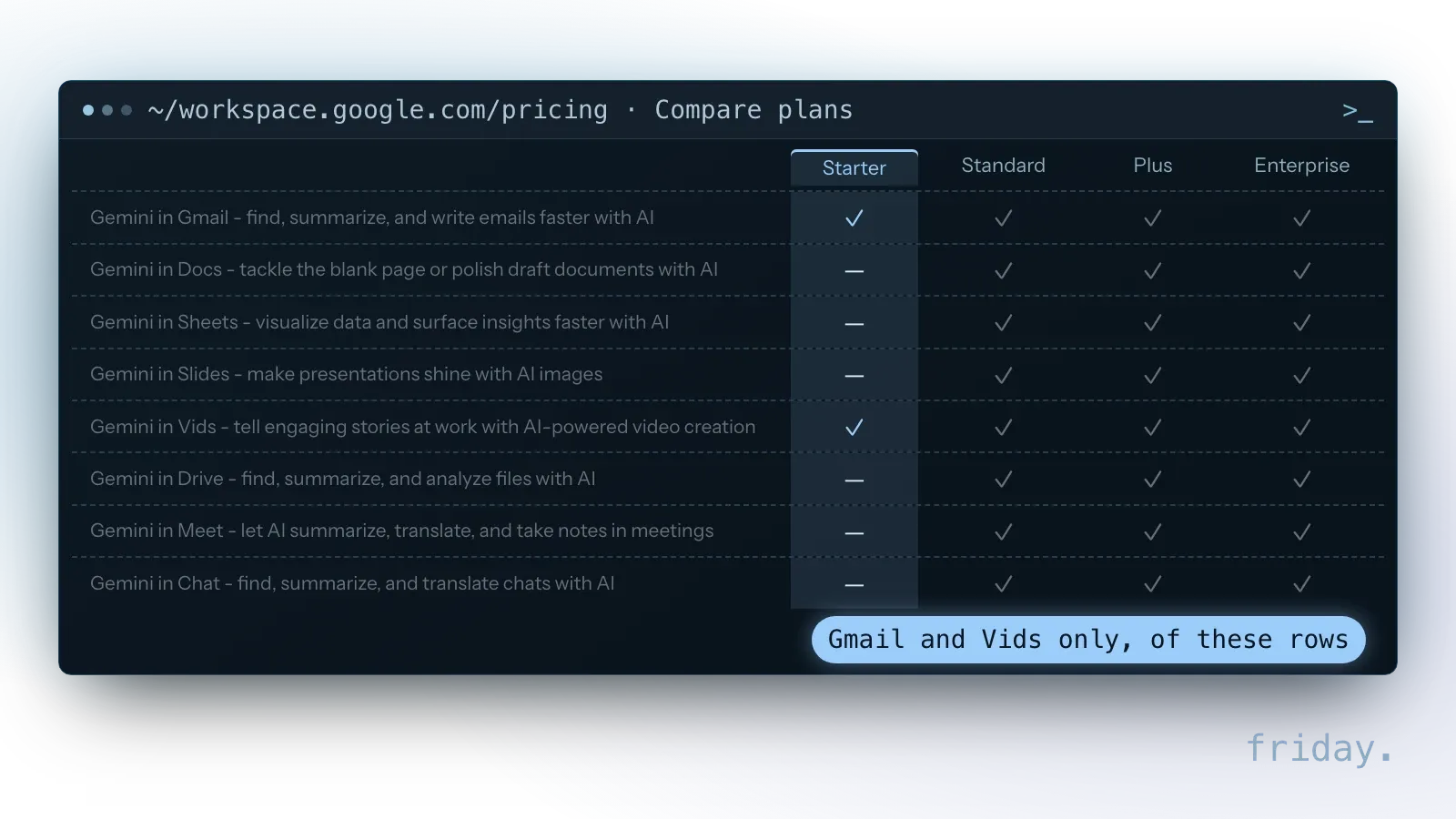
The Starter card itself lists the "Gemini AI assistant in Gmail" and says that when you chat with AI in Gemini, "your company data is not used to train models." Starter storage is 30 GB pooled per user, and meetings hold 100 participants.
Standard and up: Gemini in shared files and meetings
The Business Standard card lists the "Gemini AI assistant in Gmail, Docs, Meet, and more", 2 TB of pooled storage per user and video meetings with recording for 150 participants. Business Plus raises storage to 5 TB per user and meetings to 500 participants. Meeting notes, document drafts and spreadsheet help then sit inside the files your team already shares.
Seat caps and who can see what
Google says Business Starter, Standard and Plus "can be purchased for a maximum of 300 users," with no user limit on Enterprise plans. Its privacy hub adds that if a user can't open a document or email, "Gemini will not retrieve that content", so Gemini follows the sharing settings you already have.
ChatGPT Business for teams outside one suite
ChatGPT Business is OpenAI's self-serve plan for small teams. In a Gemini vs ChatGPT for business choice, its case rests on reach across tools, for work split across Google, Microsoft and team chat.
What the Business plan card lists
OpenAI's card describes a shared workspace with SAML single sign-on, centralized billing, spend controls and usage analytics, and "No training on your business data by default." It is sized "For teams of 2–200 employees," and lists skills as a Business feature.
Connecting Google Workspace or Microsoft 365
The same card lists connections to Google Workspace, Slack, GitHub and Microsoft 365. For Google data, OpenAI's help center says ChatGPT can reach Gmail, Calendar or Drive "subject to your Google account permissions and workspace settings", and that adding a connected Drive file does not change its sharing settings.
Standard and Premium seats
Business sells two seat types on one workspace. The Premium card reads "More usage than Standard, with no 5-hour limit," and lists Dots, always-on agents, for Premium seats only. Standard covers everyone else, and the card lets you "Mix and match seat types." That seat mix sets a team's ChatGPT or Gemini pricing total on the OpenAI side, so count heavy users first.
Gemini vs ChatGPT pricing for a five-person team
Gemini vs ChatGPT pricing only lines up once you count what each seat buys. A Workspace seat comes with email, storage and meetings; a ChatGPT Business seat covers ChatGPT and Codex but no email.
ChatGPT Business seat prices
OpenAI's billing guide, checked November 17, 2026, lists Standard seats at $25 per user per month on the monthly plan, or $20 on the annual plan, billed annually. Premium seats are $125 per user per month billed monthly, or $100 billed annually.
Gemini with Google Workspace and Gemini Enterprise
Google's US Gemini page, checked November 17, 2026, sells Gemini to businesses two ways: bundled with Workspace from $14 per seat per month, or added to another suite as Gemini Enterprise from $30 per seat per month.
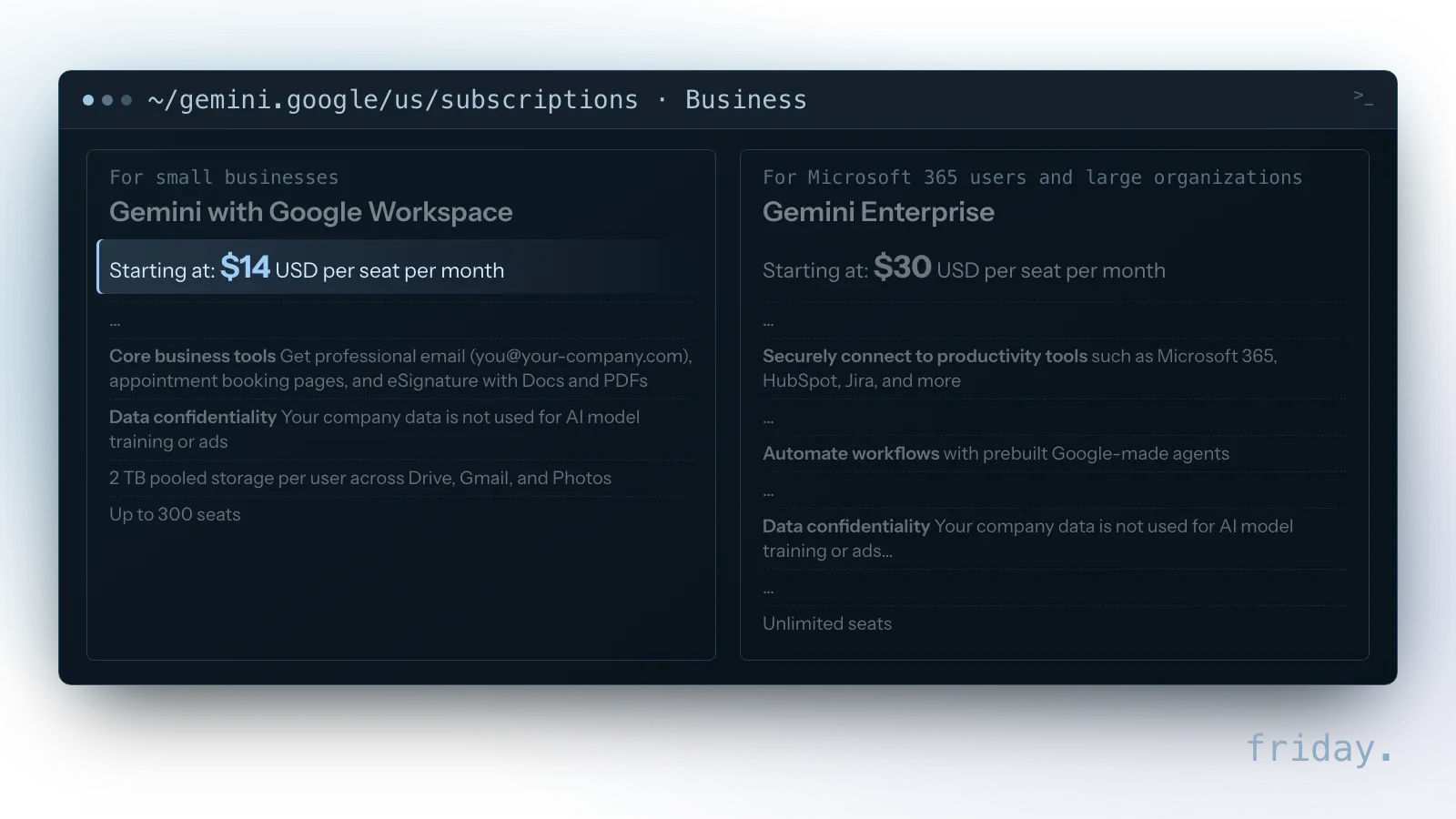
The page does not say which billing term or Workspace edition the starting price maps to, so confirm both at checkout before you set the Gemini vs ChatGPT pricing side by side. Google's Workspace pricing page served euro prices on our check, so plan-by-plan Workspace prices are not listed.
A worked example at five seats
Worked example, our Gemini vs ChatGPT pricing arithmetic at list prices checked November 17, 2026: five ChatGPT Business Standard seats cost $100 a month on the annual plan (5 × $20) or $125 on the monthly plan (5 × $25). Five seats of Gemini with Google Workspace start at $70 a month (5 × $14), and five Gemini Enterprise seats start at $150 (5 × $30).
A sample mix at the same list prices (checked November 17, 2026) shows how Premium changes the sum: two Premium seats and three Standard seats on annual billing come to $260 a month (2 × $100 plus 3 × $20). The Workspace figure counts for more if it replaces an email bill you already pay, and for less if you keep your current email host.
Personal plans for a solo owner
For a solo owner, Gemini vs ChatGPT pricing sits within a cent at the $20 level. On Google's US page, checked November 17, 2026, Google AI Plus is $4.99 a month, Google AI Pro is $19.99 and Google AI Ultra starts at $99.99, with a $199.99 tier. OpenAI lists ChatGPT Plus at "$20/month (billed monthly)" and says API usage is billed separately.
Seat rules behind the list prices
Gemini vs ChatGPT pricing on list pages leaves out OpenAI's seat rules. OpenAI says each billing cycle charges for every Standard and Premium seat in the workspace, assigned or not, and that removing a member "does not automatically reduce the number of paid seats." Self-serve Business workspaces also have no invoice, ACH or purchase-order billing, so plan on a card.
Training defaults and who sees your data
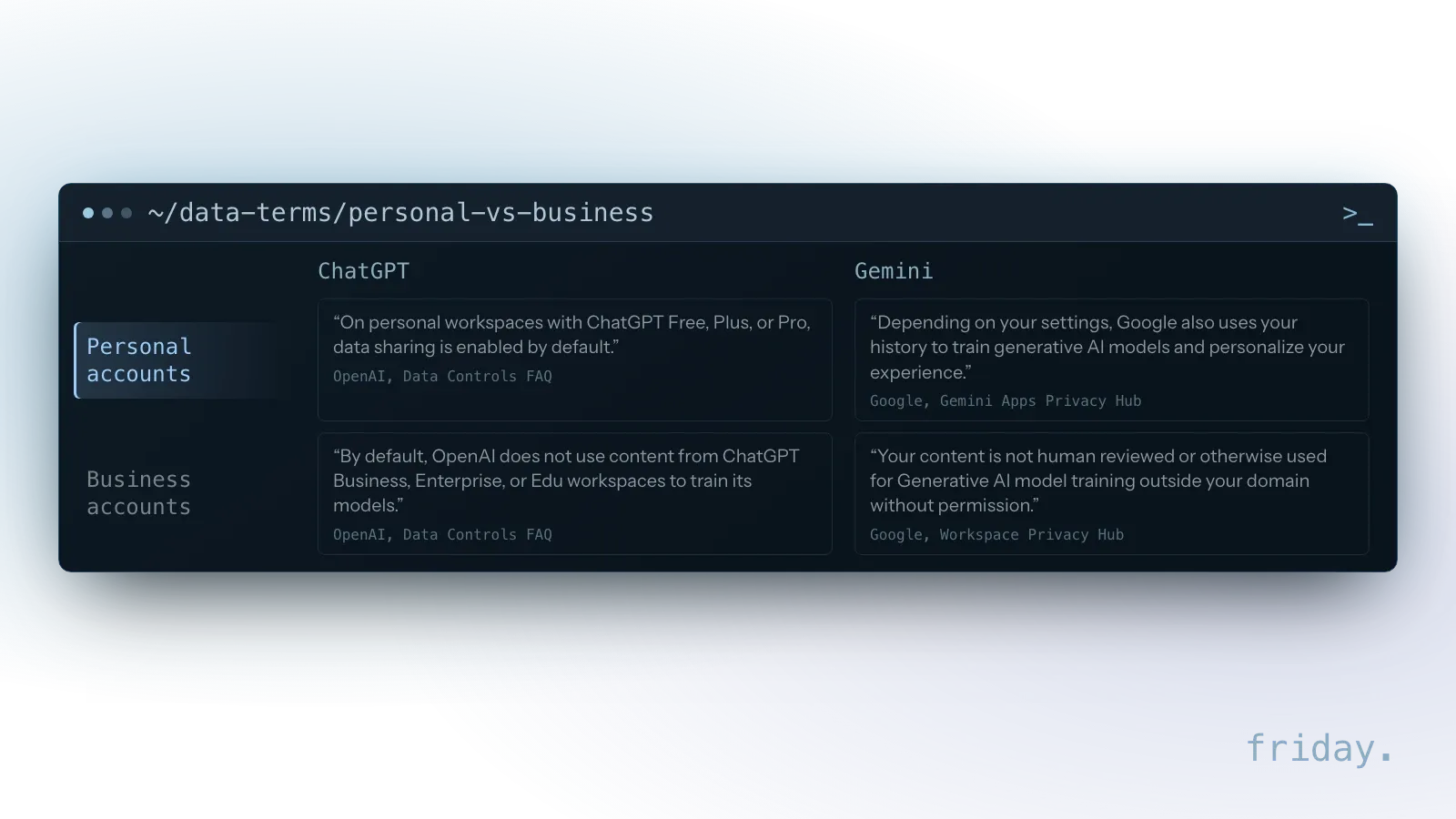
The data rules differ more between personal and business accounts than between the two vendors. Before anyone pastes client details into a chat, check which kind of account they are signed in to.
Personal ChatGPT and Gemini accounts
Personal accounts carry different terms on both sides: each vendor has its own defaults for training, review and retention, and lets a solo owner change some of them. Google adds that chats reviewed by its human reviewers "are not deleted when you delete your history."
Settings a solo owner controls
In ChatGPT, OpenAI says the "Improve the model for everyone" setting can be switched off without losing your chat history. In Gemini, Google's privacy hub says Gemini History lets you control whether your data trains its models and change auto-delete from the default of 18 months to 3 or 36 months, or keep chats indefinitely.
ChatGPT or Gemini for business accounts
On the data question, the Gemini vs ChatGPT for business plans come out close. What is left to compare is which plan names each vendor's business terms cover, so match the plan you buy to the plan named on the vendor's data page.
Gemini follows your Workspace sharing
Google's Workspace privacy hub says "Your existing Google Workspace protections are automatically applied" to Gemini. Clean up who can open which shared drive before you switch Gemini on for the team, because its answers draw on whatever each person can already open.
Test ChatGPT vs Gemini on three real jobs
The table narrows ChatGPT vs Gemini for business to one or two plans. A short trial with real work settles the rest, and ChatGPT Business starts at two seats, so not everyone needs to join it.
Pick three jobs you repeat each week
Choose work your team already does: a client follow-up email, a summary of a long document and a cleanup of a sales spreadsheet. Run the same three in both assistants, with the same source files and the same instructions, so the only thing that changes is the assistant.
Use business accounts for the trial
Run the Gemini vs ChatGPT for business trial on business seats, not personal accounts, so client files fall under the business data terms. Two ChatGPT Business seats and your existing Workspace plan cover it, if that plan is Standard or above.
Record time saved and edits needed
For each job, note how long the draft took, how much you changed and any wrong fact you caught. Keep the notes in one shared sheet, so the result is written down rather than remembered. Keep the assistant that needs fewer corrections on your own files.
When a chat window is not enough
Inside a chat, either assistant handles one request at a time. The gap shows when the same job repeats every day across several tools and still needs someone to copy, paste and check each step.
Repeat jobs become skills and agents
Google lists ready-made agents for Gemini Enterprise, Workspace shows "Customize AI with skills" for all four plans, and the ChatGPT Business plan table includes skills as well. A repeat job, such as turning new orders into a weekly report, can run as a defined skill instead of a fresh prompt each time.
Connections decide what an agent can reach
An agent can reach only what its connections allow. If you want help scoping which jobs to turn into agents and skills for your team, start with the tools where each job begins and ends.
What a person still checks
An assistant's draft is still a draft. Agree who reviews each kind of result, what counts as a claim that needs proof, and who signs off before anything reaches a client.
ChatGPT vs Gemini FAQs
These five questions come from competitor FAQs and search results for these two assistants. Each answer rests on the same OpenAI and Google pages, checked November 17, 2026.
Is Gemini better than ChatGPT for business?
No vendor page names a winner for every company; the Gemini vs ChatGPT for business answer turns on your suite. Gemini fits a team already on Google Workspace, because it works inside the Workspace apps a team shares from Business Standard up. A team spread across Microsoft 365, Slack and other apps can trial ChatGPT Business or Gemini Enterprise.
Is Gemini included with Google Workspace?
Yes, on Google's comparison table. Gemini in Gmail and the Gemini app come with every Business plan, and Gemini reaches more of the Workspace apps from Business Standard up.
Can ChatGPT connect to Gmail and Google Drive?
Yes. OpenAI's Business card lists a Google Workspace connection, and its help center says ChatGPT works within your Google account's permissions, with workspace admins able to turn Google app actions on or off.
Does Gemini have a free plan?
Yes. Google's US page lists Free at $0 a month with a Google Account, with access to its Flash-Lite model and 15 GB of storage across Gmail, Drive and Photos (checked November 17, 2026). OpenAI also offers ChatGPT Free.
Which is the best AI chatbot for a small business?
No single chatbot fits every business; the right one depends on your tools. Roundups also rank assistants such as Claude, Copilot and Perplexity, and each needs its own trial on your work.
Pick by your stack, then by your seat count
For a small business, ChatGPT vs Gemini comes down to two facts: where your email and files live, and the number of people who need seats. Start with the table, then confirm the plan with the vendor.
If your team runs on Google Workspace, the Gemini vs ChatGPT for business answer starts with the plan you have: check that it is Standard or above before paying for another assistant. If your work spans Microsoft 365, Slack or several apps, compare ChatGPT Business on two seats with Gemini Enterprise, and recheck the Gemini vs ChatGPT pricing once you know which people need Premium. If you want help mapping which jobs to connect first, tell us which tools your business uses.
Last checked: November 17, 2026, against Google's US Gemini subscriptions page, Workspace plan comparison and the Workspace and Gemini Apps privacy hubs, and OpenAI's ChatGPT Business pricing page and help center articles on Business billing and seats, ChatGPT Plus, data controls and Google app data. Plans change; check the vendor pages before you buy.
Plan and price details come from OpenAI's and Google's own pages, checked November 17, 2026. Friday has no relationship with either vendor.