
No-Code AI Agent Builder or Custom Agent: How to Choose One
No-code agent builder or custom AI agent? Five signals help a small business decide, from the systems the agent writes to, to what you keep if the tool changes.
Copilot Studio, Zapier and Make build a first agent from written instructions; a custom agent earns its cost when your logic, data or systems outgrow them.
The answer can turn on cost and portability: how a builder bills a daily agent, what happens to your data and what you keep if a vendor changes its product.
What a no-code builder gives you
The builders aim at people without a technical background. A first agent that answers questions from your documents, prepares a reply or updates a record in one app fits them well.
| Builder | Billing unit | What an export keeps | Training on your data |
|---|---|---|---|
| Copilot Studio | Copilot Credits | Solutions move agents across environments; not all components are included | Not used unless you provide consent (Power Platform FAQ) |
| Zapier Agents | Activities, moving to tasks in AI by Zapier | No documented export | Workflow data isn't used for training, on any plan |
| Make | Credits | A scenario blueprint as a .json file, below 2 MB, with connections to recreate | Depends on the AI provider and subscription type |
For a first AI agent, a no-code builder is a practical start: Microsoft Copilot Studio, Zapier and Make all let you set up an agent from written instructions and connect it to your apps. A custom agent starts to make sense when the agent must write to several of your systems, follow logic that is specific to your business, handle sensitive data under your own controls, or keep working regardless of what one vendor decides to change.
Microsoft Copilot Studio
Microsoft describes Copilot Studio as a graphical, low-code studio for building and managing AI-powered agents and workflows, with prebuilt or custom connectors and built-in evaluations to test quality before and after publishing.
What a Copilot Studio reply costs
Microsoft's rates put a generative answer at 2 Copilot Credits and an agent action at 5, against 1 for a classic answer, the fixed reply a maker writes by hand.
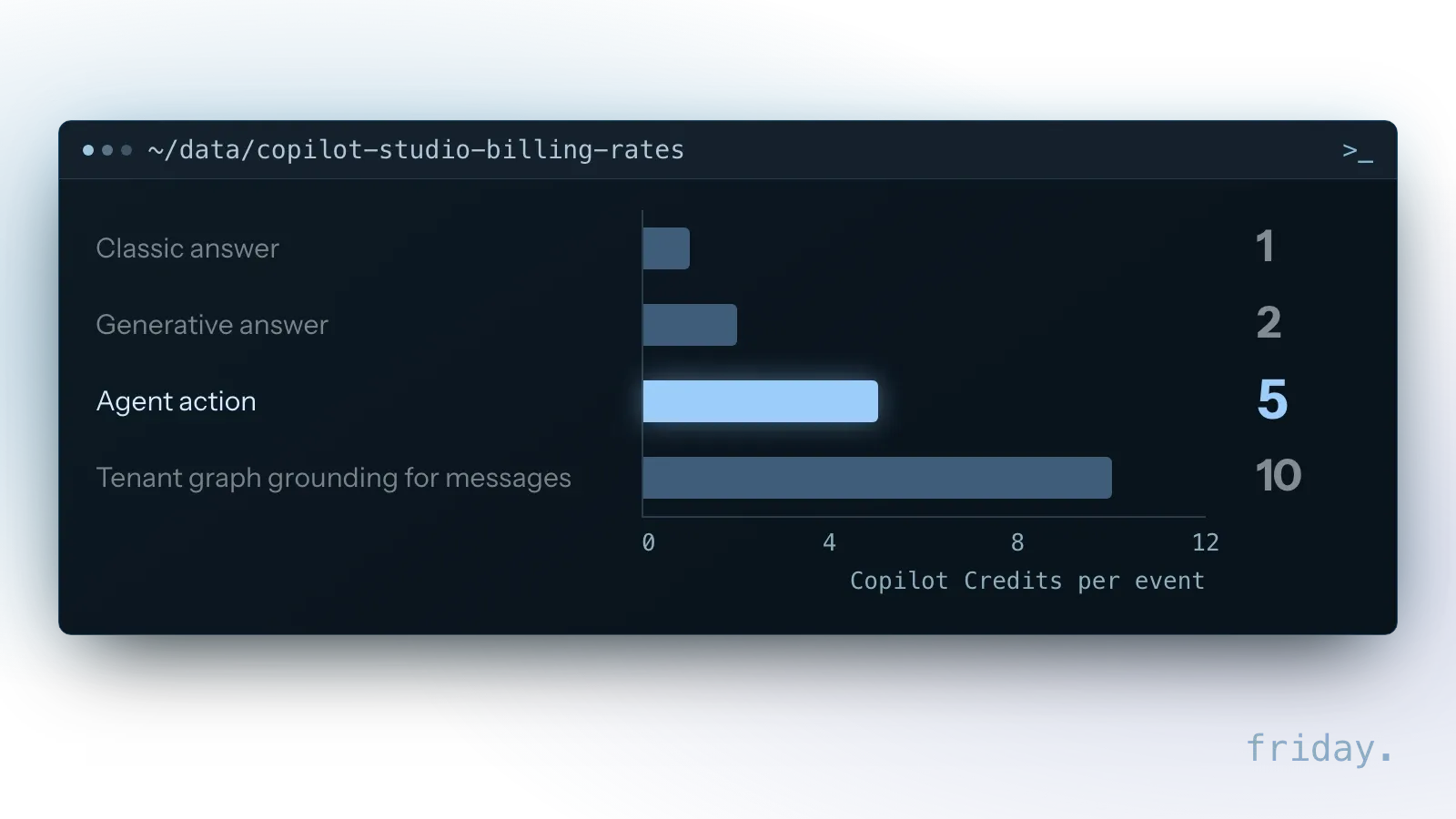
Agent actions cover steps such as triggers, deep reasoning and topic transitions, and in generative orchestration Microsoft counts actions and topics as agent actions, so each action call the agent makes is billed at that rate.
Zapier Agents
Zapier's agents are built by describing what should trigger the agent, what tasks it should do and which apps it should use, across its catalog of more than 9,000 apps. You add actions to give the agent tools, and you can share a template of an agent so colleagues can create their own copy.
Make AI agents
Make's AI agents use its modules, scenarios and MCP tools as their tools; the Make AI Agent app is in open beta, and Make notes that functionality and pricing may change. Its help center lists practical limits: you get an error when the context window is exceeded, and agent nesting stops at one level, so a sub-agent cannot have its own sub-agent.
Five signals that point to a custom agent
Read the table row by row for the agent you have in mind. Each row is a signal: where your answer lands in the middle column or the right one tells you which way that signal points.
| Signal | Builder is enough when | Custom is worth considering when |
|---|---|---|
| Systems it writes to | One or two apps with ready-made connectors | Several systems, or one with no connector |
| Your own logic | The rules fit in plain instructions | Pricing rules, eligibility checks or steps unique to your business |
| Data sensitivity | General business information | Client, health or financial records that need your own controls and logs |
| Who maintains it | Someone on the team who will own it in the builder | Nobody internal, or an outside team that maintains code |
| What you keep if you leave | You accept rebuilding it if the tool changes | The agent must survive a vendor's product change |
Reading the result
If none of the right-hand column applies, start in a builder. If two or more apply, a custom build is worth pricing out; our fixed project prices show what that involves.
Check whether you need an agent at all
Anthropic's guidance on building effective agents recommends finding the simplest solution possible and only increasing complexity when needed. It describes workflows as systems where models and tools follow predefined code paths, and agents as the better option when flexibility and model-driven decision-making are needed at scale. If your task always runs the same steps, a workflow in the same builder may do the job with fewer surprises.
What you keep if the tool changes
The builders' own documentation shows why this signal matters: each limits what travels with an agent when you move it, and OpenAI's similar Agent Builder is shutting down.
OpenAI's Agent Builder
OpenAI's Agent Builder guide says the product is deprecated and scheduled to shut down on November 30, 2026. The same guide lists a feature to copy the workflow code and use it anywhere, which is the part of an agent built there that can outlive the product.
Zapier Agents, compared
Zapier is migrating its Agents into AI by Zapier, converting agents to Zaps, with billing moving from activities to Zapier's regular task-based pricing. Zapier notes that some knowledge sources are not yet supported in the new product and that it has not set a date to turn off Agents. Migration creates a native trigger step and a single AI by Zapier step that holds the agent's prompt, instructions and tools, and agents you start by chatting have no direct equivalent trigger in the Zap editor yet.
Copilot Studio
Copilot Studio agents can be exported and imported using solutions, but Microsoft notes that not all components are included: the main instructions travel, while some custom topics and knowledge sources might not. Microsoft describes these exports as a way to move agents across environments, so they help within Copilot Studio, not when you leave it.
What to redo after a Copilot Studio import
Microsoft lists bot properties that don't transfer in an import, among them the environment ID and topic-level comments, and the agent icon and channel details can arrive empty.
The import steps then say to configure user authentication for the agent again, and the imported agent must be published before it can be shared. Plan that setup for every move between environments, such as from a test environment to the live one.
Make
Make exports a scenario as a JSON blueprint, which must be under 2 MB to import, and the person importing it still has to create the account connections again.
Watch the abstraction layer
Anthropic's guidance on building effective agents adds a related caution about frameworks: they can create extra layers of abstraction that obscure the underlying prompts. Keep a copy of the prompts and tool settings you rely on, outside the builder, where your team can read them.
How each one bills
Usage units differ, which matters once an agent runs every day. Before you commit, find out what one run of your agent costs in each builder's unit and what happens when you hit the limit.
Copilot Credits
Copilot Studio measures usage in Copilot Credits, which Microsoft describes as the time and effort an agent needs to retrieve information, respond and take actions. Microsoft warns that exceeding purchased capacity can result in service denial, and that with a trial license you can test an agent in the test chat panel but cannot publish it.
Zapier activities and tasks
Zapier Agents count activities, any billable action the agent takes, and stop running when the limit is reached.
What one run costs in Zapier
Zapier's help center works through an example agent that checks your inbox for a keyword, summarizes each matching email, adds it as a Trello task and sends a Slack message. One matching email counts as four activities; two count as seven.
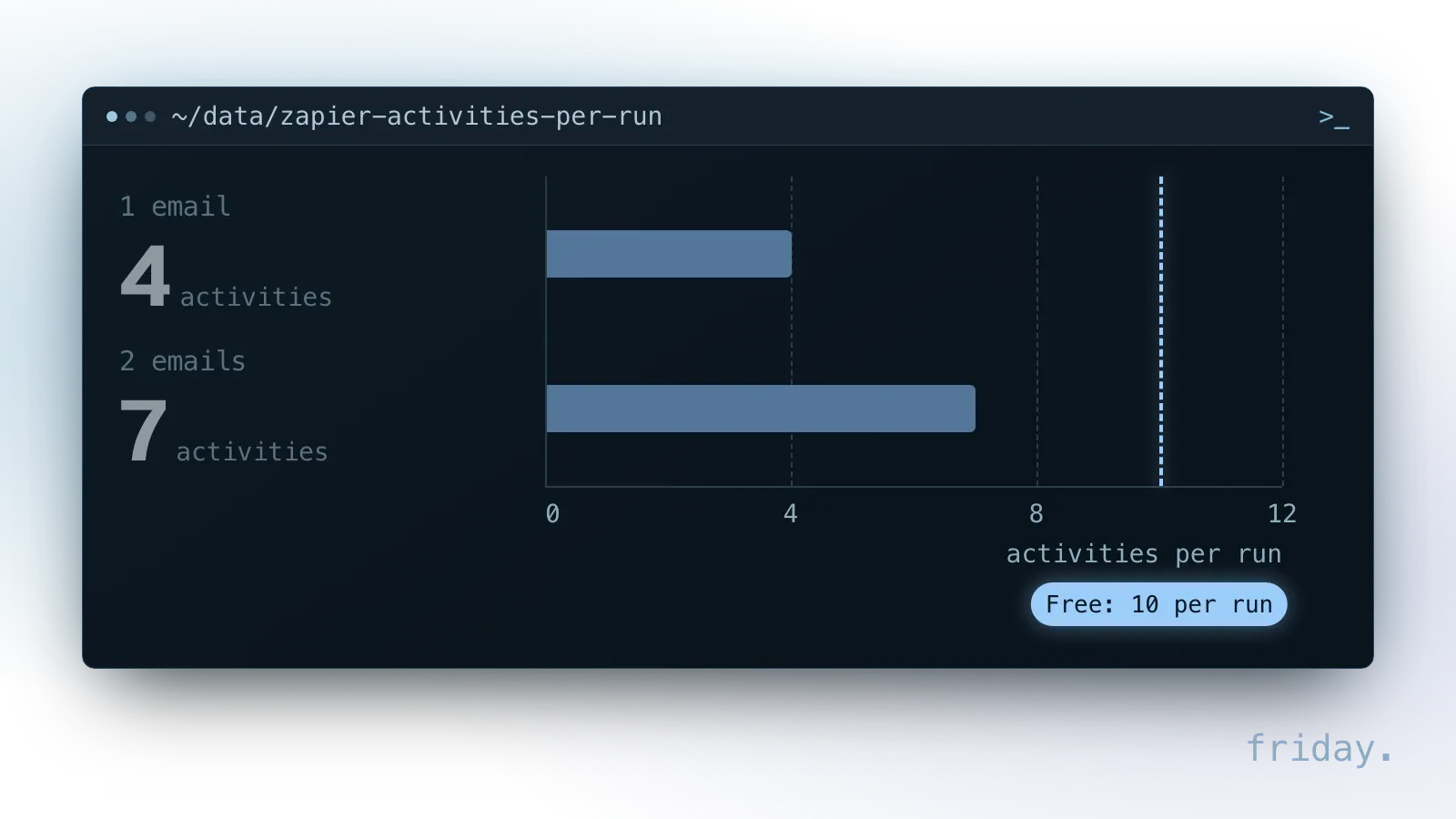
Each plan also caps a single run: 10 activities on Free and 40 on Pro, with 400 and 1,500 a month, and on Free your testing counts toward the quota. Our own arithmetic on that example, one run a day for 30 days at 4 or 7 activities each, gives 120 or 210 activities a month, within Free's 400. Count your own agent's steps per item the same way before you pick a plan.
Make credits
Make's help center notes that connecting several MCP servers and tools can mean high token usage, and that Anthropic's models add a system prompt for tool use, which increases credit consumption.
Data and training terms
Check where your data goes before you connect anything sensitive. Each builder answers it differently, and the model provider you connect can change the answer.
What each builder states
- Microsoft's Power Platform FAQ says it doesn't use your customer data to train Copilot or its AI features unless you consent, and that some features, such as third-party plug-ins, may send data outside the Microsoft Cloud trust boundary. Its feature table lists Copilot Studio's generative answers and generative actions among the features it covers, and points each Copilot Studio feature to Copilot Studio security and governance to turn it off.
- Zapier states that it doesn't train on the data that runs through your workflows, on any plan, though it may learn from how workflows are built unless you opt out.
- Make's guidance notes that, depending on the AI provider and subscription you connect, data may be logged, stored or used for training, and recommends business tiers with retention guarantees.
What changes with a custom agent
With a custom agent you choose the model provider, the data each tool can reach and what gets logged, and you answer these questions yourself.
Build and test the first version
Whichever path you choose, the first version should be small and tested before anyone relies on it. These five steps work in any builder and carry over to a custom build later.
Pick one task
Choose one task with a clear end, such as answering questions about your service terms or preparing a quote request for review. One task makes it obvious whether the agent did its job.
Write the instructions and give it tools
In Zapier you describe the trigger, the tasks and the apps; in Copilot Studio and Make you write instructions and connect tools. Give it only the tools the task needs, and leave anything that deletes or sends for later.
Decide what it must not do
Write down the actions the agent should never take on its own, such as sending to a customer, changing a price or deleting a record. In the builder, leave those tools out, or route them to a person for approval, until the pilot shows the agent handles the safe part well.
Test before people rely on it
Run your five real examples through it and compare the answers with the right ones. Copilot Studio includes evaluations with test sets for this, and Anthropic recommends extensive testing in sandboxed environments with appropriate guardrails.
Run a small pilot
Let one or two people use it for real work for a couple of weeks, and keep a list of every answer they had to correct. That list tells you whether to keep going, change the instructions or move to a custom build.
Mixing a builder with custom parts
The choice is not always one or the other. Copilot Studio and Make can call outside tools through MCP, so a custom piece can do the hard part while the builder handles the rest of the agent.
MCP tools inside a builder
Microsoft's documentation says you can extend a Copilot Studio agent with tools by using MCP, that it supports MCP tools and resources, and that generative orchestration must be turned on to use them. Make's help center says its agents can use tools from third-party MCP servers.
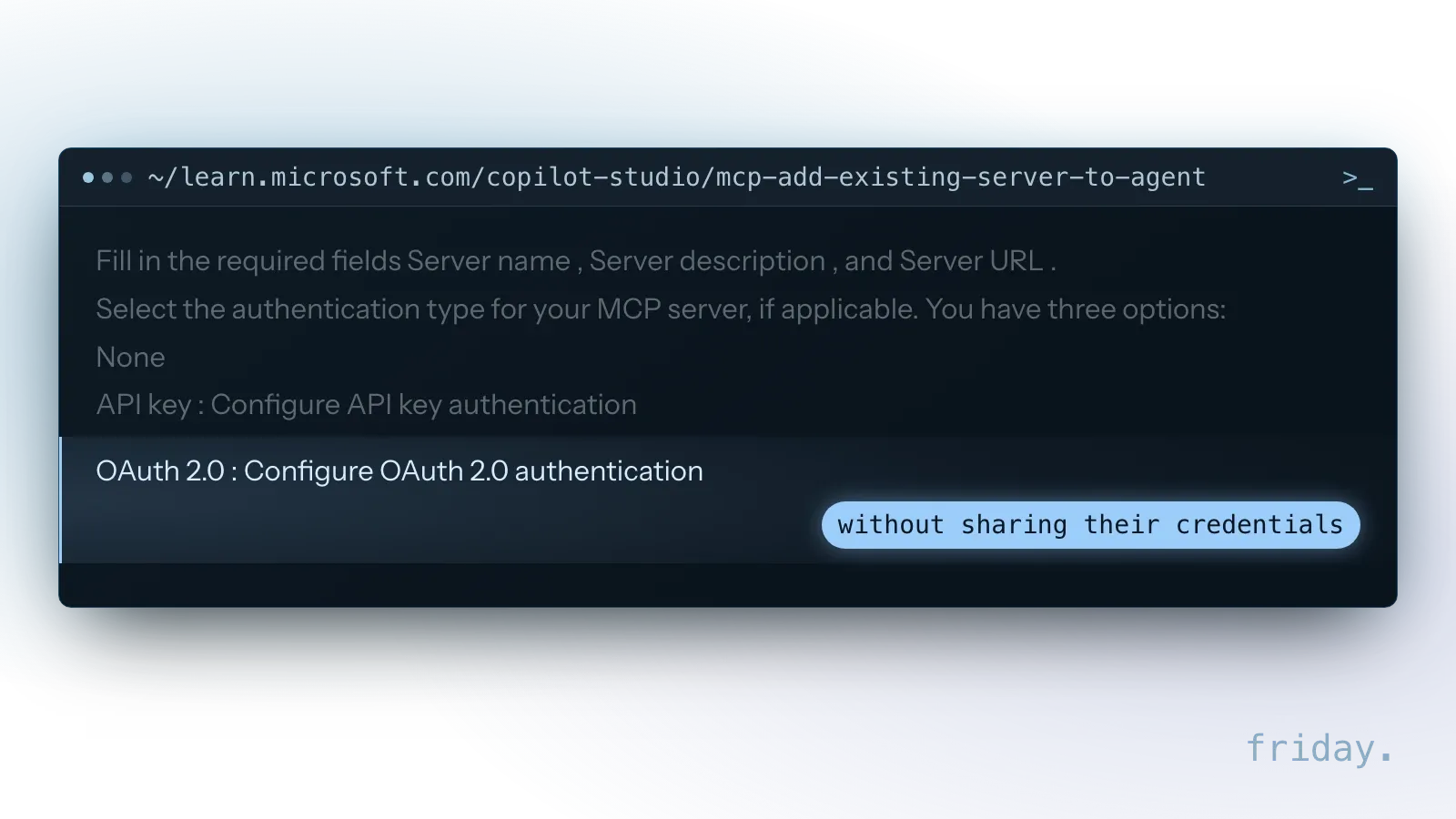
If a developer builds that server for you, the description entered in Microsoft's onboarding wizard is what the agent orchestrator uses to identify whether to call your server at runtime. The wizard offers three authentication options: None, API key and OAuth 2.0. Copilot Studio supports the Streamable transport type and dropped SSE after August 2025, so ask for a server built on Streamable.
Who is responsible for the custom part
Microsoft adds that when you connect to a non-Microsoft product, including an external MCP server, you are responsible for the tools and resources you access. A custom server you own puts the sensitive logic and data access under your control, and the maintenance with it.
When the custom part is worth it
A custom tool behind a builder makes sense when one step needs your own rules or a system the builder cannot reach, such as a pricing calculation or a lookup in a job-tracking database, while the conversation and the simpler steps stay in a tool your team can edit.
FAQs About No-Code and Custom AI Agents
Starting in a builder raises its own doubts: whether you can move to custom later, whether custom is automatically safer, and what your team has to hand over before a build starts.
Can we start in a builder and move to custom later?
Yes. The one-page spec in the last section is what makes the move practical, together with the list of answers your pilot users had to correct.
Is a custom agent more secure?
Not automatically. It gives you more control over data, permissions and logging, and also more responsibility for getting them right.
Can a builder agent use our own documents and data?
Yes, within limits. Zapier says you can equip its agents with company knowledge, and Microsoft says Copilot Studio connects to other data sources through prebuilt or custom connectors. Check how each one stores that knowledge before you add client or financial records.
Which builder should we try first?
Start with the one closest to tools you already pay for and use every day, so the connections and accounts exist already. Check its billing unit and data terms above before you build anything that runs daily.
What does a custom agent need from us?
A clear task, access to the systems it will use, real examples of good results, and one person who decides what the agent may do without asking.
Write the spec before you choose
A one-page spec makes either path faster to build and easier to judge. It also gives an outside builder, or a custom developer, everything needed to quote the work accurately.
What goes on the page
The task the agent owns, the systems it reads and writes, the data it must never touch, five real examples with the right answer, and who on your team owns it.
Then build
Build the first version in a builder. If any signal in the table lands in the right-hand column, a custom AI agent is the next step, and a call to review your one-page spec is a good place to start.
Last checked: November 16, 2026, against each vendor's documentation. These products change; check each vendor's current documentation before you rely on a detail.
Product details come from the vendors' own documentation, checked November 16, 2026.