
MCP vs API: What Is the Difference for Your Small Business?
An API lets your software run fixed steps against another system. An MCP connection lets an AI app choose those steps on request. Both obey the vendor's rules.
The choice turns on who decides each call: code a developer wrote ahead, or an AI app answering a person. That sets the cost, the team effort and the risk.
In HubSpot, a custom MCP server built as a private app shares the daily API limit with every other app in the account. What differs is build, cost and upkeep.
MCP vs API in one table
Both can reach the same systems, and the main difference is who decides each step. Five points cover what an owner needs to compare before paying someone to build either option.
| Point | API integration | MCP connection |
|---|---|---|
| Who makes the call | Code written by a developer | An AI app, on a person's request |
| How capabilities are found | A developer reads the documentation | The AI app asks the server what it offers |
| Fits | Fixed, repeatable processes | Questions and tasks that vary each time |
| Running cost | Vendor plan and hosting | Vendor plan, hosting and model tokens |
| Setup | Integration code or a workflow tool | A server added to an AI app |
Who decides which call runs
With an API integration, a developer decides in advance which endpoint runs and in what order. The same input follows the same path every time, which is what makes the result easy to test. With MCP, the tools specification calls tools model-controlled: the language model can discover and invoke them based on its contextual understanding and the user's prompts. The person asking shapes the path, and the model picks the tool.
What stays the same
Both reach the system through its own rules. A vendor that caps API requests, limits features by plan or requires sign-in applies those rules to an MCP server that calls its API, as it does to any other integration. Picking MCP does not get around a missing plan feature, and picking an API does not remove the need to decide who may change what.
What changes under the hood
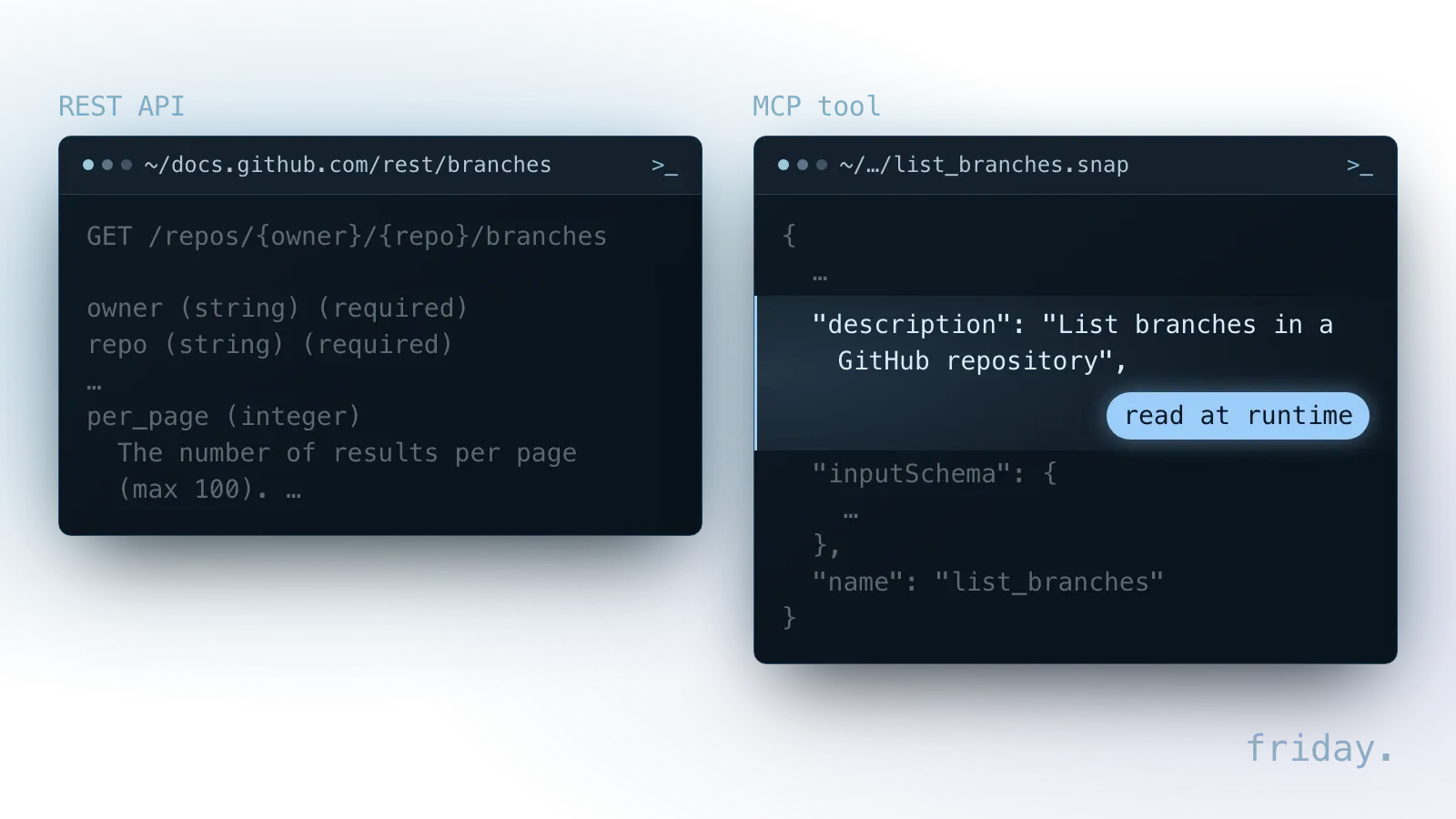
A developer reads an API's reference once, while building, and hard-codes the calls. An AI app reads an MCP tool's description whenever it is loaded into a request, as GitHub's two versions show.
When the reading happens
With an API integration, a new vendor feature changes nothing until someone updates the code. Under the MCP tools specification, an AI app asks a server for its tool list and gets back each tool's name, a description and a JSON Schema for its inputs. A server that declares the listChanged capability should notify subscribed apps when that list changes, so new tools can appear without anyone editing integration code.
That flexibility has a price. With an API integration, you know exactly which call runs. With MCP, the model chooses, so the wording of each tool description and the limits on each tool matter as much as the code behind them.
Whose credentials are used
A direct API integration can run on one API key or service account stored with the automation. That fits a fixed process, but every call carries the same access no matter who triggered it.
A remote MCP server can have each person sign in instead, so each call carries that person's access. When you evaluate a server, ask which identity your CRM or help desk records in its own logs: the person, or one shared account.
When a direct API integration is the better fit
Fixed code wins when the steps are known in advance and nobody needs to ask a question. Three signs point to an API workflow: a set rule, a high volume and a need to show each step.
The steps never change
"Every new order creates an invoice" is a rule with no question in it. A workflow tool or a short script runs it the same way on every trigger or schedule, with no AI model in the loop. Nightly syncs between two systems and weekly exports to a spreadsheet belong here too.
The volume is high
Thousands of identical operations are cheaper as direct calls, because each one skips the model and its token charges. The vendor's request limits still apply, and a workflow can be paced to stay under them, which is harder to promise when an AI app decides how many calls to make.
Every step must be shown
Fixed code produces the same path for the same input, so an accountant, an auditor or a new hire can read what happened and why. An AI app's choice of tool can be logged, but it remains a choice, and the reason behind it is harder to show after the fact.
When an MCP connection is the better fit
An AI app earns its running cost when the request changes each time and the person asking knows what they need. Three signs favor an MCP connection over another report or screen.
A person is asking
"Which of my open deals have not been contacted in two weeks?" is a different question each time someone asks it, with a different date range, owner or stage. Building a fixed report for every variant is a project of its own. A read-only search tool lets the AI app answer each variant as it comes.
The answer spans several systems
One assistant can use an accounting server and a help desk server in the same conversation, for a question such as which customers with open tickets also have unpaid invoices. A direct integration would need code written for that exact combination.
The team already works in an AI app
When people already draft, summarize and research in an AI app, an MCP connection brings the business data to that screen. The alternative is a trip to a separate dashboard for each lookup, then pasting the result back into the chat by hand.
How MCP and an API share one budget
A custom MCP server calls the same vendor API your automations use, so in HubSpot both draw on one daily limit when built as private apps in one account. The limit grows with the plan.
MCP wraps the API
The MCP architecture overview defines a server as a program that provides context to MCP clients, and the tools specification lists calling APIs among the things tools let a model do. In a business setup, the server turns a request from the AI app into calls to the tool's API, applies its own rules and returns a result. Adding MCP leaves existing integrations in place. It adds a second way to reach the same system.
One daily limit for every app
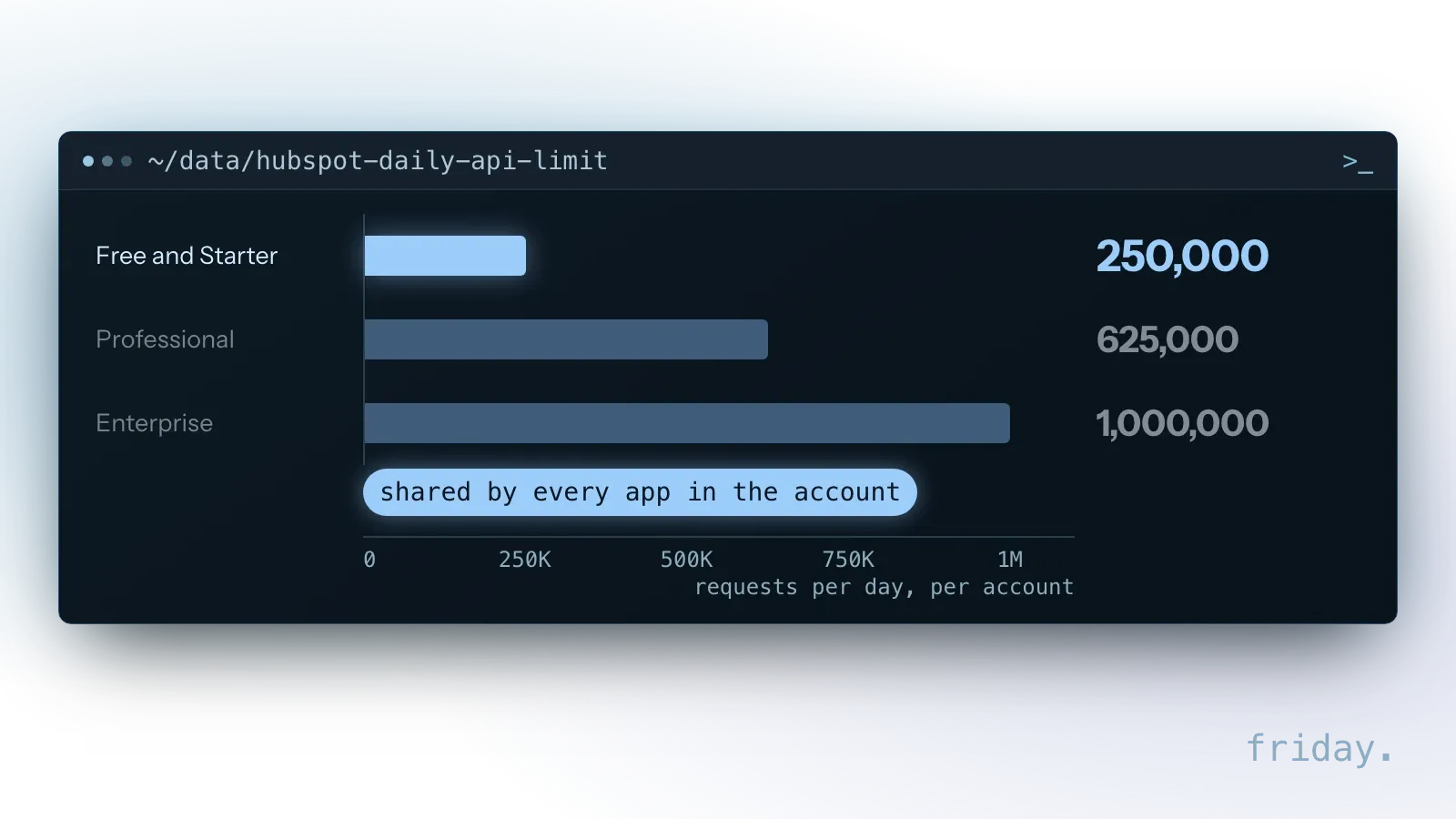
HubSpot's API usage guidelines apply the burst limit to each app individually and share the daily limit across all apps within the same HubSpot account. For privately distributed apps, that daily limit is 250,000 requests on Free and Starter, 625,000 on Professional and 1,000,000 on Enterprise.
So a custom MCP server and a nightly sync built as two private apps in one account count toward the same daily total. HubSpot says any app or integration exceeding its rate limits will receive a 429 error response for all subsequent API calls. Before adding an AI app that may call the API on every question, check how much of the daily budget your existing workflows already use. HubSpot's guidelines do not mention MCP servers, so whether its own hosted server counts against that limit is for HubSpot to document.
Putting an MCP server on top of an API you already use
If your tool already has a solid API, adding an MCP server is a matter of deciding what to expose, and the mistake to avoid is mirroring every endpoint as a tool. An AI app choosing among dozens of near-identical actions has more chances to pick the wrong one, and every write endpoint you expose is another action to approve and monitor.
- Shape tools around tasks. One tool called "find overdue invoices for a customer" asks less of the model than three raw endpoints it has to chain together.
- Start read-only. Expose lookups first and add write actions one at a time, each with its own approval rule.
- Keep the limits. The tools specification requires servers to rate limit tool invocations; set that limit so the AI app leaves enough of the API budget for your workflows.
- Leave working automations alone. Existing workflows on the same API keep running unchanged; the MCP server sits beside them.
What each costs to build
Build cost depends on how much has to be written and tested before the first real request. An API workflow needs steps and error handling; an MCP server also needs tools a model can choose well.
Building an API integration
The work is mapping the process: which event starts it, which endpoints it calls, what it writes and what happens when a call fails. A workflow tool covers the plumbing for the apps it supports, and custom code fills the steps it does not. Either way, the developer reads the vendor's documentation once, and the result is a fixed sequence that can be tested with a handful of sample records.
Building an MCP server
The work adds a design step: deciding which tasks become tools, writing a description and an input schema for each, and testing that a model picks the right tool for real requests. The server also has to meet the four security duties the tools specification sets for every server, covered in our post on what an MCP server is. Each write tool adds an approval rule to design and a test with real records. A remote server also needs hosting and, when each person signs in, a sign-in flow; a local one has to be installed on each person's machine.
Where the build cost shrinks
When the vendor publishes an official MCP server, the build becomes configuration: connecting it, narrowing what it exposes and testing it with real requests. When the tool has a solid API and no official server, the plumbing exists and the job is the design step. When the tool has no API at all, both options start with the hard part, and the MCP server has nothing stable to call.
What each costs to run
An API call costs the vendor plan and the hosting it runs on. An MCP connection adds model usage, because every tool definition the AI app loads counts as input tokens on each request.
What an API call costs
A direct call has no model in the middle, so its running cost is the vendor plan that includes API access, the place the workflow runs and the time spent fixing failed runs. Its ceiling is the vendor's request budget, such as HubSpot's daily limit per account.
What tool definitions add
Anthropic's Claude pricing page says tool use requests are priced on the total number of input tokens, including the tools parameter with each tool's name, description and schema. A tool use system prompt comes on top: 286 tokens on Claude Sonnet 5.5 with the default tool choice.
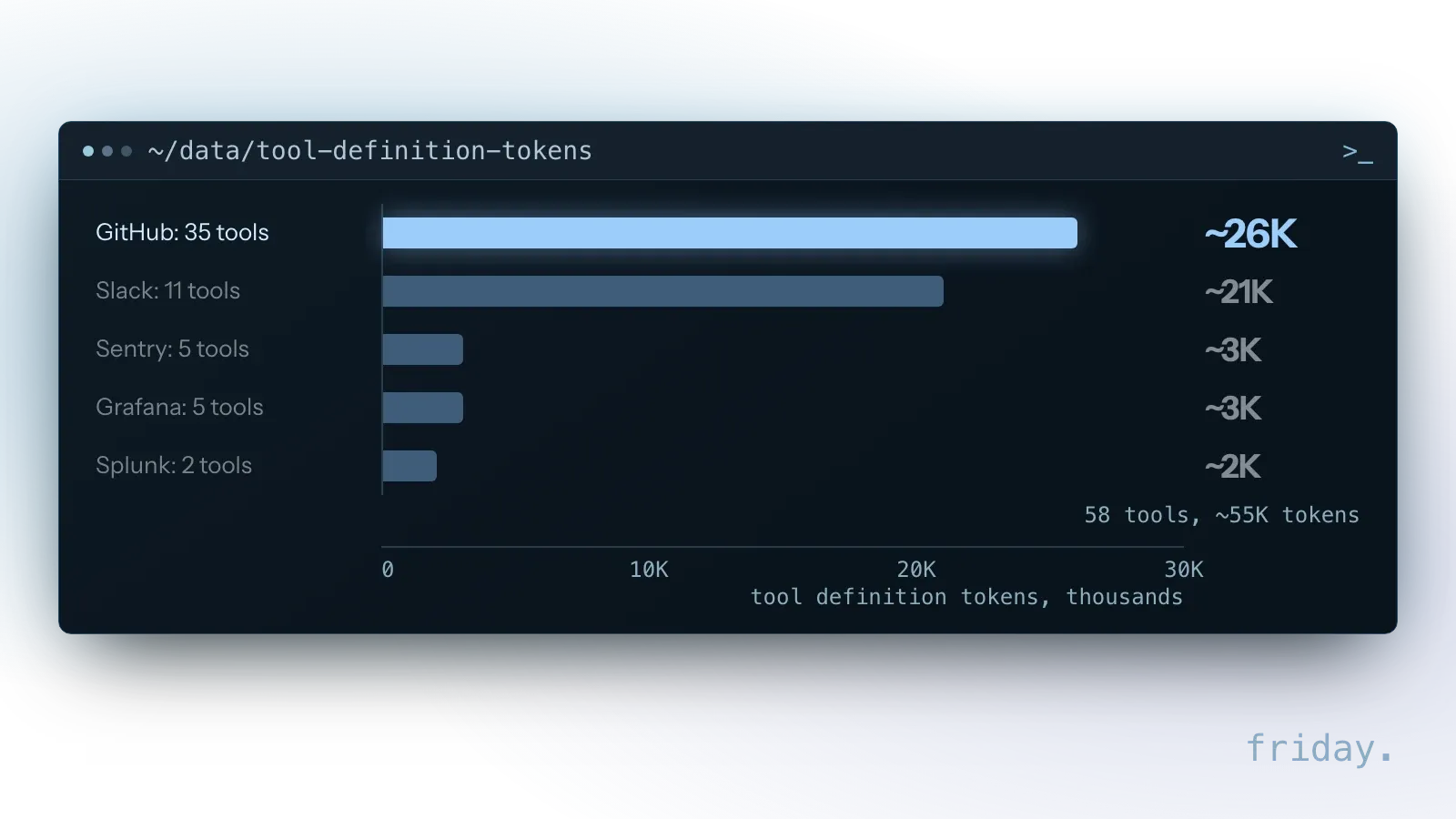
The definitions add up. In Anthropic's advanced tool use post, a five-server setup loads 58 tools worth about 55,000 tokens before the conversation starts: GitHub's 35 tools take about 26,000 tokens, Slack's 11 about 21,000, and Sentry, Grafana and Splunk between 2,000 and 3,000 each. The post adds that Jira alone uses about 17,000.
Pricing that five-server example
Anthropic lists Claude Sonnet 5.5 at $2 per million base input tokens and $0.10 per million for cache hits. At the base price, 55,000 tokens of tool definitions come to $0.11 per request before the model reads the question. Once those definitions are cached (the first request writes the cache at $2.50 per million, about $0.14), each later request that reads them within the cache lifetime costs about $0.0055. This arithmetic applies when your own app or agent pays per token through the Claude API.
Two levers cut that overhead. Connect only the servers a task uses, and expose fewer tools shaped around tasks. Anthropic also reports that its Tool Search Tool, which loads tool definitions on demand, brought an 85% reduction in token usage in its example.
What each needs from your team
Neither option runs itself. An API workflow needs an owner for its credentials and failures; an MCP connection also needs someone who reviews what the AI did and approves changes.
For an API integration
Someone holds the API key or service account, watches for failed runs and 429 errors, and updates the workflow when the vendor changes its API version. A list of what each workflow reads and writes makes the handover easier when that person changes roles.
For an MCP connection
The tools specification says there should always be a human in the loop with the ability to deny tool invocations, and that apps should prompt for confirmation on sensitive operations and log tool usage for audit purposes. In practice, a person decides which actions need approval, reads the record of what the AI called, and rewrites a tool description when the model keeps choosing the wrong tool.
For both
Each connection needs one named owner and a short record: what it reaches, which account it uses, what it costs each month and who to call when it breaks. Write that record before launch, and update it when the vendor, the plan or the AI app changes.
FAQs About MCP vs API
An MCP server for a business tool calls that tool's API, so neither one replaces the other. What changes between them is who decides each call, what it costs and who checks it.
Will MCP replace APIs?
No. An MCP server needs something to call, and for a business tool that is its API. MCP standardizes how AI apps use those capabilities; it does not remove the need for them.
Is MCP more secure than an API?
Neither is secure by default. Security comes from narrow credentials, per-person permissions and approval steps, whichever interface you use.
Can I start with an API and add MCP later?
Yes. A clean API integration is a good foundation. An MCP server can be added on top when your team wants to reach the same system from an AI app, and the workflow keeps running beside it.
What if my tool has no API?
Then an MCP server has nothing stable to call, and building one means working around the tool through exports, a database or screen automation. Each of those breaks more easily. Check first whether the vendor offers API access on a higher plan or publishes an official MCP server.
Should I connect every server my AI app offers?
No. Each connected server adds its tool definitions to the model's input on every request. Connect the servers a task uses, and remove the ones nobody has called in a month.
Choosing for your task
Start from the task, then pick the interface. Fixed and frequent work goes to an API workflow, varied questions from people go to an MCP connection, and both can share one API.
If the process is fixed, automate it with a workflow; see our workflow automation service. If your team needs to ask and act from their AI app, see our MCP connection service. Not sure which one your task needs? Describe it to us and we will tell you which option costs less to build and run.
Last checked: November 16, 2026, against the MCP specification revision 2026-07-28 (tools), the MCP architecture overview, HubSpot's API usage guidelines, Anthropic's Claude pricing page and its advanced tool use post. Prices and limits change; check the linked pages before relying on a figure.
Protocol details come from the MCP documentation; limits and prices come from HubSpot and Anthropic, checked November 16, 2026.