
What Is an MCP Server and How Does It Work for a Business?
An MCP server sits between an AI app and one of your business tools. It lists what the AI may do, checks each request and returns a result or a clear error.
It also shapes what the AI hears back when a request goes wrong, and how far anyone can trust what the server says about itself, from its name to its tool list.
What a server does depends on where it runs, who maintains it and what it refuses, and those are the facts to get before you install a server or pay for one.

What an MCP server is
An MCP server is a program that offers one system's data and actions to AI apps through the Model Context Protocol. The app asks, and the server decides what to return and what to refuse.
A program that serves context
The MCP architecture page defines a server as a program that provides context to MCP clients, and the client lives inside the AI app your team uses. A server does not need an AI model of its own and does not work out what the user meant. It describes what it can do, waits for a request and runs it within the rules it enforces.
One connection per server
The AI app creates one MCP client for each MCP server it connects to, and each client keeps a dedicated connection. The documentation also says servers can execute locally or remotely: its examples are a filesystem server that Claude Desktop launches on the same machine and Sentry's official server, which runs on the Sentry platform.
What happens when the AI app uses a server
In the current specification, revision 2026-07-28, an AI app learns what a server supports, reads its list of tools, calls one with arguments and hands the result back to the model.
Discovery
Every server must answer a request called server/discover with the protocol versions it supports and its capabilities, and it should include its name and version. The app may skip it, because each request carries its own protocol version; a server that does not support that version rejects the request and lists the versions it does support. One caution for a buyer: the server's name and version are self-reported and not verified by the protocol, so a name the AI app displays from the server itself does not establish who published the code.
The tool list
Next, the app sends tools/list and gets back the tools currently available to the requesting client. The MCP tools specification allows that list to vary by the authorization presented on the request, for example returning only the tools the caller's granted scopes permit. A server built that way can show a sales rep and an office manager different menus in the same AI app; a server that does not do this shows everyone the same list.
What the AI actually sees
Each entry in that list carries a name, a human-readable description and a JSON Schema for its inputs, and the model in the AI app reads the description to decide which tool fits a request. The definition in the figure, from GitHub's official MCP server, shows all three for a tool called get_label: the description is the line used to choose, the schema declares the typed inputs and the name identifies the tool.
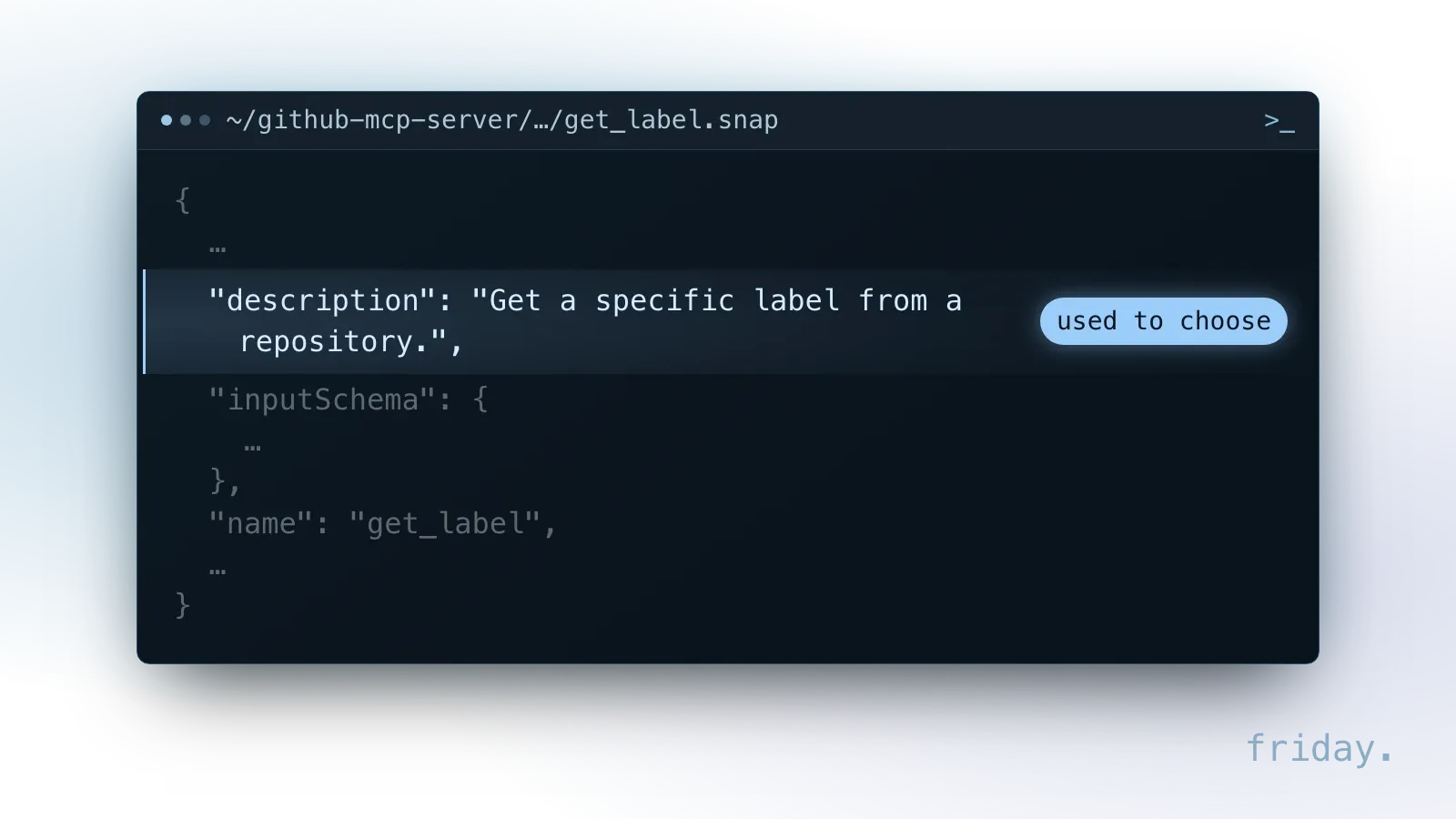
Because the model chooses by reading descriptions, a vague one such as "update record" invites the wrong pick, and "add a note to one CRM contact" narrows it. That makes the descriptions worth reading before you connect a server.
The call and the result
When the model picks a tool, the app sends tools/call with the tool's name and arguments that match its schema. The server runs the action and returns content with a flag named isError that says whether the tool itself failed. The tools specification adds that a person should be able to deny tool invocations.
No handshake in the current revision
Revisions 2025-11-25 and earlier opened each session with an initialize handshake. Revision 2026-07-28 has no negotiation handshake: the protocol is stateless, and every request contains all the information needed to process it. The specification's compatibility table shows that a server and an AI app built for different eras can fail to work together unless one side supports both.
Tools, resources and prompts in practice
A server can offer three kinds of capability. Each one comes with its own validation rule in the specification, and each rule protects a different part of your business from a bad request.
Tools take actions
Tools are the capability that can change something, such as adding a note to a contact or posting a reply. A read-only tool such as get_label only looks something up; a tool that writes, sends or deletes needs its own approval rule. The tools specification requires servers to validate all tool inputs before acting on them.
Resources supply context
Resources are data the server shares as context, such as files, database schemas or application-specific information, and each one is identified by a URI. The specification says servers must validate all resource URIs and, when serving files, must sanitize file paths to prevent directory traversal attacks, which keeps a request from reaching files outside the folder it was meant to read.
What a resource read returns
An AI app finds a server's resources with resources/list and fetches one with resources/read, naming its URI. In the specification's example, the server answers with the file's URI, MIME type and text, plus two caching hints: ttlMs, how long the app may treat the result as fresh, and cacheScope. The example marks the file fresh for 60,000 milliseconds and private, so the app may reuse that copy for one minute and only within the same authorization context (for example, the same access token).
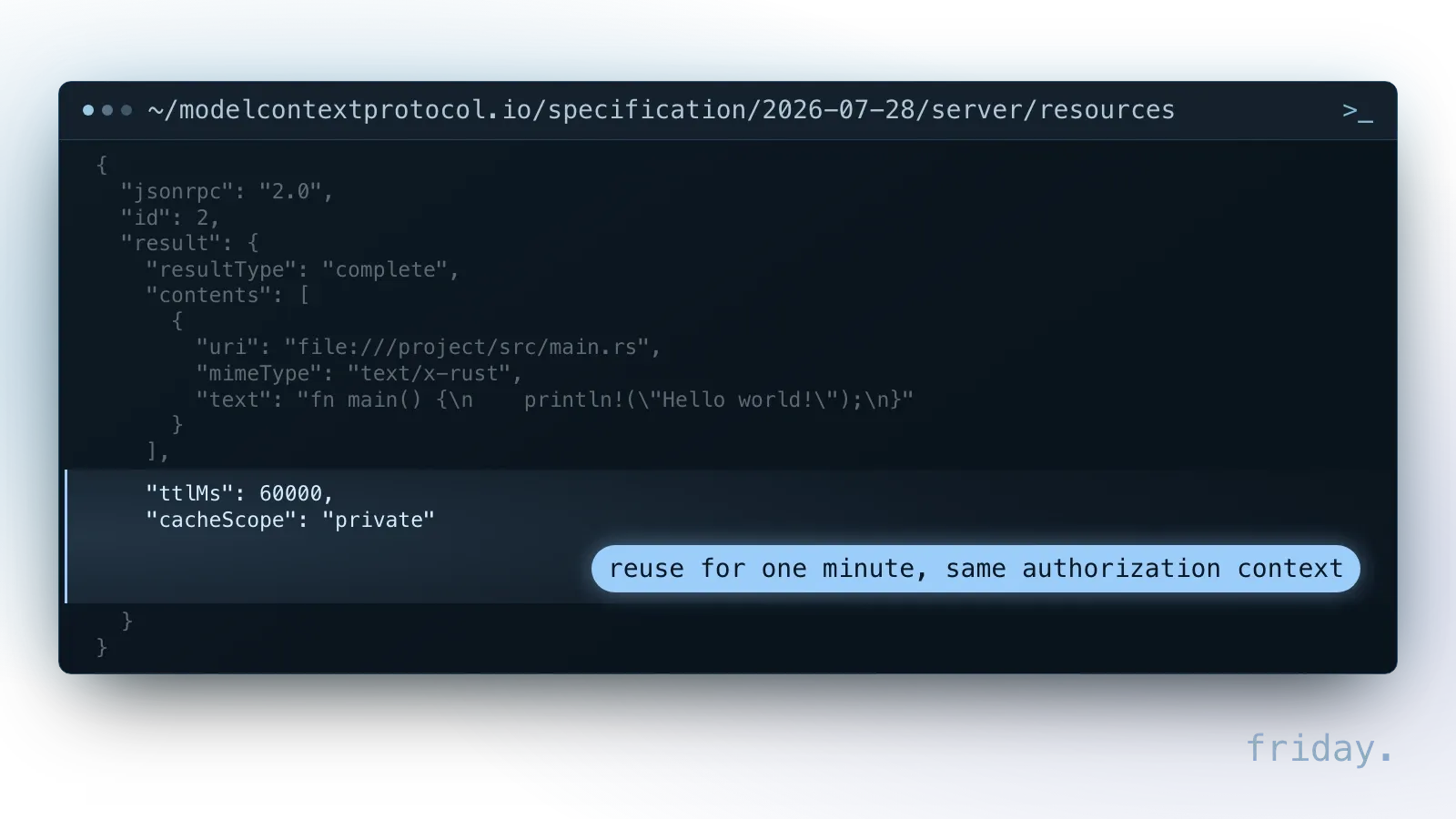
The difference from a tool is who decides. The tools specification calls tools model-controlled, while the resources specification calls resources application-driven: the AI app decides how to include them, for example in a list the user picks from or by automatic inclusion based on heuristics or the model's selection.
The caching hints shape which copy the AI reads. The specification calls the TTL a freshness hint and says servers may change the data before it expires, so a document edited on the server can reach the AI as the earlier copy until the hint runs out, unless a change notification invalidates it first. A result marked public may be stored and served to any user, so a read that depends on the signed-in person belongs under private, and servers must not rely on cacheScope alone to prevent unauthorized access.
Prompts package a task
Prompts are templates the server provides and the user explicitly selects. A prompt can take arguments, such as the ticket to summarize. The prompts specification requires implementations to validate prompt inputs and outputs to prevent injection attacks or unauthorized access to resources.
Example: one help desk server
Picture a help desk server for a four-person support team. A resource holds the refund policy for the AI app to include. A prompt named "summarize ticket" takes a ticket number that the agent picks. A read-only tool looks up a customer's open tickets, and a tool that posts a reply waits for a person's approval each time.
When a request fails
The tools specification separates two kinds of failure. Which one a server returns affects how likely the AI is to correct the request itself instead of reporting the failure to the person asking.
Protocol errors
Protocol errors cover problems with the request itself: an unknown tool, a malformed request or a server error. They come back as standard JSON-RPC errors. AI apps may pass them to the model, though the specification says these are less likely to result in successful recovery.
Tool execution errors
Tool execution errors cover failures inside the tool: an API failure, an input validation error such as a date in the wrong format, or a business rule the request broke. They come back as an ordinary result with isError set to true and a message the model can read. The specification says AI apps should pass these to the model so it can self-correct and retry with adjusted parameters.
Why the wording of an error matters
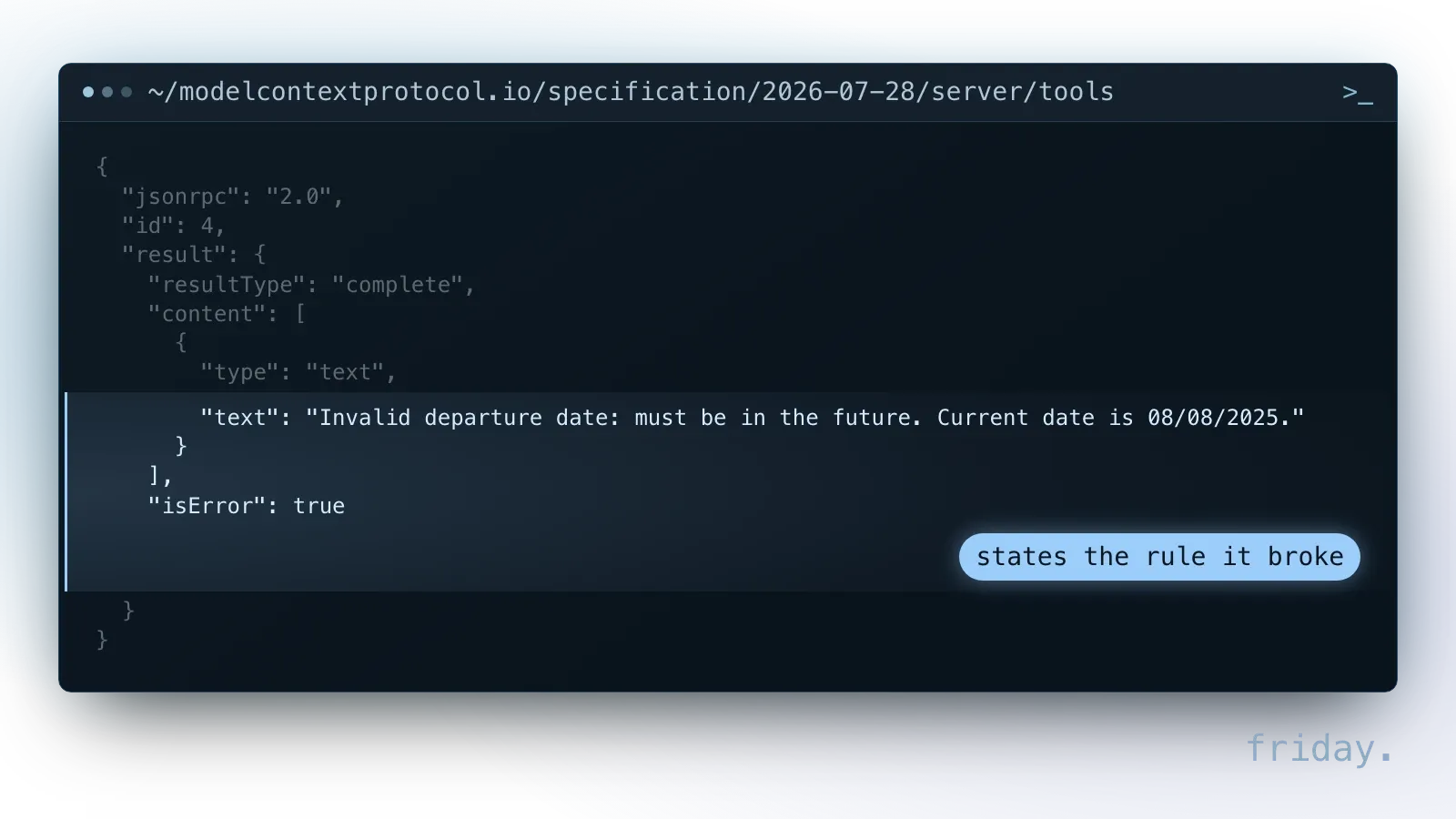
A tool execution error is only as useful as its message. The specification's own example, a result flagged isError, rejects a departure date, states the rule it broke, that the date must be in the future, and gives the current date. That lets the AI fix the input on the next try. A bare "error 500" leaves it guessing.
Local and remote servers, from the operator's side
The specification defines two standard transports. The choice decides who launches the server, who can reach it and what the person or company running it has to protect.
Local servers over stdio
With stdio, the AI app launches the server as a subprocess on the same computer and talks to it over standard input and output. The server must not write anything to that output that is not a valid MCP message, and it may write logs to a separate stream, stderr. For sign-in, the authorization specification says stdio servers should retrieve credentials from the environment, in practice a key stored on that computer.
The risk of a local install
The MCP project's security guidance warns that local servers may have direct access to the user's system, and that an attacker can hide a malicious startup command in a client configuration that then runs with the client's privileges. It requires AI apps that offer one-click local setup to show the exact command, without truncation, and to ask for explicit approval. If a setup screen shows a command you do not understand, stop there.
Remote servers over Streamable HTTP
With Streamable HTTP, the server runs as an independent process that can handle multiple client connections, and every message the AI app sends is an HTTP POST to a single endpoint, such as the /mcp path in the specification's example. The operator must validate the Origin header on all incoming connections to prevent DNS rebinding attacks, should bind only to localhost when running the server locally and should implement proper authentication for all connections. A remote server can ask each person to sign in, but someone has to host it and keep it patched.
What a well-built server does
The specification sets a short baseline for every server that offers tools. A well-built server meets it and adds narrow access, time limits and records that let you trace what happened.
The four requirements in the tools specification
The tools specification says servers must validate all tool inputs, implement proper access controls, rate limit tool invocations and sanitize tool outputs. Together they work as an acceptance test for any server, official or custom.
- Input validation stops a malformed request before it reaches your system.
- Access controls keep each person inside their own permissions.
- Rate limits keep an AI caught in a loop from hammering your CRM with repeated calls.
- Output sanitizing keeps sensitive fields and injected text from flowing back into the conversation.
Narrow scopes
Access starts with what the server asks for at sign-in. The MCP security guidance lists wildcard or omnibus scopes, such as full-access, among common mistakes. Naming one scope is not the same as asking for a narrow one: GitHub's listing for get_label, a read-only lookup, names the repo scope, which GitHub documents as full access to public and private repositories, including read and write access to code. Our MCP security post covers sign-in tokens and per-person permissions in more depth.
Timeouts and limits
A tool call that hangs ties up the conversation and, on a write action, leaves you unsure whether it ran. The tools specification asks AI apps to implement timeouts for tool calls, and OWASP's MCP Security Cheat Sheet advises resource controls such as rate limits, quotas and timeouts, applied per session or tenant to resist denial of service and limit the impact of abuse.
Logs after the deprecation
The tools specification asks AI apps to log tool usage for audit purposes. Revision 2026-07-28 deprecated the protocol's own logging feature; the documentation points stdio servers to stderr and suggests OpenTelemetry as an alternative. What a log should record is covered in our MCP security post.
Official server or custom build?
When the vendor of your tool publishes its own MCP server, start there. A custom server is worth its cost when no official one exists or when the official one cannot be narrowed to the task.
What an official server gives you
GitHub's official MCP server is one documented example. GitHub hosts a remote version and also documents a local one that runs in Docker or as a binary over stdio. The operator can turn on only some groups of tools, called toolsets, and GitHub says enabling only the toolsets you need can help the model with tool choice and reduce the context size. A read-only mode skips write tools even when the operator lists them by name in the tools setting. Look for the same two switches in any server.
When a custom server makes sense
A custom server fits when one of these is true:
- The system is internal or niche, and no official server exists.
- The official server exposes more than the task needs and has no switch to narrow it.
- The task needs a business rule in the middle, such as showing only orders from the user's own region.
- One answer needs data from several systems, combined under one set of rules.
Questions to ask a vendor or builder
Before you install a server or pay for one, get written answers on where it runs, what it can change and what it records. A server that cannot answer clearly should be treated as untrusted.
About the server
- Who publishes it, and who updates it when your tool or the specification changes?
- Which protocol revisions does it support: 2026-07-28, earlier ones, or both?
- Does it run on a laptop over stdio or remotely over Streamable HTTP, and who hosts it?
- Which tools can write, send or delete, and can they be switched off?
About access and records
- Does it act with each person's own permissions or with one shared account?
- Which scopes does it request at sign-in, and what does each one allow?
- What rate limits and timeouts does it apply?
- What does it return for a bad input, and where are its logs kept?
FAQs About MCP Servers
Older servers can still work beside newer apps, a server can call a model if its builder adds one, and the protocol keeps no memory between requests; a server that needs state keeps it itself.
What happens to a server built for an older revision?
It keeps working with AI apps that speak the same revision. A server can also support both eras: the specification lets it answer the old initialize request and modern requests on the same endpoint. A modern-only app and a legacy-only server fail to connect.
Can an MCP server call a language model itself?
Yes, if its builder adds one. Revision 2026-07-28 deprecated sampling, the feature that let a server ask the AI app for a completion, and the documentation tells servers that need completions to integrate directly with LLM provider APIs.
Does a server remember earlier requests?
Not at the protocol level. Revision 2026-07-28 has no protocol-level session. A server that needs state, such as a shopping cart, stores it itself and gives the AI an identifier to send back; a server that requires sign-in should check the caller's authorization against that identifier on every call.
Before you connect a server
An official server that passes the four requirements and can be narrowed to the task is the first choice. When none does, a custom server built to the same baseline is the alternative to price.
What a Friday connection covers
Our MCP tools and integrations page sets out what one connection includes: read and write permissions defined per action, approval steps for changes and test cases.
Get a second opinion
When a vendor has offered you a server, send us its answers to the vendor questions and we will point out what they leave out.
Last checked: November 16, 2026, against the MCP specification revision 2026-07-28 (tools, resources, prompts, caching, discovery, versioning, transports, stdio, Streamable HTTP and authorization), the MCP architecture overview and security guidance, GitHub's github-mcp-server README and OAuth scope documentation, and the OWASP MCP Security Cheat Sheet. Specifications change; check the linked pages before relying on a detail.
Technical details come from the MCP documentation, GitHub and OWASP, checked November 16, 2026.