What Is MCP? A Plain-English Guide for Small Businesses
MCP lets the AI app your team already uses reach your CRM, inbox or database through one open standard, and each connection reaches only what you allow it to.
MCP, short for Model Context Protocol, is an open standard connecting AI apps to your business tools, so an assistant can look up a record or, if allowed, act.
Anthropic introduced MCP in November 2024 and published it at modelcontextprotocol.io. What matters for an owner is what it reaches and what it may change.

What MCP does, in plain terms
MCP gives an AI app a standard way to ask another system for information or to take an action there, so the person asking no longer copies data between windows by hand.
The short definition
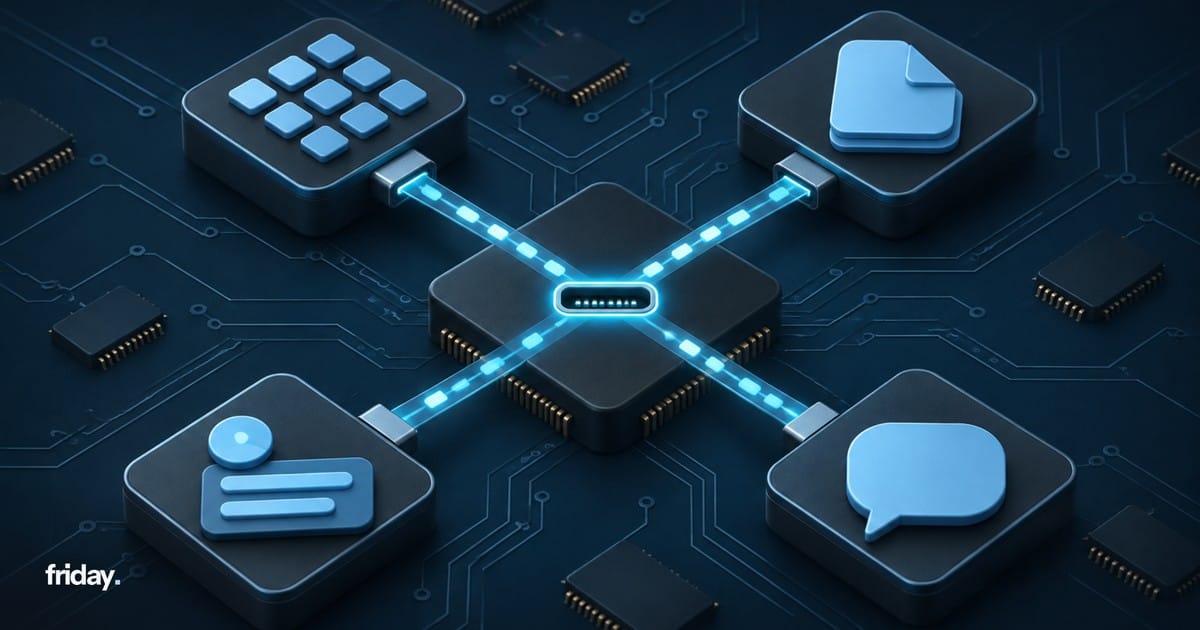
The official documentation describes MCP as an open-source standard for connecting AI applications to external systems. It compares MCP to a USB-C port for AI applications: one standard plug in place of a different cable for every device.
Example: what did we promise this customer?
Picture a sales rep who asks an AI assistant what the business last promised a customer. Without a connection, the rep opens the CRM, finds the account, copies the notes and pastes them into the chat. With an MCP connection to the CRM, the assistant can request those notes itself, answer the question and name the record it used. The rep still decides what to do with the answer and whether anything gets sent; what disappears is the copying in between.
The parts of an MCP setup
The specification names three roles and three kinds of capability. You do not need to build any of them, but knowing the names makes vendor answers and setup screens easier to read.
Host, client and server
The MCP architecture page lists three participants. The host is the AI application your team uses, such as Claude or a coding tool. The server is a program that provides context, for example the data and actions of your CRM. The client sits inside the host and keeps the connection to one server: the host creates one MCP client for each MCP server it connects to. An assistant connected to your CRM and your calendar holds two separate connections, each added or removed on its own.
Tools, resources and prompts
A server can offer three building blocks. Tools are functions the AI model can call, such as creating a task or sending a message, and the documentation names the model as the one that decides when to use them. Resources are read-only data such as file contents or a database schema, and the AI application decides how to use them. Prompts are pre-built instruction templates that the user picks, in some apps through a slash command.
A resource only informs the answer. A tool can change something in your business, which is why the documentation notes that tools may require user consent prior to execution.
How the model chooses a tool
When an AI app connects, it asks each server for its list of tools, and the model reads each tool's description to decide which one fits a request. The specification calls that request tools/list, and each tool in the answer has a name, a description and an input schema that sets the details it needs.
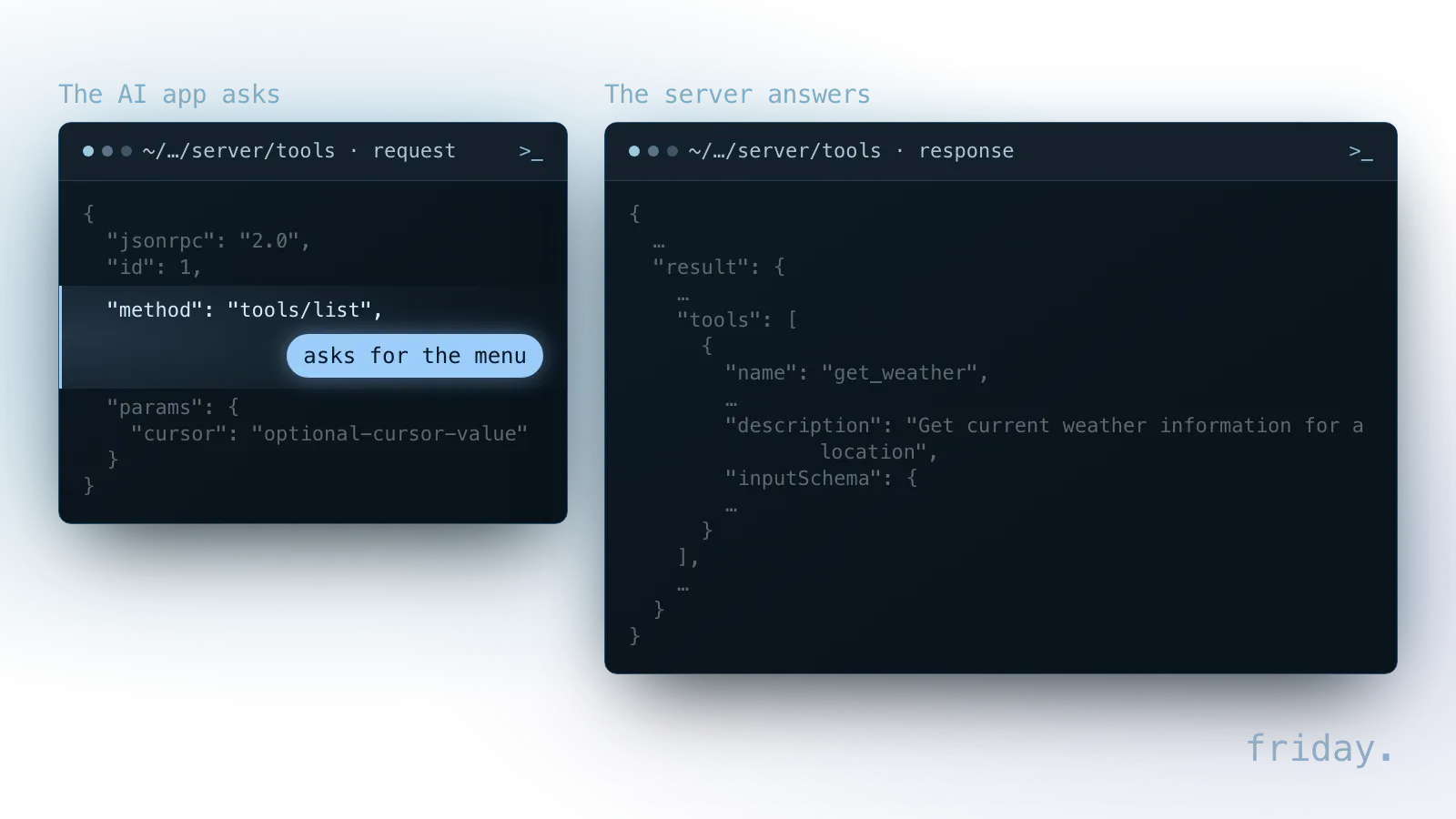
That makes the descriptions part of the risk: the OWASP MCP Security Cheat Sheet lists tool poisoning, malicious instructions hidden in tool descriptions, parameter schemas or return values, as a key risk. Who publishes a server matters as much as what it offers.
Why a shared standard matters
Before MCP, each pairing of an AI app and a business tool needed its own integration. A shared protocol lets one server work with every AI app that supports the same transport, version and features.
One server, several AI apps
Without a standard, five tools and two AI apps could mean ten separate integrations, each maintained on its own. With MCP, one server can work with any host that supports the same transport, protocol revision and features, and the official documentation sums this up as build once and integrate everywhere.
Your connection to the CRM is less tied to one AI product: switching assistants can reuse the same server if the new assistant reaches it the same way, local or remote, and supports custom MCP on your plan. And when a software vendor publishes an official server, you benefit from integration work you did not pay for.
Where MCP shows up in Claude and ChatGPT
In Claude, MCP connections appear as connectors. Anthropic's help center says connectors let Claude access your apps and services, retrieve your data, and take actions within connected services, and that you can also connect to any service that supports MCP.
In ChatGPT, OpenAI's help center says apps connect ChatGPT to services you already use, such as Google Drive or Slack. For servers you add yourself, the same help center says custom MCP server connections and full MCP support are available for ChatGPT Business and Enterprise/Edu customers on ChatGPT web.
Who maintains MCP
MCP is now hosted by a foundation rather than by Anthropic alone. On December 9, 2025, Anthropic announced it was donating MCP to the Agentic AI Foundation, a directed fund under the Linux Foundation co-founded by Anthropic, Block and OpenAI. The Linux Foundation describes the foundation as a neutral, open foundation for agentic AI.
How widely MCP is used
One public measure is the official TypeScript SDK, one of the code libraries developers use to build MCP servers and clients. The npm registry recorded 102,851 downloads of it in December 2024, 33.8 million in October 2025 and 295.6 million in October 2026.
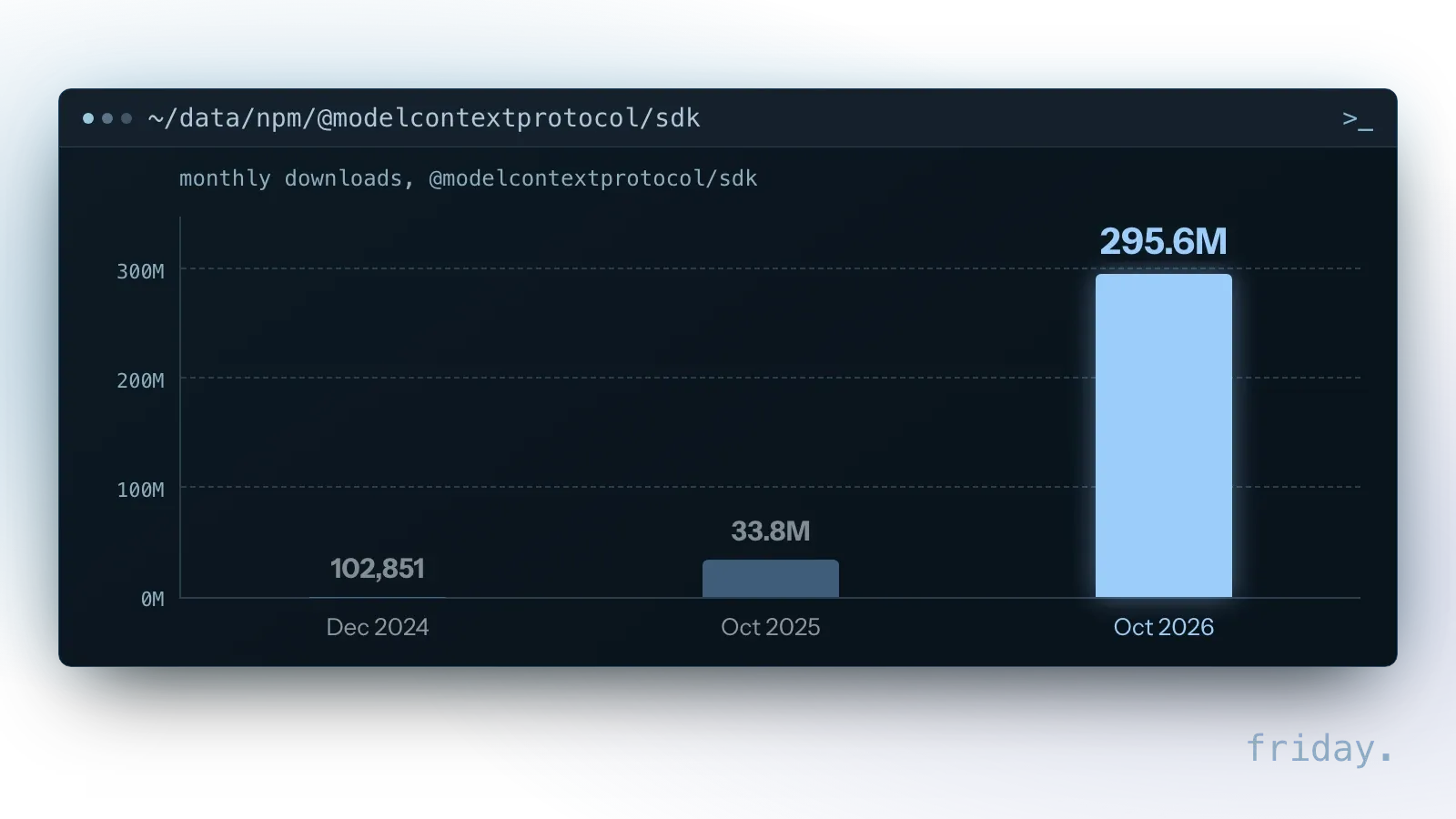
npm counts every package file it serves, including automated build servers and mirrors, and says its numbers are not the same as the number of users. They are a rough sign of developer interest and say nothing direct about how many businesses use MCP.
In its December 9, 2025 announcement, Anthropic reported more than 10,000 active public MCP servers and said MCP had been adopted by ChatGPT, Cursor, Gemini, Microsoft Copilot and Visual Studio Code, among other AI products. Those figures are Anthropic's, as of December 2025; Friday has not checked them independently.
Local and remote servers
The specification defines two standard ways for an AI app and a server to talk. The choice changes who installs the server, where it runs and how each person signs in to the system behind it.
Local servers
With the stdio transport, the AI app starts the server as a program on the same computer. A local server can be tried without hosting anything and can reach files on that machine, but it has to be installed and kept current on every computer that uses it, and the specification says it should retrieve credentials from the environment.
Remote servers
With Streamable HTTP, each message is an HTTP POST to a single MCP endpoint, so the server can run in a vendor's cloud or on your own infrastructure. A remote server does not need installing on each computer, can ask each person to sign in with their own account, and, where the vendor offers admin controls, can have access removed for someone who leaves. Claude, for example, connects to a remote MCP server from Anthropic's cloud infrastructure rather than from your device, so that server must be reachable over the public internet.
| Question | Local (stdio) | Remote (Streamable HTTP) |
|---|---|---|
| How the AI app reaches it | The AI app starts the server as a program on the same computer | Each message is an HTTP POST to a single MCP endpoint |
| Where it runs | On each computer that uses it | In a vendor's cloud or on your own infrastructure |
| Installing and updating | Installed and kept current on every computer that uses it | No install on each computer |
| Credentials | Retrieved from the environment | Each person can sign in with their own account |
How sign-in works
Authorization is optional in the specification, but HTTP-based servers that support it should follow its authorization rules, which are based on OAuth 2.1. Anthropic's help center says that when you add a remote connector, you'll typically go through an OAuth authentication process to securely sign in to the application. The specification also requires a server to check that each access token was issued specifically for it; our MCP security post covers how to review sign-in and permissions in more depth.
How to find and vet a server
A server is software that acts inside your business systems, so where it comes from matters. Start with official listings, then check who publishes the server and what it is allowed to do.
The official MCP Registry
The MCP project runs an official registry, which it describes as the official centralized metadata repository for publicly accessible MCP servers. It is currently in preview. It ties each server name to a verified GitHub account or domain, and its maintainers can remove spam or malicious listings. It does not scan server code, so a listing confirms who published a server. Safety checks are left to package registries and marketplaces.
Questions to ask before you connect
A connection gives an AI app reach into your business. Treat it like giving a new employee a login: decide what they need for the job and nothing more.
- Which task is this for? A named task keeps the scope small and makes the result testable.
- Read only, or read and write? Reading informs answers. Writing changes records and adds risk.
- Whose login does it use? Each person's own account, with that person's access, never a shared admin login.
- Which actions need approval? Sending, paying and deleting should wait for a person.
What OWASP adds
OWASP's guidance backs those questions. It says to grant each MCP server the minimum permissions needed for its function, to install servers only from trusted, verified sources and to log every tool invocation, so a wrong action can be traced to the server and person behind it.
When a server asks you for information
If the AI app supports it, a server can pause a task to ask the person using the AI app for details, a step the specification calls elicitation. The request carries a message saying what is needed and why, and the reply comes back as accept with the answer, decline or cancel.
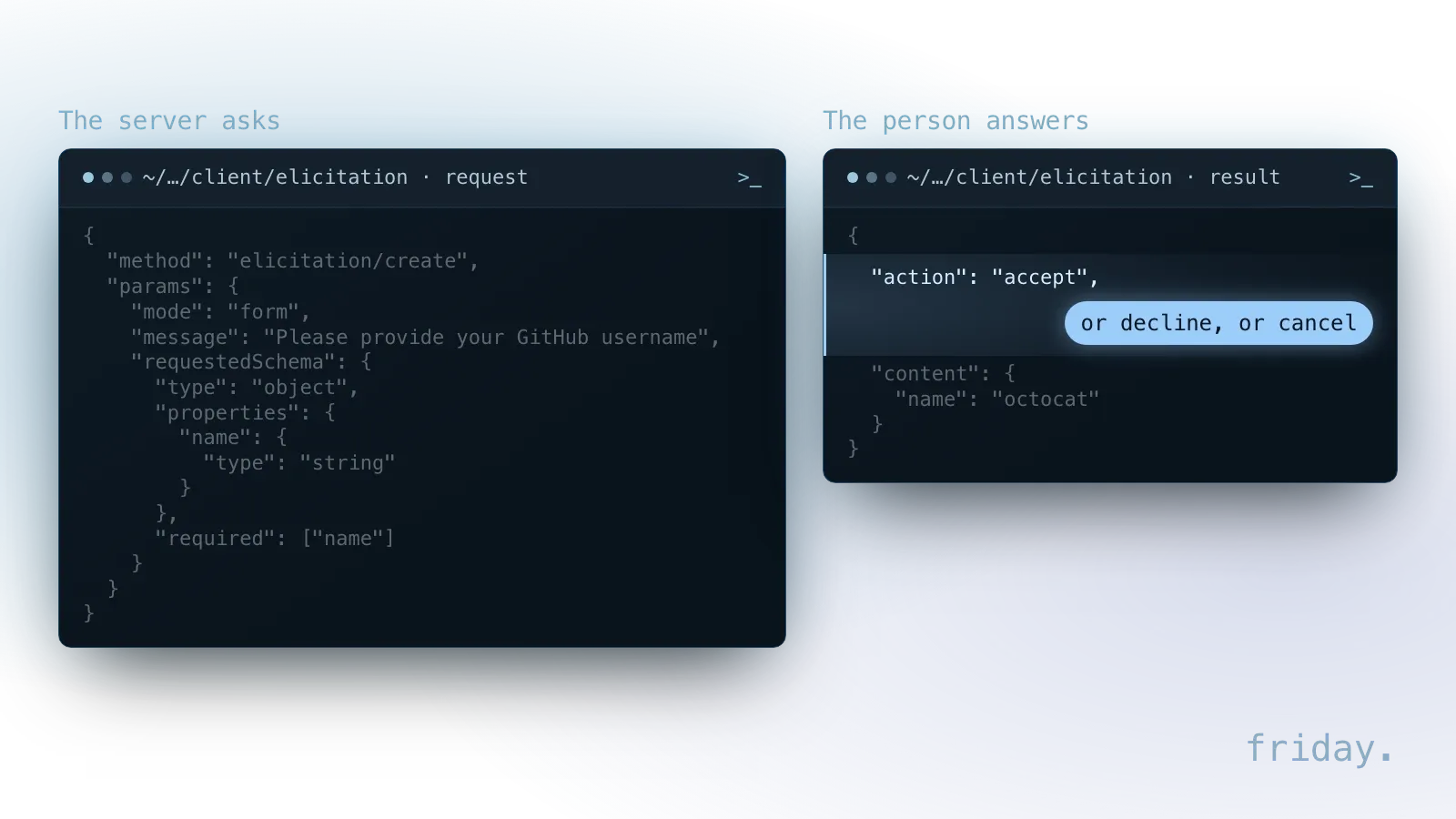
The specification requires the AI app to make clear which server is asking and to offer clear decline and cancel options. Servers must not use a form to request passwords, API keys, access tokens or payment credentials; those go through a web page the app opens only after you consent. A server whose form asks for a password breaks that rule, which is a reason not to connect it.
When MCP is worth using
MCP earns its place when a person keeps moving information between an AI app and another system by hand. It fits conversational work, where the next step depends on what someone asks.
Good signs
Look for these signs before you plan a first connection:
- Your team asks the AI app the same kind of question several times a day, and the answer lives in one tool.
- Copying data into the chat is slow, error-prone or exposes more information than the task needs.
- A vendor offers an official server for the tool, or the tool has a stable API to build on.
When a workflow fits better
MCP is less useful when the work is a fixed, scheduled process with no conversation involved. A nightly sync between two systems runs the same steps every time and has no question to answer, so a scheduled workflow built for that process fits it better.
Example: a bookkeeping question
Picture a three-person bookkeeping office whose owner asks an AI app, several times a week, which client invoices are past due. A read-only connection to the accounting tool answers that question in the chat. Whether the AI app may also send reminder emails is a separate decision for later.
What MCP does not do
A standard connection solves the plumbing between an AI app and a system. Accuracy, access and long-term maintenance remain decisions that someone in the business has to make and check.
It does not make answers correct
MCP is a way to connect, not a guarantee of good answers. The architecture page states that MCP focuses solely on the protocol for context exchange and does not dictate how AI applications use language models or manage the context they receive. A connection can still return the wrong record when a request is ambiguous, so test each new connection before relying on it.
It does not grant access by itself
A connection reaches only what its credentials allow. For a remote server, that is the account a person signed in with and the scopes they approved; for a local server, it is the credentials stored on that computer.
The specification keeps changing
The specification is versioned by date. Each version identifier follows a YYYY-MM-DD format that marks the last date backwards incompatible changes were made, and the current version is 2026-07-28. Clients and servers may support several versions at once, and the specification describes how newer software works with servers built for the 2025-11-25 revision and earlier.
That is a practical reason to ask who maintains a server: a connection built against an older revision can need work when your AI app moves to a newer one, and a server that nobody updates becomes a risk to the systems it reaches.
What MCP costs
The protocol itself is an open-source standard, so there is no license fee. The costs sit around it: the AI app and its plan, the connected tool's plan, and the time for setup and upkeep.
The AI app and its plan
What you pay for is the AI app and the plan it runs on, and plans gate MCP features. In Claude, custom connectors are available on every plan Anthropic lists, from Free to Enterprise, with Free users limited to one. In ChatGPT, custom MCP server connections are listed for Business and Enterprise/Edu customers on the web, and OpenAI says app use may count toward your ChatGPT plan limits.
The connected tool and the build
The connected tool may need a plan that includes API access, and a custom server has to be built and hosted by someone, which the protocol does not do for you.
Your first MCP connection, step by step
A first connection should be small enough to test with one real question and easy to switch off. Steps 2 and 3 follow Anthropic's and OpenAI's help centers; the rest is our advice.
1. Pick one task and one system
Write down one question your team asks the AI app repeatedly and the system that holds the answer. One task and one system give you a clear test: the answer comes back right or it does not.
2. Find the official connector or server
Check your AI app's own directory first. In Claude, go to Customize, then Connectors, and select the plus button to browse. In ChatGPT, OpenAI's steps start at Settings, then Plugins, where you select the app or the plugin that includes it. If the tool's vendor lists an official server, confirm the publisher in the MCP Registry or in the vendor's own documentation.
3. Connect with the narrowest access
Approve only the access the task needs, following the questions above. For a custom server, Anthropic advises connecting Claude only to servers built and hosted by organizations and applications you trust, and it asks for the server URL exactly as the provider documents it.
4. Test with a real request
Ask the question from step one and compare the answer with the record in the system itself. Then try an ambiguous version of the same question and see whether the AI app picks the right record or asks which one you mean.
5. Decide on write actions last
Only after reads behave as expected, decide which actions the connection may take and which need approval each time, and disconnect the server if the test account should not stay connected.
FAQs About MCP
Anyone can connect a listed service, an agent is a separate layer from MCP, and customer data safety depends on the AI app, the server operator and each connection's permissions.
Is MCP only for developers?
No. Claude and ChatGPT both let people connect listed services from their settings, much like authorizing an app. Custom connections to internal systems still need development work, because someone has to build and host the server.
Is MCP the same as an AI agent?
No. MCP is the connection. An agent is an AI app that carries out a multi-step task, and it can use MCP connections to reach the systems that task touches.
Is MCP safe to use with customer data?
It depends on more than the protocol: the AI app's plan and its data terms, who runs the server, and whether each connection has narrow permissions, uses each person's own access and asks approval before changing data. If any of those is unclear, keep customer data out.
Where to go from here
A first read-only connection, tested with a real question, shows whether MCP is worth more of your time. When the system you need has no server yet, a custom one is an option.
Plan a first connection
See what a first connection includes on our MCP tools and integrations page, including what happens when the tool has no official server.
Talk it through
Tell us about the task, and we will say whether MCP fits or a simpler option would do.
Last checked: November 16, 2026, against the MCP documentation (introduction, architecture, server concepts, SDKs, tools, elicitation, transports, authorization, versioning and the MCP Registry), the npm registry's download counts for the TypeScript SDK, Anthropic's November 2024 and December 2025 announcements, the Linux Foundation's Agentic AI Foundation announcement, Anthropic's and OpenAI's help centers and the OWASP MCP Security Cheat Sheet. Specifications and plans change; check the linked pages before relying on a detail.
Technical details come from the MCP documentation, npm, Anthropic, OpenAI, the Linux Foundation and OWASP, checked November 16, 2026.