
Microsoft Outage: What Broke in Exchange Online and Why
Exchange Online failed on November 12, 2026, and Microsoft said all customers were restored a day and a half later. What broke and what a small business can do.
The timeline comes from Microsoft's status posts on X, its statements and what news outlets confirmed. Claims that circled online without a source are left out.
The second half is for owners on Microsoft 365: how to follow an incident when the admin center is down, what the SLA terms say and a short continuity plan.
November 12: the Microsoft outage hits Exchange Online
The Microsoft outage started on Thursday, November 12, when users in the Americas could not open Exchange Online mailboxes. Microsoft said all customers were restored early Saturday, November 14.
The first status post
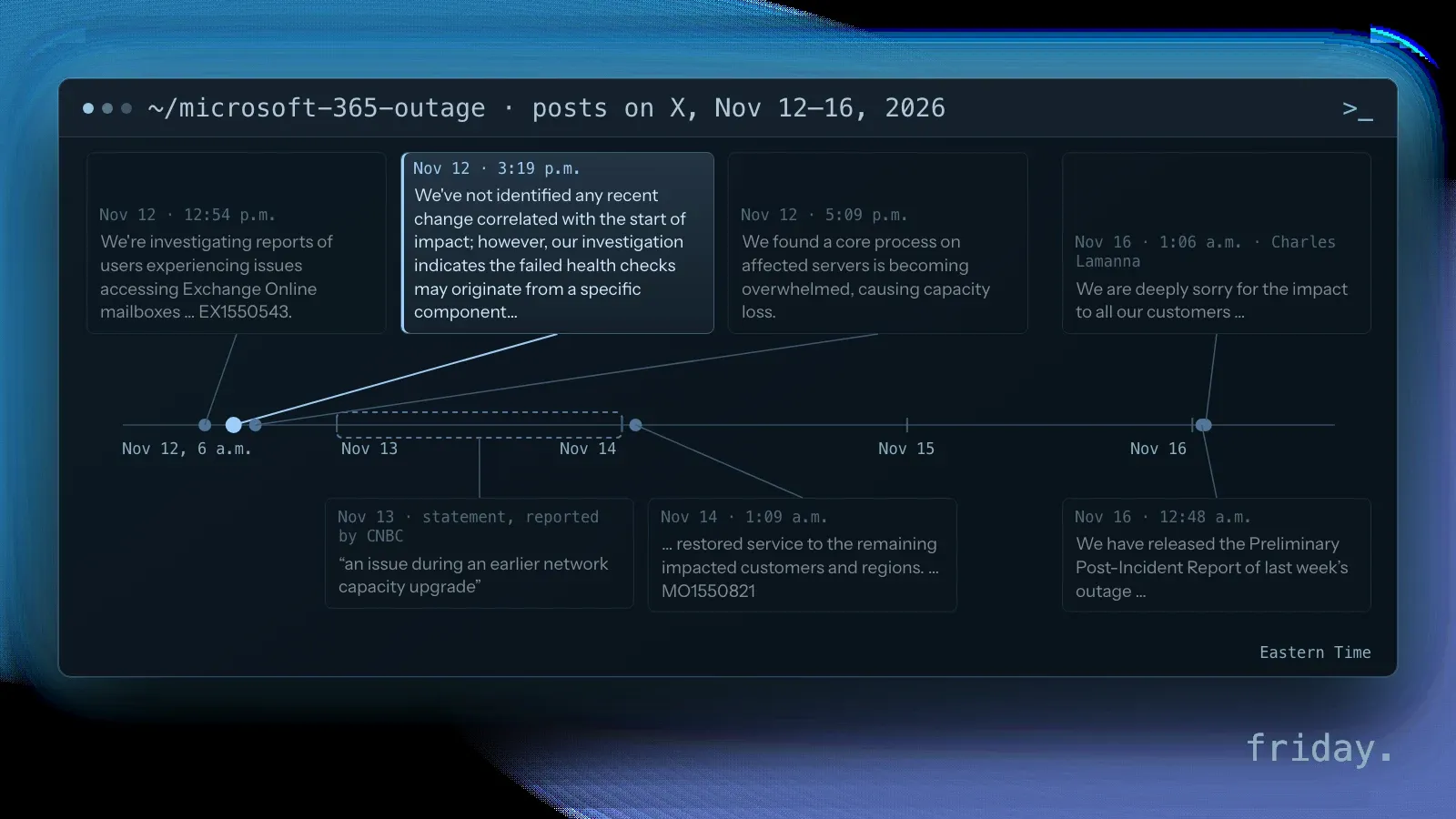
Microsoft's status account posted at 12:54 p.m. ET that it was investigating mailbox access problems "through multiple connection methods in the Americas," under incident EX1550543 in the Microsoft 365 admin center. CNBC reported that the connectivity problems began shortly before 1 p.m. ET.
We're investigating reports of users experiencing issues accessing Exchange Online mailboxes through multiple connection methods in the Americas. More details can be found in the Microsoft 365 admin center under EX1550543.
How far the Microsoft 365 outage spread
The Associated Press reported that Outlook, Teams and Copilot were interrupted, and that Downdetector received outage reports from 74 countries and territories within an hour. The AP also reported that on Thursday Microsoft said it had "successfully restored" Teams in North America, while some users still reported connectivity issues. Al Jazeera reported that Teams chats and calls had "largely continued working" and that the desktop version of Outlook could still show emails already downloaded. The AP's list included Copilot, so the AI assistant inside the suite was not a way around the outage.
CNN reported an estimate from Anderson Economic Group, a Michigan think tank, that the Microsoft 365 outage could cost $7 billion in lost productivity. It also reported that small businesses scrambled for other ways to communicate and that local governments asked residents to call instead of email.
Why the Microsoft outage lasted a day and a half
Through Thursday afternoon, Microsoft's own posts show the diagnosis changing as fixes failed. Read in order, they explain why a Microsoft outage that began as a mailbox problem took so long to clear.
Health checks, then an overwhelmed process
At 3:19 p.m. ET on the first day, Microsoft said it had "not identified any recent change correlated with the start of impact," and that failed health checks might come from a component that processes server health. Less than two hours later it posted that "a core process on affected servers is becoming overwhelmed, causing capacity loss," and that its actions so far "have not provided the anticipated relief."
Why restarts did not end it
In plain terms, servers that fail a health check are taken out of rotation, and the remaining servers take their traffic. When enough of them drop out at once, the rest can be overloaded too, which matches Microsoft's description of capacity loss. Servers brought back face the same waiting traffic, which may explain why the Microsoft outage took so long to clear.
At 1:09 a.m. ET on November 14, about 36 hours after its first post, Microsoft's status account said it had "restored service to the remaining impacted customers and regions," with follow-up under a second incident number, MO1550821. CNBC reported Microsoft said on Saturday that service had been restored across products.
Microsoft's explanation, and what is still missing
By Friday, Microsoft had moved from "no recent change" to a named cause. A full report is still to come, and Microsoft and federal officials both ruled out the explanations that spread fastest online.
An earlier network capacity upgrade
On Friday, November 13, Microsoft said in a statement reported by CNBC that the disruption stemmed from "an issue during an earlier network capacity upgrade." A Microsoft spokesperson told CNBC: "We are deeply sorry for the disruption this incident has caused our customers and partners." On November 16, Microsoft's status account said the preliminary post-incident report was available in the admin center under MO1550821 and EX1550543, and Microsoft executive Charles Lamanna posted an abridged root-cause summary of the Microsoft 365 outage on X with an apology to customers. Microsoft has not said publicly what the upgrade changed; that detail belongs in the final post-incident report, which Microsoft said would follow the preliminary one.
Not a cyberattack, and not the FAA
The AP reported Microsoft said the outage was not related to a cyberattack or AI agents, and Al Jazeera quoted Charles Lamanna saying there was "no indication" of malicious or cyber activity. On Friday, November 13, the FAA halted departures nationwide; Government Executive reported that officials said there was no indication of a cyberattack or of any relation to the Microsoft outage earlier in the week.
What Microsoft's SLA does and does not cover
For an owner, the first practical question after a Microsoft outage is money. Microsoft's service level agreement can owe customers a credit, and eligibility depends on its terms.
What a credit request needs
Microsoft's Partner Center guide, written for resellers that request credits for their customers, says SLA credits "are determined based on which services were affected." A request needs the customer's tenant ID and the outage ID from the Service Health Dashboard; for this incident, EX1550543 or MO1550821. For most services, the guide says requests must be submitted "within one month from the end of the billing month in which the incident occurred."
Advisory incidents and your own losses
The same guide says advisory incidents "aren't typically eligible for SLA credits." Whether your tenant qualifies depends on the terms in Microsoft's Service Level Agreements for Online Services; if you buy through a reseller, ask them to file. In Friday's view, read the SLA as Microsoft's commitment about its own service fee; missed orders and unanswered customers are yours to plan for.
A continuity plan for the next Outlook outage
The rest is preparation. For a small business on Microsoft 365, a continuity plan covers how to follow an Outlook outage, which parts of the business to own outright and where customers can reach you.
Follow an Outlook outage without the admin center
Microsoft Learn says Service health sits under Health in the admin center, and that admins can choose Customize, then Email, to get notifications of new incidents, such as an Outlook outage, and of status changes. It also says the Microsoft 365 Admin app shows Service health with push notifications.
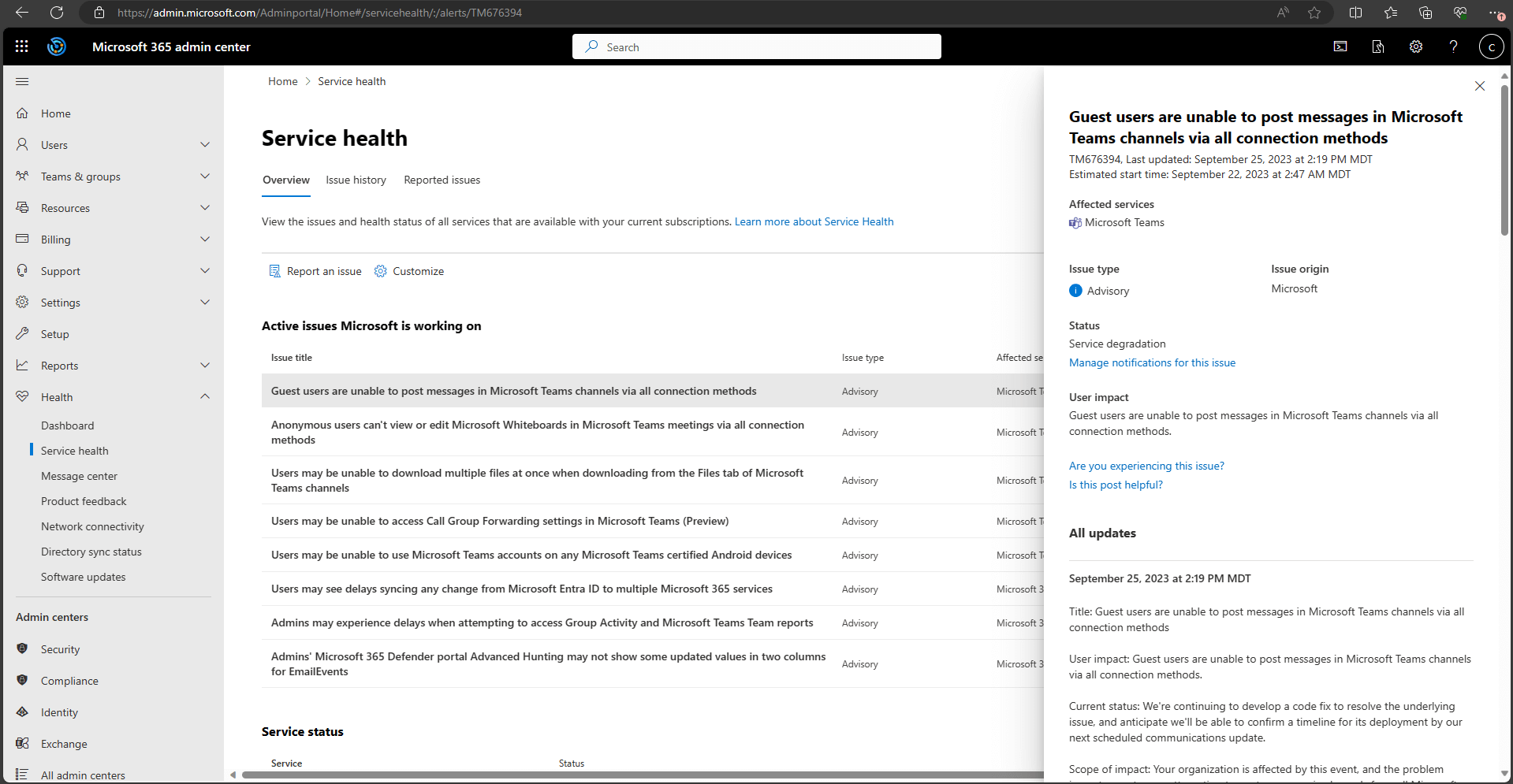
If you cannot sign in, Microsoft says "you can use the service status page to check for known issues." Its Service health guide covers both. Microsoft's status account on X carried the updates during this Outlook outage. Save both before you need them, and make sure at least two people can reach them from a phone.
Own the parts you cannot rent back
Friday's view: keep your domain and DNS in an account you control, outside the suite and outside any agency's login. With DNS in your hands you can point mail elsewhere in an emergency. Keep offline copies of the files you would need for a day like the Microsoft outage, such as price lists, client contacts and open orders.
A second channel your customers know
In Friday's view, when mail, chat and calendar sit in one suite, plan for a day when they fail together. Pick one channel outside it, such as a phone line, a text service or a status note on your website, and tell regular customers where to look. Even a text from the owner's phone to the customers expecting a delivery that day counts as a plan. Write the plan down while the Microsoft 365 outage is fresh, and test it once.
Scalability is not resilience
In Friday's view, a suite that bundles mail, chat and an AI assistant scales neatly and can fail as one. Workflows that move orders or leads can keep a copy of their records outside the suite, so a workflow that connects your tools can keep working when one vendor is down. Our guide to AI workflow error handling covers retries and fallbacks for that case.
Plan for the day the suite goes dark
The Microsoft outage showed that one vendor can stop email and interrupt chat for about a day and a half. The fix for a small business is a short plan, written before the next incident.
Before the next Microsoft 365 outage, set up Service health email alerts, save the status page, and move your domain to an account you control. If your tenant was affected and the SLA terms apply, file the credit request with the incident ID before the deadline. If you want help keeping a key workflow running through the next Microsoft outage, tell us which tools your business relies on.
Last checked: November 18, 2026, against Microsoft 365 Status posts on X, Microsoft Learn, Microsoft's Partner Center credit guide and SLA page, and reporting by the AP, CNBC, CNN, Al Jazeera and Government Executive.
Timeline and statements come from Microsoft's own posts and from news reports, checked November 18, 2026. The final post-incident report was not yet public. Friday has no relationship with Microsoft. Statements marked as Friday's view are opinion.