
AI Workflow Error Handling: Retries, Fallbacks and Recovery
A plan for when an AI workflow fails: which errors to retry, how long to wait, how to stop duplicate sends and when to hand the item to a person on your team.
AI workflows can fail through timeouts, rate limits, badly formatted answers and confident wrong answers, and each of those four failures needs its own fix.
The goal: no input gets lost, no bad output reaches a customer and the right person hears about it, through error codes, retry caps, holding queues and alerts.

Classify the failure first
Before a workflow decides whether to retry, it needs to know what kind of failure it hit, because a retry clears a timeout and does nothing for a missing field or a wrong answer.
Five failure types and the first response
Retrying is the right first move for only one of these five types.
| Failure | Example | First response |
|---|---|---|
| Temporary | Timeout, rate limit, service briefly down | Retry with a delay |
| Bad input | Missing field, unreadable attachment | Stop and ask for the missing information |
| Bad output | Wrong format, missing required section | Validate, then retry once or escalate |
| Wrong answer | Plausible but incorrect content | Catch with checks or review; do not retry blindly |
| Permanent | Revoked access, deleted record | Stop, alert the owner |
Why a wrong answer is the hard case
A timeout announces itself. A plausible reply with the wrong total does not: the step reports success and the next step builds on it. The AWS Well-Architected Generative AI Lens asks builders of multi-step prompt flows to check that each prompt contains the expected information and that the model responds with expected content. Those checks turn a silent wrong answer into a visible failure.
Decide what counts as done
The same AWS guidance suggests classifying responses from external systems as actionable or not. An actionable response is one you anticipated, such as a database query that returns at least one result; an error code or an empty response goes to error handling.
Retry with limits
Retries suit temporary failures and cause harm everywhere else. Three settings keep them safe: a cap on attempts, a wait that grows between attempts and one layer that owns the retrying.
Cap the attempts
Amazon's Builders' Library calls retries "selfish": a client that retries spends more of the server's time to raise its own chance of success. When a service is struggling, every extra attempt adds to the load it is already failing under. Amazon's article says that in almost all cases its solution is to limit the number of times a client retries. Anthropic's official SDK retries transient failures twice by default.
Wait longer each time
Google Cloud's page on exponential backoff for Memorystore gives a worked schedule: after a failure, wait 1 second plus a random number of milliseconds up to 1,000, then 2 seconds plus a new random amount, then 4, doubling up to a maximum backoff that the page says is typically 32 or 64 seconds. After that, the client keeps retrying at the capped interval up to a maximum number of retries, then logs an error. The random part matters: without it, clients that failed at the same moment retry at the same moment, in synchronized waves.
Count the retries at every layer
Amazon's Builders' Library article on timeouts, retries and backoff describes a call that passes through five layers of services to a database, with three retries at each layer; the retries multiply, first three tries, then nine (by our count, then 27 and 81), until the database carries 243 times the load, which makes it unlikely to ever recover.
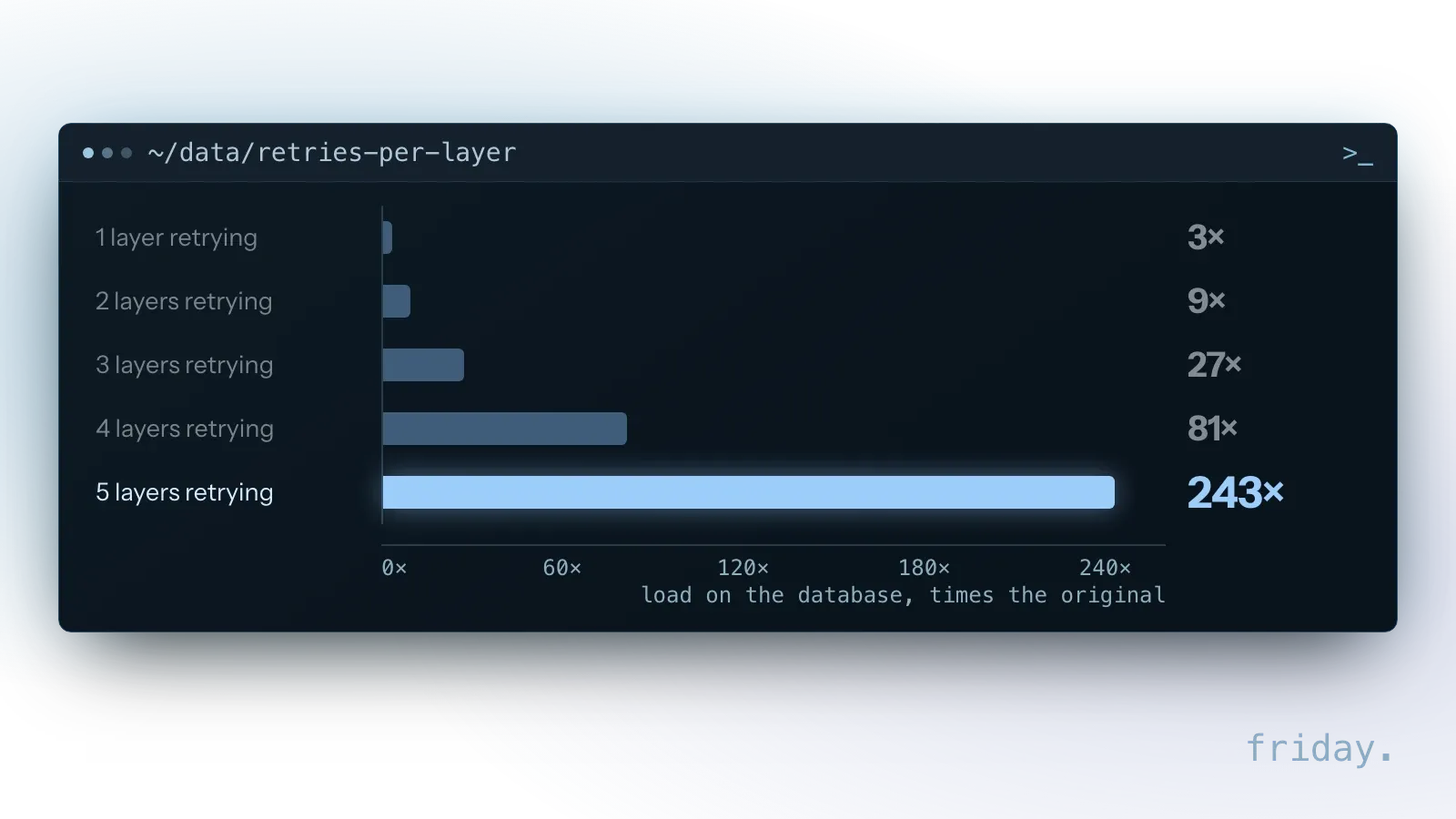
A small-business workflow has layers too: the automation platform, the connector inside a step and the provider's SDK. If the platform makes three attempts and the SDK makes up to three requests inside each one (the first plus two default retries), one failing step sends nine requests. Set the limit in one layer and turn the others down; Anthropic's SDK accepts a max_retries setting for that.
Read the error before you retry
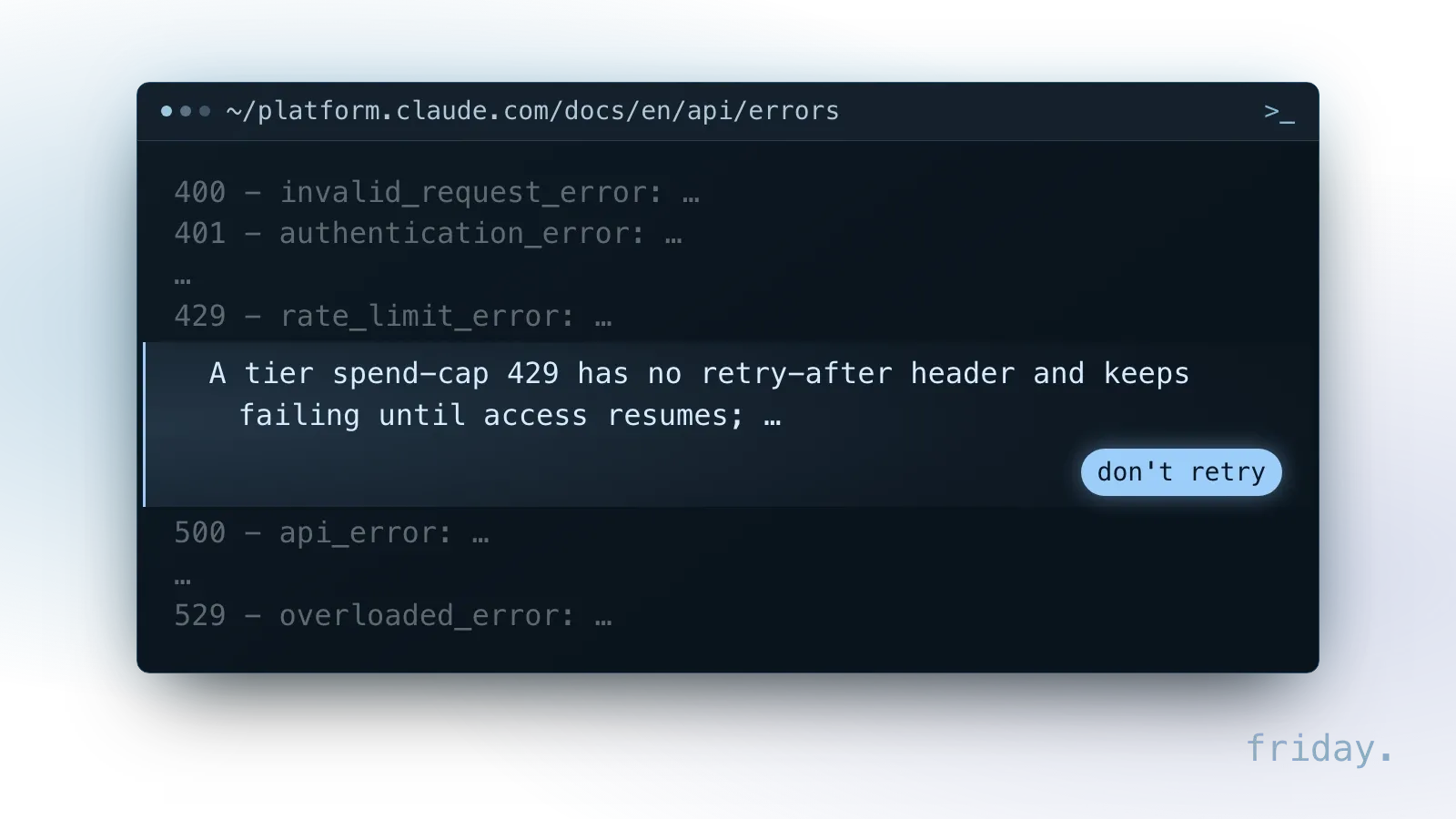
Provider errors say whether waiting will help. Anthropic's Claude API error reference separates codes to retry with backoff from codes that need a fix, and one 429 that does not clear.
What each status code asks of you
- 429 (rate limit): your organization hit a rate limit or a spend cap. Anthropic notes that a 429 caused by reaching the usage tier's monthly spend cap has no retry-after header and keeps failing until access resumes, so retrying it only fills your logs.
- 500 (internal error): retry with exponential backoff. If it persists, contact support with the request ID.
- 529 (overloaded): the API is temporarily overloaded. Wait and retry, or switch to a fallback.
- 504 (timeout): the request timed out while processing. For long requests, Anthropic points to streaming or the Message Batches API.
- 400, 401, 403: a problem with the request, the key or permissions. Sending the same request again will not help; fix it or alert the owner. Anthropic also returns a 400 when usage reaches a spend limit you set yourself.
What the response says about waiting
Anthropic's rate limits page lists the headers that come back with a response. The retry-after header gives the number of seconds to wait before retrying, and the page warns that earlier retries might fail. Headers such as anthropic-ratelimit-requests-remaining show how much room is left, so a workflow can slow down before it hits the limit.
Two 429s look alike and need different handling. When the monthly spend cap is reached, usage pauses until 00:00 UTC on the first day of the next month, and the error carries the code enforced_spend_limit_reached. A sharp jump in usage can trigger a ramp limit, with the code ramp_limit_exceeded, even under your rate limits; Anthropic advises starting scheduled or bulk jobs at a low rate.
Keep the request ID
Every Claude API response includes a unique request-id header, and error bodies repeat it as request_id. Store it with the failed item: when a 500 persists, Anthropic asks you to include that ID when you contact support.
Make repeats harmless with idempotency keys
A retry does harm when the first attempt worked but its confirmation got lost. The workflow tries again, and the customer gets two emails, two invoices or two charges.
How an idempotency key works
The fix is to make the action idempotent: doing it twice has the same effect as doing it once. Stripe's documentation on idempotent requests shows the pattern. The client sends a unique key with the request. For API v1, Stripe saves the status code and body of the first request made with that key, and retries with the same key return the saved response, including 500 errors. Keys can be removed once they are at least 24 hours old, and a reused key with different parameters returns an error.
Generate the key once per item
The key only works if every retry sends the same one. Create it when the item enters the workflow, store it with the item and reuse it on each attempt; a new key per attempt makes each retry look like a new request. Stripe suggests V4 UUIDs or another random string, and warns against using email addresses or other personal identifiers as keys. Amazon's Builders' Library states its general view: APIs with side effects are not safe to retry unless they provide idempotency.
When a tool has no key
Where a tool offers no such feature, build the check yourself. Before sending, look up whether a message for this item's ID already went out. Before creating a record, search for one with the same reference. It costs one extra lookup and saves an awkward apology.
Fall back to something reliable
When retries run out, the workflow needs a next step that still works. A simpler model, a template reply or a person can each serve as the fallback; the right choice depends on what the step produces.
Match the fallback to the step
Prefer a reliable fallback over a clever one. The AWS Generative AI Lens advises a defined fallback action for when relevant data is missing, and lists fallback prompt templates among its recovery mechanisms.
| Step | Fallback | What the customer sees |
|---|---|---|
| Drafting a reply | Template acknowledgment, item to the review queue | A short confirmation that a person will follow up |
| Pulling data from a document | Hold the item for a person to key in | Nothing until the record is right |
| Sorting or routing | Default route to "needs review" | Nothing; a person picks the route |
| Updating a record | Stop and alert the owner | Nothing; no partial update goes out |
Use a second model with care
A backup model can work, but test it on your real inputs first. It may format answers differently, so its output goes through the same validation.
Pause calls to a service that keeps failing
The AWS lens also lists circuit breakers among its recovery mechanisms. In plain terms: after a set number of failures in a row, stop calling the service for a while, send new items straight to the fallback, then try one call to see whether it has recovered.
Validate outputs before they move on
Some AI failures do not look like errors at all. The model returns an answer with the wrong shape or a wrong number, so each output gets checked before the next step relies on it.
Checks for shape, range and rules
- Does it have the required fields and format?
- Are numbers within a sensible range?
- Does it reference only records that exist?
- Did it follow the rules, such as "never offer a discount over 10%"?
What structured outputs cover
Anthropic's error reference points to strict tool use to keep tool inputs schema-valid, and to structured outputs when the response itself must follow a fixed JSON shape. These reduce format failures. They do not check whether the content is correct, so the business-rule checks stay.
A success code is not a finished answer
Anthropic's error reference notes that with a streaming response, an error can occur after the API returns a 200 response, and that some networks might drop idle connections on long requests. Mark a step complete only after the full output arrives and passes its checks. An output that fails a check is treated like any other failure: retry once with the failed check noted, then escalate.
Never lose an item between steps
Handoffs, where one step passes work to the next, are where items quietly disappear. Each item needs an ID, a recorded status at every step and a place to wait when it cannot finish.
Track every item by ID and status
Give every item an ID when it enters the workflow and record its status after each step: received, drafted, checked, sent. A workflow that fails loudly is fixable; one that fails silently is not.
A holding queue for items that keep failing
Queue services call this a dead-letter queue. Amazon SQS describes it as a queue that source queues can target for messages that are not processed successfully, so you can isolate them and find out why. A setting called maxReceiveCount decides how many times a message can be received before it moves there; Amazon advises setting it high enough to allow for sufficient retries. Messages can later be moved back with a redrive.
A small business does not need SQS to use the idea. A "needs attention" list in a spreadsheet works, as long as each entry keeps the original input and the error, and one person checks it daily. Amazon's retention note applies too: in standard queues a message expires based on when it was first queued, so the holding queue should keep items longer than the queue they came from.
Example: an order email that fails twice
A shop's workflow turns order emails into records in its order system. One morning the order system times out. The workflow retries twice, both fail, and the email lands in the holding list with its ID and the timeout error. The owner gets one alert, waits for the system to come back and moves the item back. The record is created once, because the workflow checks for an existing record with the same order number before writing.
Alert the right person, in the right amount
An alert nobody reads is the same as no alert. Failures that need action go to the person who owns the workflow, through a channel they check, with enough detail to act on.
What an error alert should carry
In n8n, a workflow can name an error workflow that starts with an Error Trigger node; when the main workflow fails, that trigger receives the execution ID and a link to the run, the error message, the last node executed and the workflow's name.
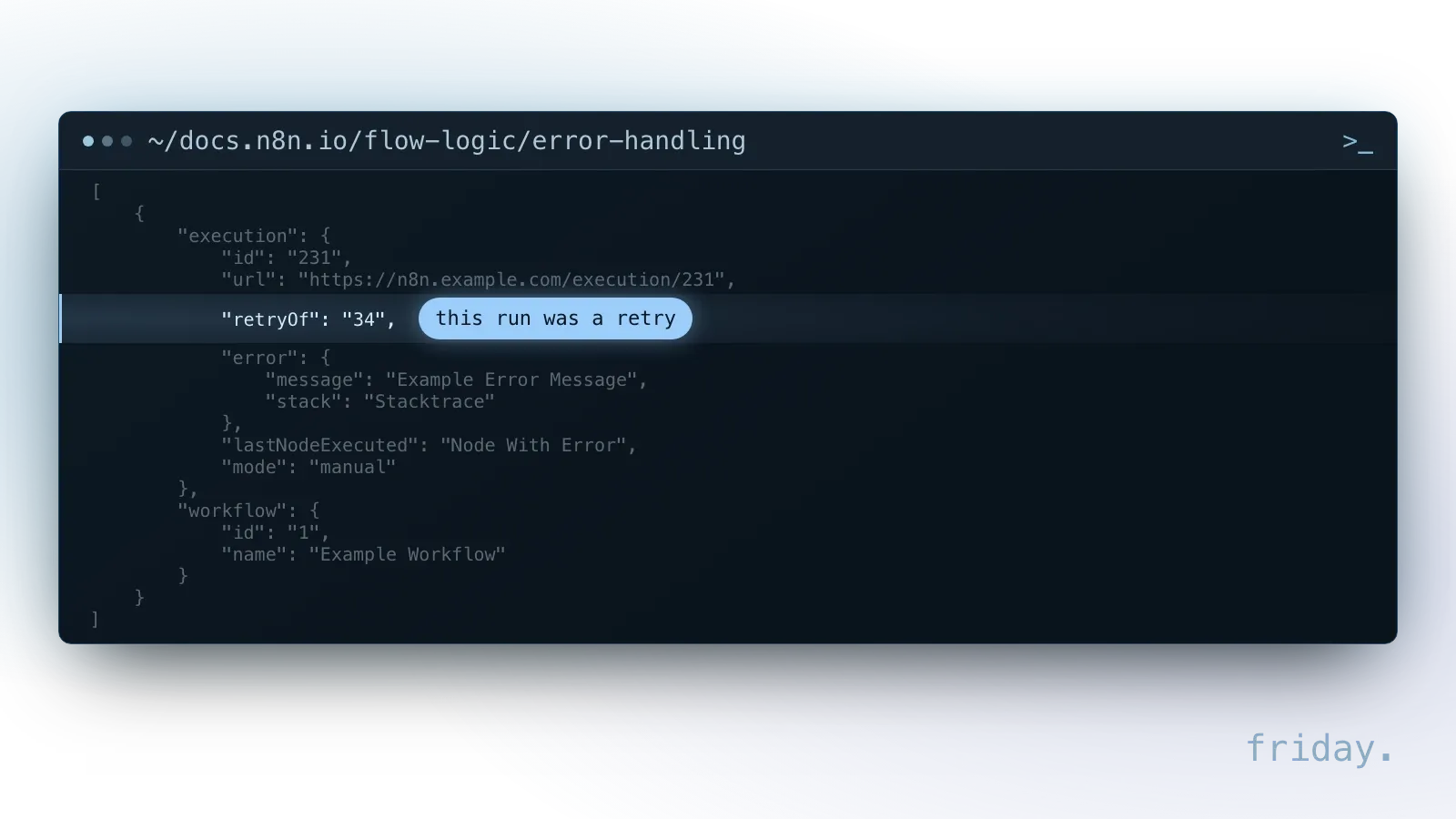
n8n's documentation notes that the execution ID and link require the execution to be saved and are missing when the error is in the main workflow's trigger node, because the workflow never runs. A Stop And Error node can force a failure under conditions you choose, which also runs the error workflow. The error data also includes retryOf, but only when the failed run was itself a retry of an earlier failed run. Whatever the tool, an alert should name the item, the step, what the error said and where to look.
Group routine failures, send urgent ones at once
Group routine failures into a daily summary instead of one message each. Alert immediately on what cannot wait: a permanent failure such as revoked access, a review queue growing faster than it is cleared, or a step that has stopped processing entirely.
Hand the item over with its context
When a person takes over, give them what the workflow knew: the original input, what was tried, each error message and the step it stopped at. Let them finish from that step, and record what they did so the same failure can be handled automatically next time.
Treat silence as a signal
If a workflow that runs every hour goes quiet for a day, something upstream is broken. Set an alert for "no items processed" over a period that fits the workflow.
Test the failure paths before launch
Error handling that has never run is a guess. Before launch, break the workflow on purpose in a test environment and confirm where each item ends up, who hears about it and how it resumes.
Failures to simulate
- Revoke a test key, to see a 401 stop the step and alert the owner.
- Submit a form with a missing field.
- Send an attachment the workflow cannot read.
- Simulate a timeout from a connected tool.
- Fire the same trigger twice, to confirm the action happens once.
What a passing test shows
For each test, confirm three things: the item lands in the holding queue with a clear reason, the right person is told, and fixing the problem lets the item continue without starting over.
When to run the tests again
Repeat these tests whenever you change a step, a model or a connected tool, since each change can alter the output format or the errors that come back.
FAQs About AI Workflow Error Handling
Short answers on how many retries to allow, whether to tell customers about a failure, what to watch after launch and whether a holding queue needs special software to work.
How many retries are enough?
No single number fits every step. Anthropic's SDK retries twice by default, and Google's example keeps retrying at a capped interval up to a maximum number of retries. Pick a small cap, count every layer, and send what remains to the holding queue.
Should a failed workflow notify customers?
Not automatically. Notify the owner, fix or complete the item, then contact the customer if the delay affects them.
What should be monitored after launch?
Failure counts by type, the size of the holding queue and how long items wait there. Rising numbers are your early warning.
Does a holding queue need special software?
No. A queue service such as Amazon SQS handles it in code; for a small team, a shared list that someone reviews daily does the same job.
Build it to fail safely
Error handling is part of every workflow we deliver through our workflow automation service. If an automation breaks without anyone noticing, tell us what it does.
Last checked: November 16, 2026, against Anthropic's Claude API errors and rate limits pages, Amazon's Builders' Library article on retries and backoff, Amazon SQS dead-letter queue documentation, the AWS Well-Architected Generative AI Lens (GENREL03-BP01), Google Cloud's Memorystore exponential backoff page, Stripe's idempotent requests reference and n8n's error handling documentation. Provider details change; check the linked pages before relying on one.
Technical details come from Anthropic, Amazon Web Services, Google Cloud, Stripe and n8n documentation, checked November 16, 2026.