
Human in the Loop AI: Where People Should Approve the Work
Human in the loop AI puts a person at the steps where a mistake costs money or trust. Place review by risk, keep reviewers alert, loosen approvals on evidence.
Human in the loop means a person reviews, corrects or approves an AI's work at set points, so a business automates the routine and keeps people on decisions.
Review fails when approval becomes a reflex and nobody reads the item. Few review points, placed by risk and built for a decision in seconds, keep it real.

In the loop, on the loop and out of the loop
Three terms describe how much a person does while the AI works. Each level fits a different kind of step, and one workflow can use all three at different points.
Human in the loop
The AI cannot complete a step until a person approves, edits or rejects it. Use this level for actions you cannot take back, such as sending a quote or deleting a customer record.
Human on the loop
The AI acts on its own while a person watches the results and steps in when something looks wrong. It suits frequent, reversible work with a log that someone actually reads.
Human out of the loop
People set the rules and check performance on a schedule but do not see individual decisions. Reserve this level for low-impact tasks with a long, clean record.
One range, set step by step
The NIST AI Risk Management Framework describes the same range: human-AI configurations can span from fully autonomous to fully manual, and an AI system can decide on its own, defer the decision to a human expert or serve as an additional opinion for a person who decides. The level belongs to each step, so one workflow can sit at several points of that range at once.
Example: one lead-intake workflow
A lead-intake workflow could tag new inquiries with no review, draft replies that a person spot-checks during the day and hold every quote until the owner approves it. That is three steps at three levels, each matched to what a mistake at that step would cost.
Which steps need a person
Ask three questions of each step in a workflow: what happens if this step is wrong, who would notice and can it be undone? The answers decide where an approval goes.
| Kind of step | Examples | Review level |
|---|---|---|
| Cannot be undone | Sending to a customer, publishing, deleting, submitting | Approval before it runs |
| Money and commitments | Payments, refunds, discounts, quotes, contract terms | Approval by the person who owns that budget |
| AI is unsure | Missing information, conflicting sources, a request outside its instructions | Routed to a person |
| New automation | The first weeks of any workflow | Review a sample of everything |
| Internal and reversible | Tagging an email, drafting an internal note | Runs without approval, logged |
Actions you cannot take back
An email to a customer, a published post, a deleted record and a submitted form cannot be recalled once they go. The n8n documentation names deleting data, sending external communications and making purchases among the irreversible actions where human review is useful.
Money and customer commitments
Payments, refunds, discounts, quotes and contract terms commit the business even when the action itself could be reversed. The approver is whoever owns that budget or that customer, because they know what a correct number looks like.
Steps the AI is unsure about
Build the workflow so the AI can say it is unsure: missing information, conflicting sources or a request outside its instructions. Those cases go to a person, and the rest of the queue keeps moving.
Steps that can run on their own
Internal, reversible and low-impact steps, such as tagging an email or drafting an internal note, can run without approval as long as each one is logged. During the first weeks of any automation, review a sample of these too.
Design reviews people actually do
A review step fails quietly when the reviewer is formally responsible but practically absent, because the review is slow, unclear or constant. Five design choices prevent it.
| Principle | In practice |
|---|---|
| Bring the context | Show the AI's output next to the source it used, so the reviewer does not hunt for it. |
| Make the decision clear | Approve, edit or reject, with the reason captured in one click. |
| Route to the right person | Refunds go to whoever owns refunds, with a named backup. |
| Set a time limit | Decide what happens if nobody reviews within a day. |
| Keep a record | Who approved what, when and why, in a log nobody can quietly edit. |
Bring the context and a clear decision
Put the AI's output next to the source it used and offer three choices: approve, edit or reject. Capture the reason in one click, so the log can explain each decision months later.
Route each item and set a time limit
Send each item to the person who owns that decision, with a named backup for days off. Decide in advance what happens when nobody answers within a day: the item waits, escalates to someone else or is canceled.
Keep a record nobody can edit
Record who approved what, when and why, in a log that cannot be quietly changed. The record answers a customer's question about a decision and shows where the AI keeps needing correction.
Why reviewers stop reading
Automation bias is the propensity for humans to favor suggestions from automated systems. A prospective experiment with radiologists measured how far a wrong suggestion moves experts.
What automation bias looks like at work
Once a run of drafts has been correct, a reviewer can start approving on sight. The one wrong draft then goes out with an approval on record, and the log makes it look checked.
What one experiment measured
In a study published in Radiology in May 2023, 27 radiologists read 50 mammograms with help from a purported AI system, which suggested an incorrect category for 12 of them. With a correct suggestion, readers at every experience level rated 79.7% to 82.3% of mammograms correctly; with an incorrect one, inexperienced readers fell to 19.8% and very experienced readers to 45.5%.
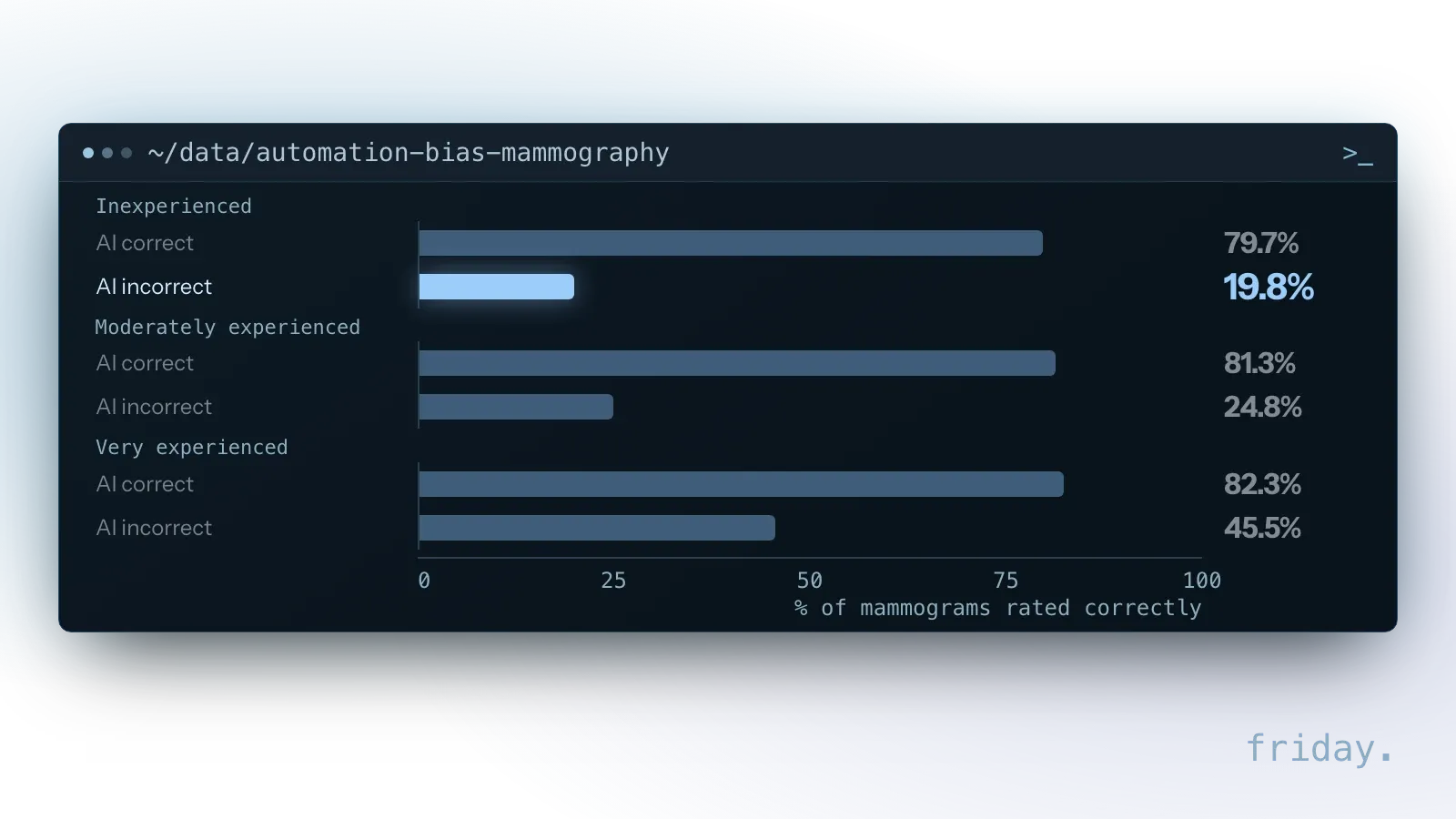
The readers were trained specialists, and the setting was medical. Experience reduced the effect without removing it, and that is the warning for any business reviewer who approves AI drafts all day.
Design choices that keep attention real
- Keep the volume humane. If one person sees hundreds of items a day, review a sample and gate only the risky ones, so the items that get a careful look are the ones that need it.
- Ask for a specific check. "Confirm the price matches the quote sheet" gets a better review than "Does this look OK?"
- Show what changed. When the AI edits an existing record, highlight the difference instead of showing the whole record.
- Plant a known error now and then. A test item with a deliberate mistake shows whether the queue is being read.
Separate proposing from doing
One rule keeps AI mistakes in the draft stage, where they are cheap to fix: the AI proposes, and a person or a fixed rule carries out the action that reaches the outside world.
The AI drafts, the system sends
The AI drafts the refund email, and the system sends it only after approval. A wrong draft costs a few seconds of a reviewer's time, because nothing leaves until a person or a rule lets it through.
Limits a manager sets
The AI suggests a discount, and the quote tool applies it only within limits a manager set in advance, such as a maximum percentage. Anything over the limit becomes an approval request for that manager.
Approvals for AI agents and their tools
Agents raise the stakes because they act: they send messages, update records and call other systems. Approval for an agent belongs on each tool it can call, sized to that tool.
What the MCP specification asks of AI apps
Agents can connect to business tools through the Model Context Protocol (MCP), an open standard for linking AI applications to tools and data. Its tools specification, revision 2026-07-28, says there should always be a human in the loop with the ability to deny tool invocations, and that AI apps should show tool inputs to the user before calling the server.
Approve per tool, not per agent
Reading a calendar or searching a knowledge base can run freely. Creating an invoice, emailing a customer or deleting a record should wait for a confirmation that shows the exact inputs the agent is about to send. The n8n documentation lets a builder apply human review to all tools connected to an AI Agent node or to selected individual tools.
What the reviewer sees in n8n
In n8n's human review for tools, the reviewer's message can be built from two properties: $tool.name, the tool the agent is trying to call, and $tool.parameters, the inputs it is trying to use. The request goes out through a channel such as Slack, Telegram, Gmail or n8n's own chat, and that channel can differ from the one the user talks to the agent in.
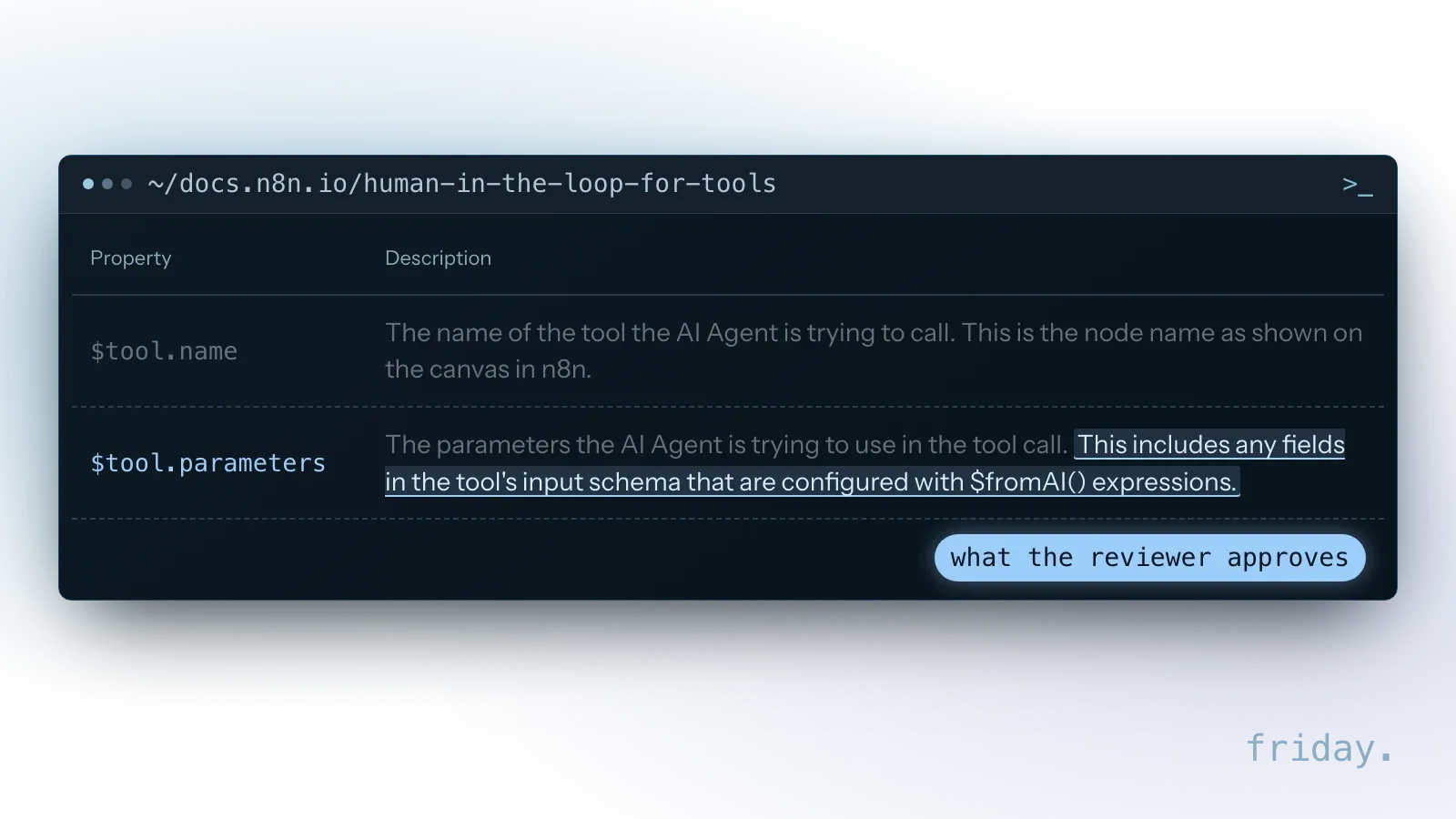
With the $fromAI() function, the AI can dynamically specify tool parameters, and those AI-determined values are what the human reviewer sees and approves. If the reviewer approves, the tool executes with the AI-specified input. If the reviewer denies, the action is canceled and the AI is informed of the rejection, and n8n tells builders to describe the review setup in the agent's system prompt so the agent handles a denied call.
Give each tool the narrowest permission
An agent that drafts replies does not need permission to send them; a separate, approved step can do that. Our MCP security post covers sign-in scopes and per-person permissions for agents in more depth.
Adjust approvals as trust builds
Approval points are not permanent. After a few weeks, the log shows where the AI is right and where reviewers keep correcting it, and that evidence decides what to loosen.
Loosen review in stages
The n8n documentation gives the same advice for AI tools: start with human review enabled, then reduce oversight as confidence grows. A staged path looks like this:
- Review every output at launch.
- Review a sample once results hold.
- Review only the cases the workflow flags.
- Keep approvals on money and irreversible actions permanently.
Count the overrules
NIST's framework notes that data about the frequency and rationale with which humans overrule AI system output in deployed systems may be useful to collect and analyze. For a small team, that comes down to two numbers per review step: the number of items a reviewer changed or rejected, and the reasons.
A step with a long run of approvals and no changes is a candidate to loosen. A reviewer who never changes anything while others correct the same kind of output is a queue to look at before loosening anything.
Turn corrections into instructions
When the same correction keeps appearing, update the AI's instructions or add the case to your tests, then check whether the correction rate drops. Keep approvals on money and irreversible actions whatever the numbers show.
Write the approval rules down
A written approval policy keeps the rules out of one person's head. It also matches how NIST's framework treats oversight: as a documented process with named owners.
Where NIST puts oversight
The NIST AI Risk Management Framework, released on January 26, 2023 and intended for voluntary use, places oversight in three of its four core functions: roles for human-AI configurations under GOVERN 3.2, oversight processes under MAP 3.5 and the means to supersede or deactivate a system under MANAGE 2.4.
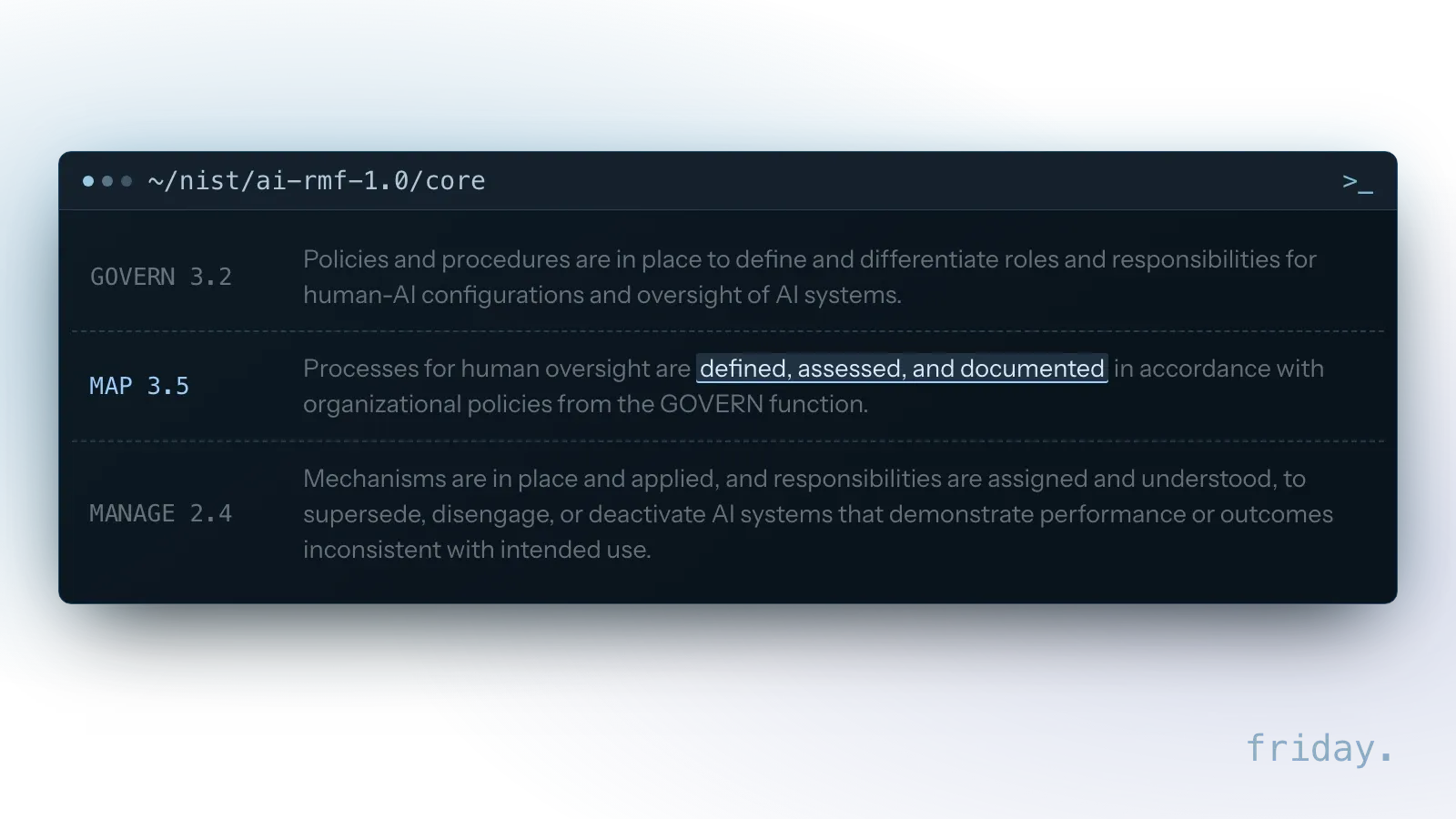
None of it needs a large team. For a small business, the three entries come down to a named approver, a written review rule and a known way to switch the automation off.
A one-page approval policy
Keep one page per workflow, stored where the team can find it:
- Which steps need approval, and at which level.
- Who approves, and the backup when that person is away.
- How long an item can wait before it escalates.
- Who can pause or switch off the automation.
- When a review point was last loosened or tightened, and why.
What the written version pays back
New staff learn the rules without guessing. When a customer or partner asks how the business uses AI, the policy is a clear, honest answer, and when something goes wrong, it shows which rule to change.
FAQs About Human in the Loop AI
Four questions owners ask before adding review to an AI workflow: whether it erases the time saved, who should review, whether review can go away and how the loop terms differ.
Does human review cancel out the time savings?
Not when it is placed by risk. A reviewer checks a ready draft against one specific question, which is a smaller job than writing it, and low-risk steps skip review entirely.
Who should be the reviewer?
The person who would make the decision without AI, with a named backup. They know what a correct answer looks like.
Can review be removed completely later?
For low-risk steps with a long, clean record and few overrules, yes. For money, customer commitments and irreversible actions, keep a person in the loop.
What is the difference between human in the loop and human on the loop?
In the loop, a person must approve before the step completes. On the loop, the AI acts first and a person monitors and intervenes when needed. The first suits irreversible steps; the second suits frequent, reversible ones.
Design the loop from the start
Review points placed at design time are part of the workflow from its first run. Start with the step that concerns you and place the first approval right there.
Every workflow we build includes review points placed by risk, with the context reviewers need; see our workflow automation service. For agents that take actions, our AI agents and skills service adds approval rules to every tool. Tell us which step concerns you, and we will show you where a person should stay involved.
Last checked: November 16, 2026, against the NIST AI Risk Management Framework (AI RMF 1.0) and its overview page, the MCP tools specification revision 2026-07-28, n8n's documentation on human review for tools and the abstract of the 2023 Radiology study on automation bias in mammography. Documentation changes; check the linked pages before relying on a detail.
Oversight details come from NIST, the MCP specification, n8n's documentation and a 2023 Radiology study, checked November 16, 2026.