
n8n vs Zapier vs Make: Which Should a Small Business Use?
Compare n8n, Zapier and Make for a small business: how each platform bills, what one real workflow would cost on each, and who on your team has to maintain it.
Zapier counts tasks, Make counts credits and n8n counts whole workflow runs, so one automation can cost very different amounts as it grows or adds AI steps.
Compare Zapier's and n8n's current plan prices, what self-hosting n8n takes, how each one meters AI steps, and when a small business needs none of the three.
How each platform counts what you pay for
Each vendor measures usage in a different unit, and that unit decides how your bill grows. Read it before you compare plan prices, because a cheap plan in an unfavorable unit can cost more.
For a small business without a developer on staff, Zapier, or Make if the workflows branch, is the safer first choice, and self-hosted n8n only makes sense when someone on the team is comfortable running servers. The real differences are in how each one counts usage and how much upkeep it expects from your team.
| Platform | What you pay for | What does not count | Free option |
|---|---|---|---|
| Zapier | Tasks: each successful action in a Zap | Triggers, Filter and Paths steps, testing and failed actions | Free plan with 100 tasks a month |
| Make | Credits: by default one operation equals one credit, and AI features can use more | Error handler modules such as Rollback, Break and Ignore | Free plan with 1,000 credits a month |
| n8n | Executions on n8n Cloud: one run of the whole workflow, regardless of its number of steps | Steps inside a run are not counted separately | Self-hosted Community edition, free without a license key |
Zapier: tasks
Zapier's help center spells out the rule: a task is any successful action that runs in Zapier, and only successful actions count. Trigger steps, Filter and Paths steps and testing do not use tasks. When you reach your plan's limit, Zapier either charges for extra tasks or holds new runs until the billing cycle resets, depending on your billing setting.
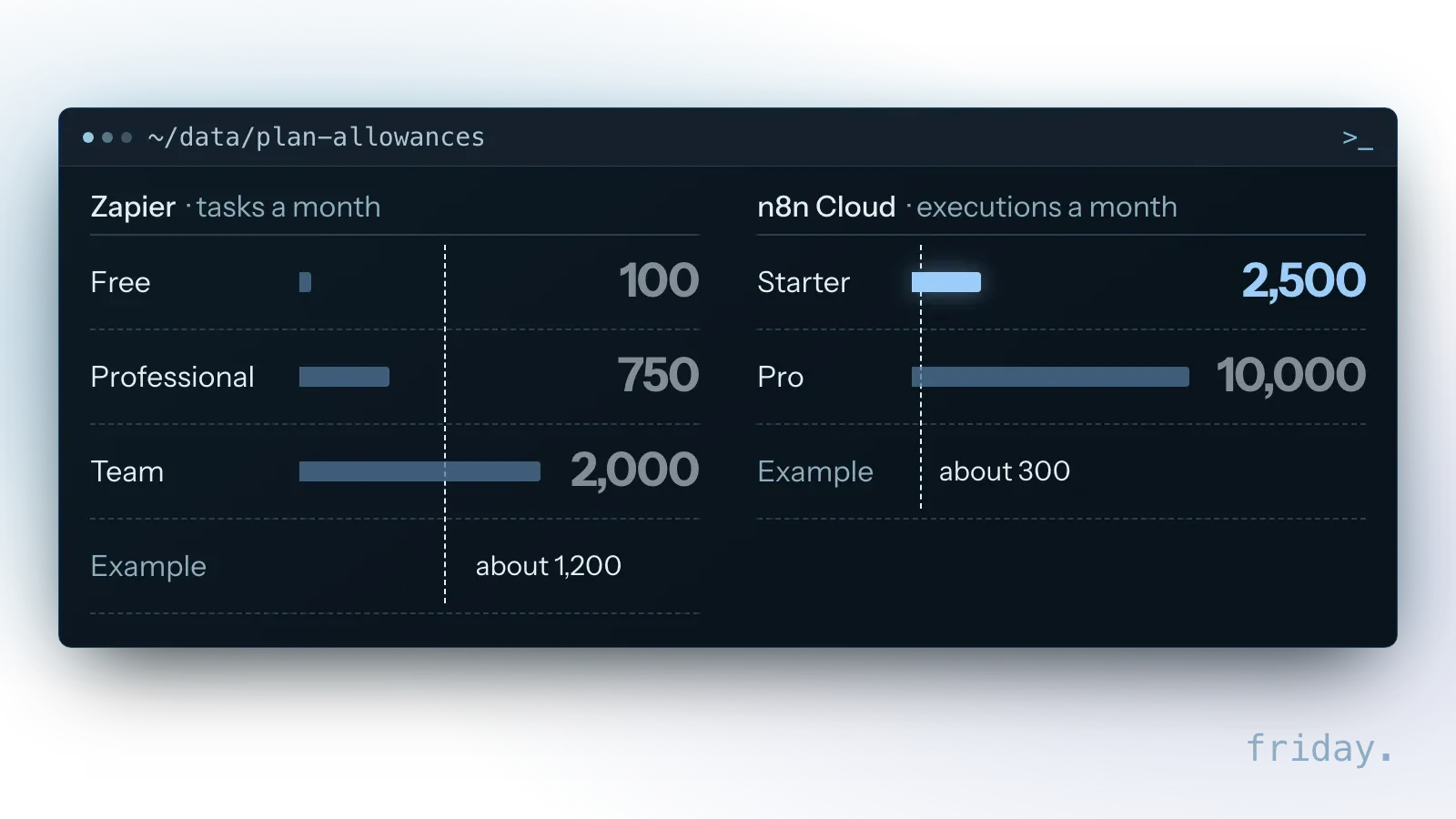
On Zapier's pricing page, the Free plan includes 100 tasks a month. The Professional plan starts at $19.99 a month billed annually ($29.99 billed monthly) for 750 tasks, and the Team plan at $69 a month billed annually ($103.50 monthly) for 2,000 tasks. Enterprise pricing is custom.
Make: credits
Make now uses credits as its billing unit. Its credits help page says that, by default, one operation equals one credit, and that only scenario runs and the AI agent's chat use credits. Its pricing page adds that some advanced AI features can use more credits than a regular operation, and that error handler modules such as Rollback, Break and Ignore use none.
The Free plan includes 1,000 credits a month. The paid plans include Core, Pro, Teams and Business. The page text did not show their prices on November 16, 2026, and Make says the usage allowance is proportional to the number of credits you purchase, so price your volume on Make's pricing page.
n8n: executions
n8n's pricing page states that pricing is based on monthly workflow executions, regardless of complexity, and defines an execution as a single run of your entire workflow. A ten-step workflow and a two-step one cost the same per run.
Hosted by n8n, Starter is 20€ a month billed annually for 2,500 executions and Pro is 50€ for 10,000, each with unlimited steps; n8n's page showed prices in euros on November 16, 2026. Business, at 667€ for 40,000 executions, is marked self-hosted only, and Enterprise can be hosted by n8n or self-hosted and is quoted by sales. The self-hosted Community edition is free to run, though the server and the upkeep still cost money.
Estimate the bill for one real workflow
Take one workflow you actually want to automate and count how each platform would meter it. The method takes a few minutes and tells you more than any feature table about your real cost.
Count the metered steps
Take a contact form that, for each submission, adds the lead to your CRM, creates a task for a salesperson, drafts a reply and posts a note in your team chat. Suppose it runs 300 times a month.
- On Zapier: the form trigger is free and the four actions each count as a task, so about 1,200 tasks a month if every action succeeds. If the reply is drafted by an AI step, Zapier's pricing page says, "Many actions cost more than one task," depending on step type and AI model tier, so treat 1,200 as a minimum.
- On n8n Cloud: each submission is one execution, so about 300 executions a month, whatever the number of steps in the workflow.
- On Make: count the operations each run uses and convert them to credits. Make's credits help page explains which features consume credits and why AI steps vary with token use.
Compare the count with each plan
In this example, 1,200 tasks is more than the 750 included in Zapier's entry Professional tier, so you would need a higher tier or the Team plan. The 300 executions fit within the 2,500 of n8n's Starter plan with room to spare. For Make, compare your credit count with the allowance of the plan size you are considering.
Then repeat the count for the next workflows you expect to add, because the ranking between platforms can change as the number of steps per workflow grows. If someone else will build it, our fixed project prices show what the build adds on top of the platform fee.
Each platform up close
Beyond billing, the three differ in the number of apps they connect to out of the box, how a workflow looks in the editor and how much of the running is left to you. That decides who can fix them.
Zapier
Zapier's pricing page lists more than 9,000 apps. Each Zap is a linear list of steps, so you can read it from top to bottom when you return to it months later. Paid plans add Versions, to roll back a change, and Autoreplay, which retries tasks that fail because of temporary errors or downtime; sharing Zaps with teammates starts on the Team plan.
Make
Make's pricing page lists 3,000+ native apps. Its visual scenario editor keeps routes and error handlers in view on one canvas, which suits workflows that branch. With Store incomplete executions enabled in a scenario's settings, Make retries a run that failed on a rate limit, a connection error or a module timeout up to eight times, starting 1 minute after the original run; its help center puts the last retry 7 hours 51 minutes after that run.
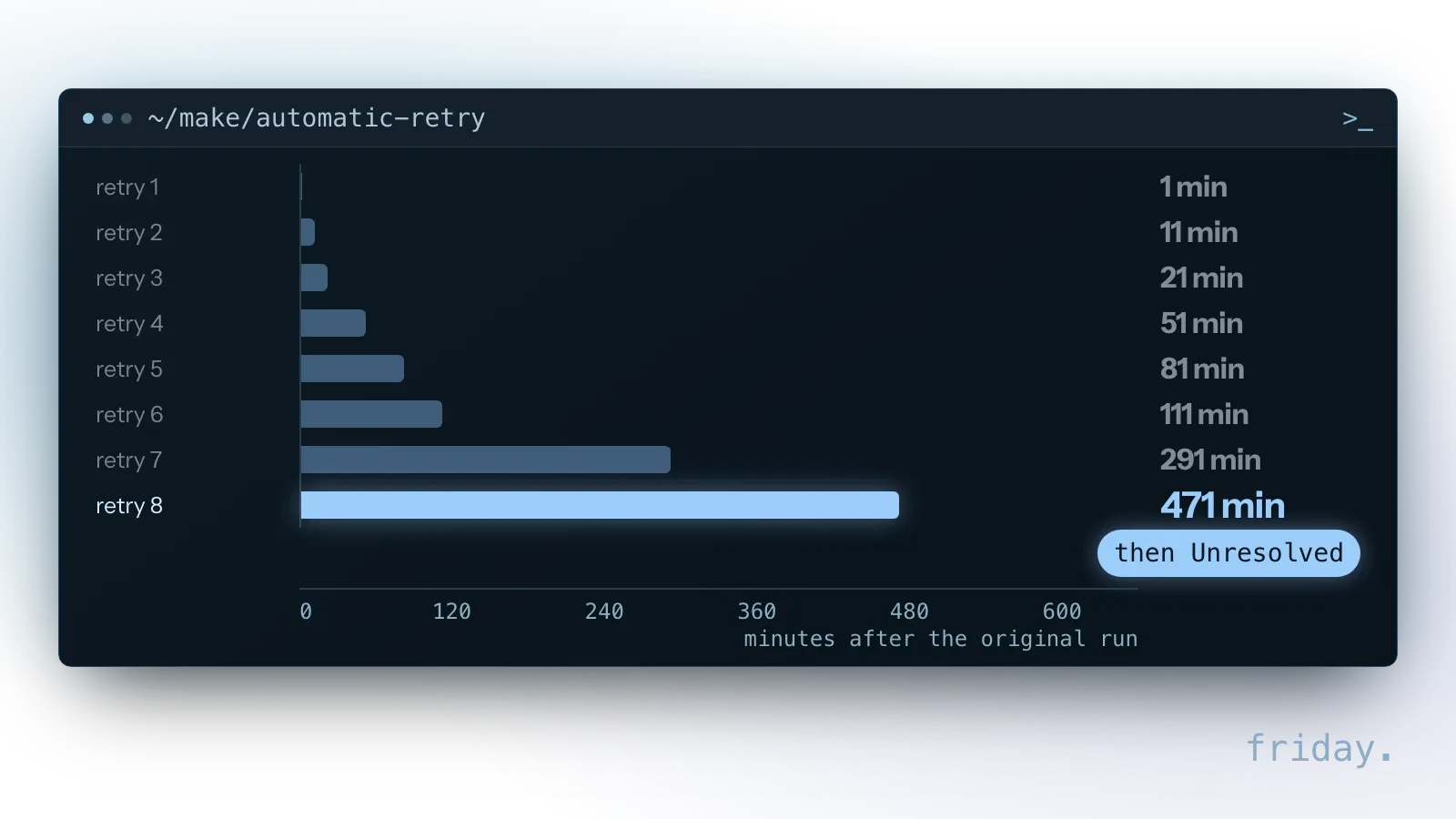
When the eighth retry fails, the run is marked Unresolved, and someone on your team retries it or resolves it by hand. Make's AI agents are available on all plans, and the company describes them as agents that take action inside your scenarios.
n8n
n8n lists 2,000+ integrations for apps, services and APIs. Besides n8n Cloud, a standard self-hosted version is available on GitHub, and its AI Agent node connects to several model providers. The price of that control is more setup and more responsibility for keeping it running.
Who will maintain it?
For a small business this question can decide the matter. Workflows break when an app changes a field or a connected account loses access, and someone must fix them.
Name the person first
Write down the name of the person who will open the editor when a workflow stops. If there is no name, pick the platform with the least to maintain, or plan for outside help; the workflows we build are handed over with documentation, a handoff session and 30 days of fixes.
Match the platform to that person
- No one technical: start with Zapier and its step-by-step Zaps.
- A visual thinker with branching workflows: Make, where routes and error handlers stay in view.
- Someone who already runs servers or writes code: n8n, for full control over hosting and logic.
What happens when a step fails
If you enable it on a paid Zapier plan, Autoreplay retries a failed step up to five times and waits longer each time: 5 minutes after the initial trigger event, then 30 minutes, 1 hour, 3 hours and 6 hours after each previous attempt. Zapier's help article on replay puts the final replay about 10 hours, 35 minutes after the first error.
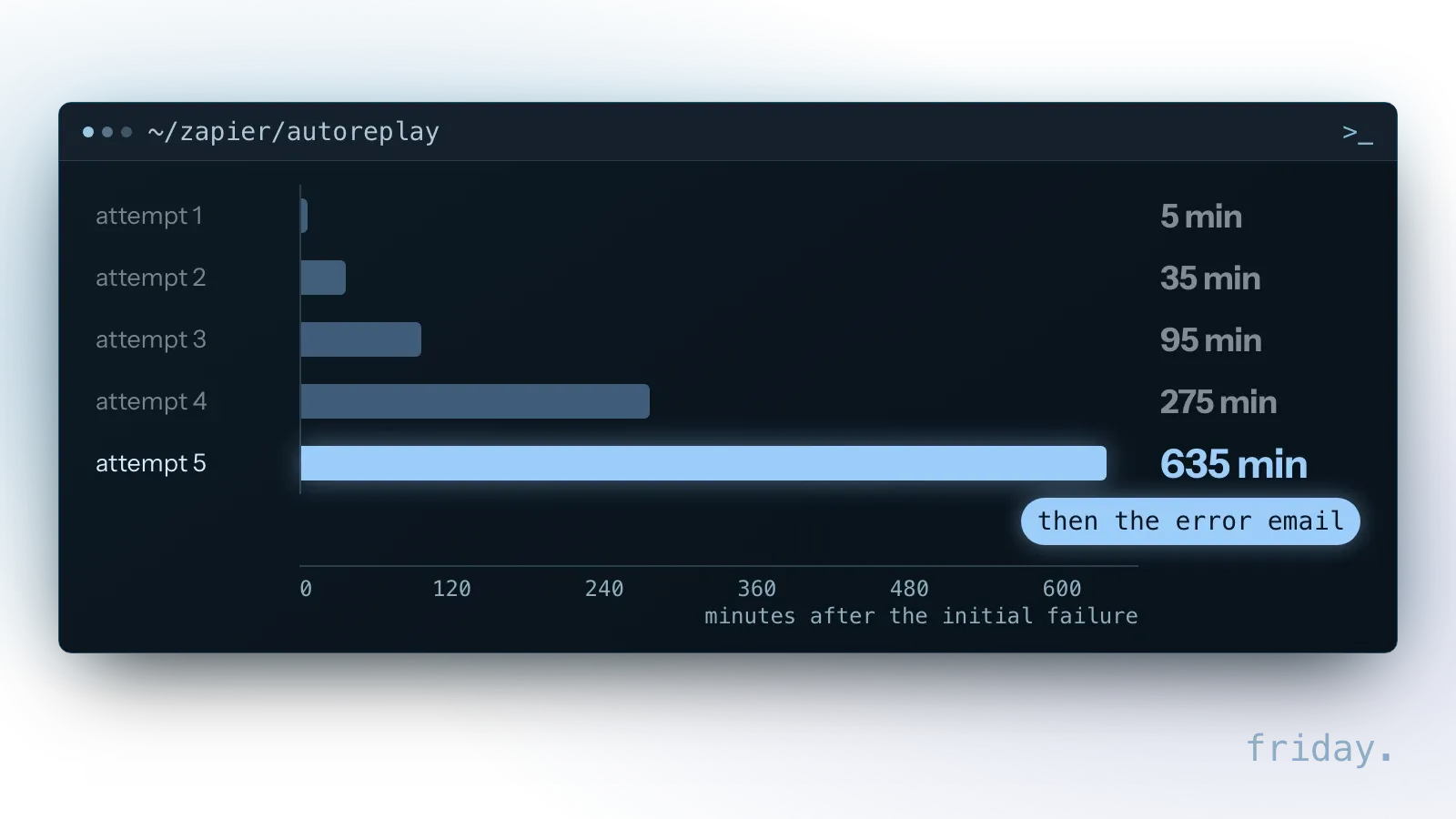
Zapier says, "The Zap run will have a scheduled status until Zapier completes all autoreplay attempts." Only when the final attempt fails does Zapier send its error notification emails and trigger any connected Zapier Manager Zaps, so the first alert comes with the last replay. Autoreplay runs only where you enable it, for each Zap or for the whole account, which on Team and Enterprise only a super admin or owner can turn on; on the Free plan, manual replay is only available for Zap runs with an errored status. Steps must be replayed within 60 days of the initial trigger event, and Autoreplay does not replay Zap runs with an on hold status.
In n8n, each node has a Retry On Fail setting that reruns the node when an execution fails, and an On Error setting with three choices: stop the workflow, continue with the last valid data, or continue and pass the error information to the next node so the workflow can handle it. Make handles failures with error handler modules such as Break and Ignore, which use no credits.
On all three, the maintainer's work starts where the retries end: read the error, fix the cause and rerun what failed.
Self-hosted n8n: what running it yourself takes
The free self-hosted edition is the main reason to look at n8n, and n8n is candid about the trade-off: the software costs nothing, but running it safely is your job from the first day.

The skills it needs
n8n's installation guide says that self-hosting requires technical knowledge, including setting up servers and containers and securing them, and warns: "n8n recommends self-hosting for expert users." The same page says mistakes can lead to data loss, security issues and downtime, and recommends n8n Cloud for anyone not experienced at managing servers.
What it costs in practice
The cost of self-hosting is the hosting bill plus the hours spent on updates, backups and security fixes. If no one on the team already does that kind of work, n8n Cloud or another platform is likely cheaper in practice, even though its plan has a monthly fee.
Check the license
n8n is published under its Sustainable Use License, in the LICENSE.md file of its GitHub repository, which allows use for your own internal business purposes. It may be shared with others only free of charge and for non-commercial purposes.
That covers a company automating its own work. Offering n8n to clients as a paid service is a different case, so read the license text, or ask a lawyer, before you build a business on it.
AI steps change the math
All three now offer AI features, and each one meters them in its own way. If a workflow drafts replies or summarizes documents on every run, that part can outgrow the rest of the bill.
Zapier Agents
Zapier's pricing page lists activities as the billing unit for its Agents, separate from tasks. Check that allowance on its own, because a busy agent can use it up independently of your Zaps.
Make AI
Make charges AI usage in credits, and its help center says, "The most common factor affecting credit usage is token consumption." The longer the text an AI step reads or writes, the more credits it uses, so AI-heavy scenarios are harder to predict than plain ones.
n8n AI
n8n's AI nodes connect to model providers such as OpenAI, Anthropic and Google. n8n's pricing page lists 1,600 AI Assistant credits a month and AI models without API keys on Starter. On a self-hosted install, check which provider account the AI nodes bill to, in addition to any n8n plan.
Whichever platform you pick, estimate the AI part of a workflow separately before you commit to a plan.
When none of the three is the right fit
An automation platform is not always the answer. Three situations call for something else first, and each one can save a subscription you would otherwise pay for every month.
The feature already exists in a tool you pay for
Your CRM, help desk or accounting tool may already include automations for reminders, assignments and status updates. Use those first; they need no extra account or subscription.
You want an assistant to work inside your tools
Connecting an AI assistant to your apps through a standard connection such as MCP can handle ad-hoc questions that would otherwise need a chain of fixed steps.
One simple, constant, critical link
For a single link between two systems that must always work, a short custom integration can be cheaper to run and easier to secure than a platform subscription, provided someone can maintain the code.
FAQs About n8n, Zapier and Make
What n8n's free edition really costs, how failed runs and app counts compare, and what using or switching platforms involves. Vendor facts come from their pages, checked on November 16, 2026.
Is n8n really free?
The self-hosted Community edition runs without a license key, so the software is free. You still pay for the server and the time to run it safely. n8n Cloud is a paid subscription billed per execution.
Do failed runs count against my plan?
For Zapier and Make, no: failed Zapier actions are not tasks, and Make's error handlers use no credits. For n8n, the unit is the whole execution; check its pricing page for how failed executions are treated.
How do the app catalogs compare?
By the vendors' own counts, Zapier lists more than 9,000 apps, Make 3,000+ and n8n 2,000+. What matters more is whether the specific apps you use are covered, with the triggers and actions you need, so search each catalog for them.
Can we use more than one platform?
Yes, but each platform is another account to pay for and another place to look when something breaks. Start with one and add a second only for a workflow the first cannot handle.
Can we switch platforms later?
Yes, but plan to rebuild each workflow in the new editor. Keep a written description of every workflow, with its trigger, steps, owner and a correct result, so the rebuild starts from a spec.
Make the choice this week
You do not need a long evaluation. Three steps are enough to pick a platform with confidence and to estimate its monthly cost for your real workflows before you build anything on it.
- Name the person who will maintain the workflows.
- Count one real workflow's metered steps on each platform and compare them with each plan's allowance.
- Estimate the AI part separately if the workflow drafts or summarizes.
If you would rather have the first workflow built and documented for you, our workflow automation service covers the build and handoff. Or send us the workflow you have in mind and we will help you weigh the options.
Last checked: November 16, 2026, against each vendor's pricing and help pages. Plans and prices change, so check them on the vendor's own page on the day you decide.
Pricing and product details link to each vendor's own pages, checked November 16, 2026.