
What to Automate First with AI: A Guide for Small Businesses
Pick your first automation from a one-week task log and a short scoring sheet: frequent, rule-based, low-risk work, valued at hours per week times hourly cost.
The first workflow sets the pace for the rest. A task your team repeats every week, with steady steps and mistakes you can catch, gives you a quick visible win.
The steps: log a normal week, shortlist the repeat tasks, check the data each one touches, score the shortlist on four traits, then pilot the winner with dates.

Find candidates with a one-week task log
A shortlist built from one normal week of real work holds up better than one built in a meeting. The log shows what people repeat, how long it takes and where work waits.
What to record for each task
For one normal week, ask each person on the team to note every task they repeat. Each entry gets five columns: the task, what triggered it, which tools they opened, roughly how long it took and what they produced at the end.
| Column | What to write |
|---|---|
| Task | A short name, such as "log a web inquiry" or "send tomorrow's reminders" |
| Trigger | What started it: a form, an email, a phone call, a day of the week |
| Tools | Every app or file opened along the way |
| Time | Rough minutes from start to finish |
| Output | What existed at the end: a CRM record, a sent email, an updated sheet |
Keep the log light. A shared spreadsheet is enough, and rough minutes will do; the goal is to see which tasks come back and how long they take. Each person keeps their own tab, so the sheet also shows who does what.
Group the entries at the end of the week
At the end of the week, group similar entries. The tasks that appear several times, across more than one person, and start from the same kind of input form the shortlist. Add up the minutes in each group and convert them to hours per week; that number feeds the scoring sheet later.
Keep the trigger and tools columns next to each group. They answer two questions the scoring needs: whether the input already arrives in a tool you use, and how many systems the automation would have to touch.
Watch the handoffs between people and tools
Look at handoffs too. A task that bounces between two people or two tools, such as copying a web form into the CRM and then emailing a colleague, can be a stronger candidate than one long task, because the waiting and retyping between steps is time nobody logs as a task of its own.
Mark each handoff in the log with an arrow or a note. When the same handoff shows up for several entries, treat the whole chain as one candidate rather than scoring each piece on its own.
Where AI adopters put it to work
Census Bureau survey data shows where firms that already use AI have put it to work. Two patterns help a first-timer: adopters stay narrow, and sales and marketing leads the list.
Sales and marketing lead the business functions
A Census Bureau working paper from April 2026, based on the AI supplement to the Business Trends and Outlook Survey, found that 18% of firms used AI in a business function between November 2025 and January 2026. Among the firms that used AI in at least one business function, sales and marketing was named most, at 52%, ahead of strategy and business development and IT.
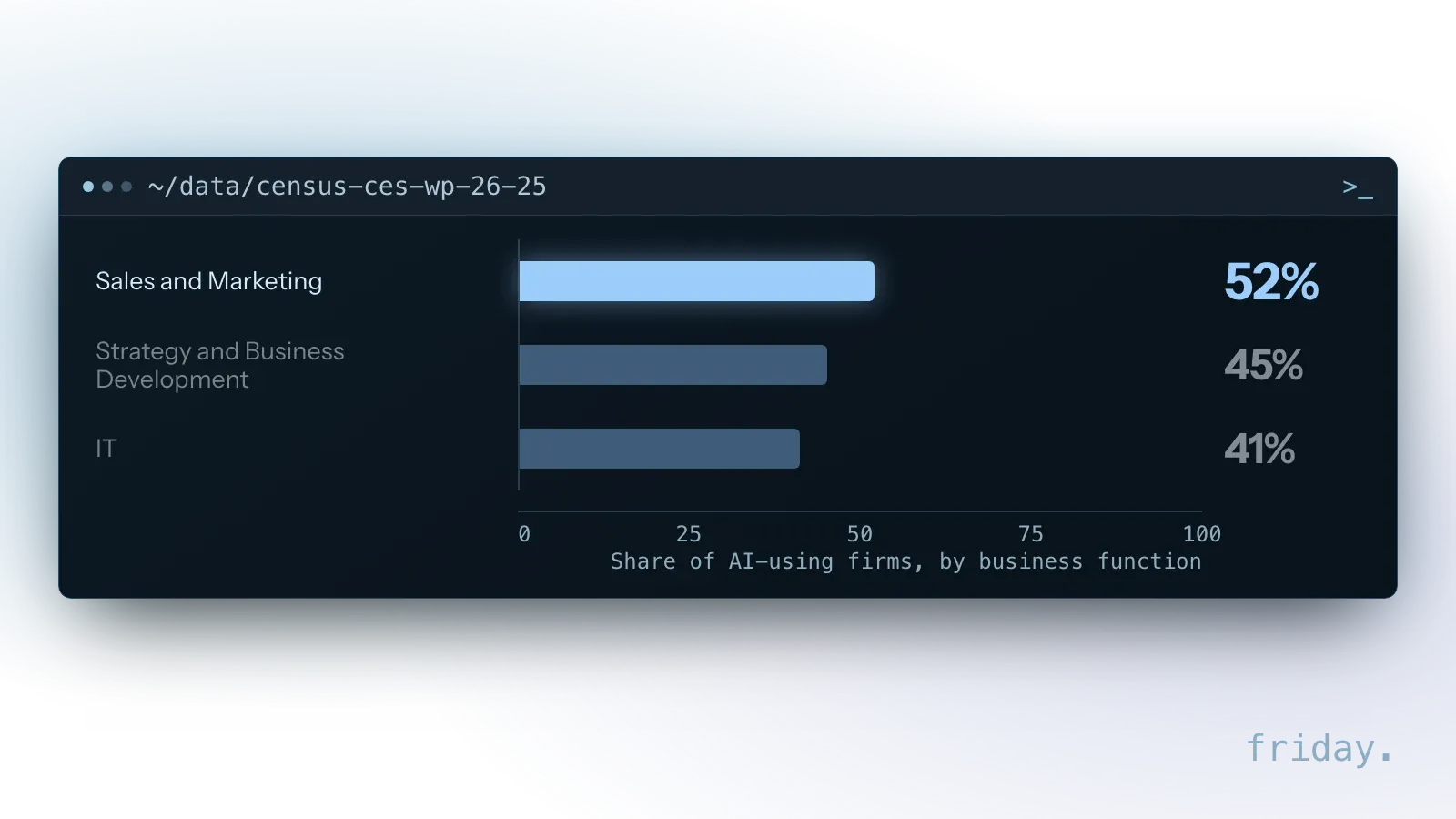
Those shares describe adopters, so they show where other businesses put AI to work, which may differ from where your own hours go. Your task log stays the deciding input; the survey only tells you that sales and marketing is where adopters use AI most.
Adopters keep the scope small
The same paper reports that 57% of AI users integrate it in three or fewer business functions. Starting with one workflow in one function matches what those adopters have done, and it keeps the first build small enough to test in a week.
Writing and document work come first for workers
At the task level, the paper names writing, document analysis and information search as the leading generative AI uses. Those map onto first picks such as drafting a reply to a lead, pulling fields out of a PDF or summarizing a week of numbers.
The paper also reports that 65% of firms limit generative AI use to three or fewer tasks. One workflow with one AI step in the middle fits that pattern for a first project.
The traits of a good first candidate
Four traits separate a task worth automating first from one that can wait. A candidate with all four gives enough volume to measure and is safe to learn on while you tune it.
Frequent
It happens at least weekly, ideally daily. A task that comes up once a quarter gives too few runs to repay the setup time or to show whether the automation works.
Consistent
The steps repeat each time, with a few predictable variations. If two people do the same task in two different ways, agree on one way before anything is built.
Connected
The inputs arrive in a tool you already use, such as email, a form, your CRM or a spreadsheet. A task that starts from a phone call or a paper note needs a capture step first, which adds to the build.
Recoverable
A mistake can be spotted and fixed before it reaches a customer or moves money. During the first weeks, a person reviews the output, so the task must leave room for that check without slowing the work down.
Five first picks that fit the four traits
The processes in the table fit the four traits in a small business office. Each one splits into a part the automation handles and a part a person keeps, at least during the pilot.
| Process | What gets automated | What stays with a person |
|---|---|---|
| Lead intake and follow-up | Logging the inquiry, enriching it, drafting a reply | Approving the first reply |
| Email triage | Sorting, labeling and routing incoming messages | Anything sensitive or unusual |
| Weekly reporting | Pulling numbers from tools and drafting the summary | Reading it and deciding what to do |
| Data entry | Moving details from forms, emails or PDFs into systems | Spot checks on a sample |
| Appointment reminders | Sending reminders and logging confirmations | Handling reschedule requests that need judgment |
Why lead follow-up earns a closer look
Lead intake shows its value quickly: every inquiry that waits for a reply is a customer who may call someone else. Automating the logging and the first draft of the reply, with a person approving it, shortens the wait without letting an unchecked message go out.
What AI changed in adopters' tasks
The Census working paper also asked AI-using firms how AI changed their employees' tasks, and supplementing a task an employee performs was the effect named most, far ahead of taking a task over.
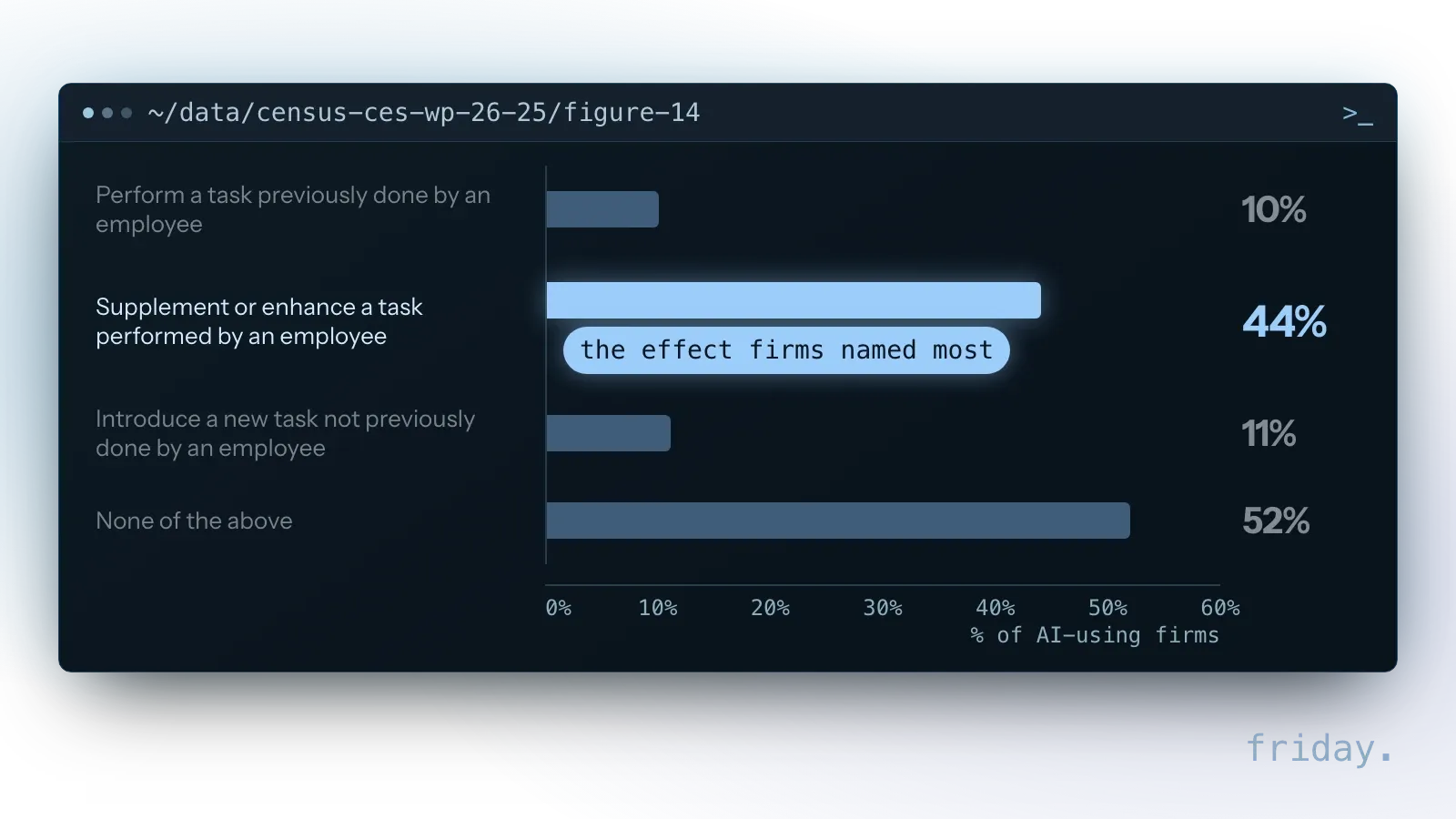
Among firms that reported any of these effects, 66% used AI only to augment tasks. Each pick in the table follows that split: the automation drafts, sorts or moves the data, and a person keeps the decision.
Fixed steps around one AI step
Anthropic's guide to building effective agents recommends finding the simplest solution possible and only increasing complexity when needed. For a first automation, that means fixed, predictable steps around a single AI step, such as drafting, classifying or extracting.
Each pick in the table has that shape. The trigger and the destination stay the same every time, and the AI step sits in the middle, where a person can check its output before anything leaves the business.
What not to automate first
Some candidates look attractive on the shortlist and cause trouble in the build. Four kinds belong further down the list until the process, the review or the documentation is ready.
A broken process
Automating a messy process produces mess faster. If the log shows the same task done three different ways, fix the steps first and automate the agreed version.
Money or contracts without review
Payments, refunds and agreements need a person in the loop. They can be automated later with an approval step, once a lower-risk workflow has shown how the tools behave with your data.
A customer-facing chatbot
A customer-facing chatbot looks exciting and carries more exposure than internal work, because every mistake reaches a customer. Internal wins cost less to get wrong and teach the same lessons about prompts, data and review.
A process only one person understands
Document it with them first, or the automation will encode their workarounds. Their notes also become the examples you test the first version against.
Check what data the process touches
Before you commit to a candidate, list the information that flows through it. That list decides which tools you can use, who needs access and how careful the first version must be.
List the data before you commit
Customer names and contact details, payment information, health or employee records and contracts each raise the bar. Write down every field the task reads or writes, then mark the ones the automation does not need to see.
The FTC's five principles
The FTC's Protecting Personal Information: A Guide for Business rests on five principles: take stock, scale down, lock it, pitch it and plan ahead. For choosing a first automation, the second one carries the weight.
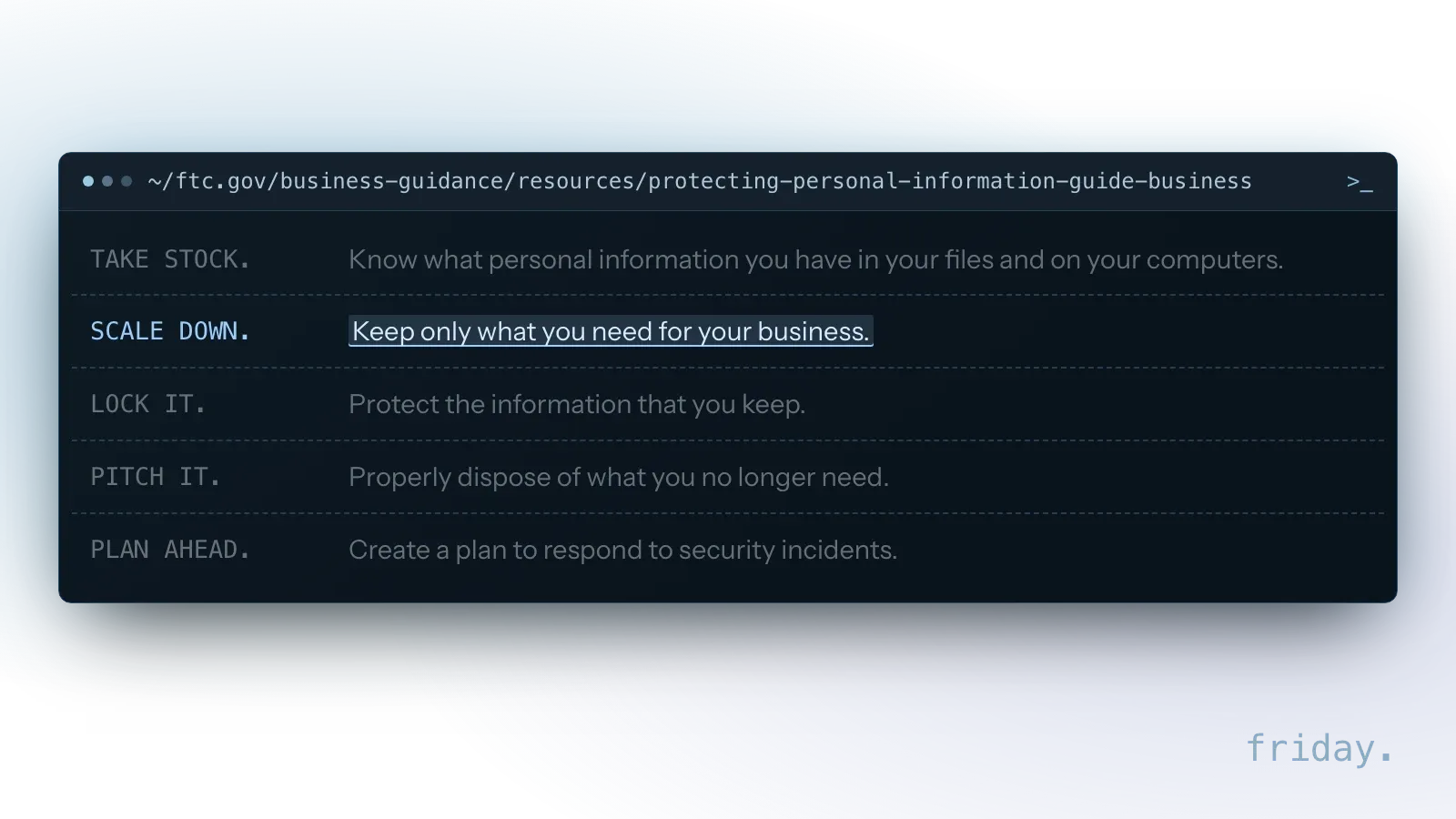
An automation that only sees the fields it needs is easier to secure and easier to explain to customers. The field list from the previous step is the take-stock half; striking the fields the task can do without is the scale-down half.
Read the vendor's terms first
A candidate that would send sensitive records to a new AI service stays on the list, but it moves down for a first project. Read the vendor's data-use and retention terms before any real data goes in, and test with made-up records until then.
Workflow or agent for your first project?
A workflow follows steps you define in advance, while an agent decides its own steps and tools. The choice changes the cost, the testing effort and how you explain a wrong result.
What each one does
Anthropic's guide draws the same line between the two. In a workflow, a form arrives, the fields are extracted, a reply is drafted and a person approves it, in that order every time. An agent given the same form would decide for itself whether to look up the company, draft a reply or ask a question.
Why a workflow fits a first project
A workflow runs the same steps on every input, so you can test it against the three examples from your scope and trace a wrong result to one step. The first picks in the table are workflows with one AI step in the middle.
Agents become worth considering later, once you have a reliable workflow, clean data and a clear sense of where fixed rules run out.
Score your shortlist
A short spreadsheet turns the shortlist into a ranking. Four scores show fit, the hours from the task log show value, and the risk score decides whether the top candidate goes first.
The four scores
List the candidates and score each from 1 to 3 on four columns: how often it happens, how consistent the steps are, how many hours it takes per week and how low the risk is. Add the four scores for a total out of 12.
Fix the scales before you score so two people get the same result. For frequency, 1 means weekly, 2 several times a week and 3 daily. For hours, 1 means under 2 hours a week, 2 means 2 to under 5 hours and 3 means 5 hours or more. For risk, 3 means a mistake is caught and fixed before it costs anything, 2 means a person checks the output before it leaves and 1 means it can move money or reach a customer unchecked.
Put a dollar figure on the hours
Multiply hours per week by your team's hourly cost to get the weekly value, then by 52 for the yearly value. Use a loaded cost, wages plus benefits, from your own payroll. When two candidates tie on the total, the one with the larger weekly value goes first, as long as its risk is acceptable.
Example: four candidates in a small office
A small office logs four candidates at a loaded cost of $35 an hour: lead intake and first reply at 5 hours a week, invoice entry from PDFs at 4 hours, appointment reminders at 3 hours and a weekly sales report at 2 hours. Lead intake is worth $175 a week and $9,100 a year, ahead of invoice entry at $140, reminders at $105 and the report at $70.
| Candidate | Frequency | Consistency | Hours | Low risk | Total |
|---|---|---|---|---|---|
| Lead intake and first reply | 3 | 3 | 3 | 2 | 11 |
| Appointment reminders | 3 | 3 | 2 | 3 | 11 |
| Invoice entry from PDFs | 3 | 3 | 2 | 1 | 9 |
| Weekly sales report | 1 | 3 | 2 | 3 | 9 |
Reminders score 3 because they run from a fixed template, and a wrong one is corrected with a second message. Lead intake and reminders tie at 11. Lead intake goes first on weekly value, with a person approving every reply during the pilot. Invoice entry scores well on volume but touches money, so it waits until an approval step is in place.
Write the scope for the winner
Once you have a winner, write down the current steps, three real examples and what a correct result looks like. That page becomes the scope, and the three examples become the first tests the automation has to pass.
Run the first automation as a pilot
Treat the first build as a test with a start date and an end date. Agreeing in writing on how to judge it before launch keeps the decision at the end tied to the results you saw.
Agree on four things in writing
- The success measure: for example, minutes per lead or the share of emails routed correctly, compared with how the process runs today.
- The owner: one person who checks results and decides what happens next.
- The review rule: which outputs a person approves during the pilot. At the start, that is all of them.
- The stop condition: the result that would make you pause or roll back.
Record the success measure for the old process during the task-log week, so the pilot has a baseline to beat. Without it, the end-of-pilot decision rests on memory.
Run old and new side by side
If you can, run the old and new process side by side for the first few days. Comparing them on the same inputs shows gaps in the scope before customers notice them.
Decide at the end
When the pilot ends, decide: keep it, adjust it or drop it. A dropped pilot still tells you something concrete about your process and makes the second choice easier, and the next candidate on the scoring sheet is already waiting.
FAQs About Choosing What to Automate First
Internal work is the safer place to learn, a first automation should save enough hours to measure, and its inputs should already live in tools you pay for today.
Should we start with customer-facing or internal work?
Internal work carries less risk. A customer-facing step can go first when a person approves every output, as lead intake does in the example.
How much time should a first automation save?
Enough to notice and measure. In the example, the winner covers 5 hours a week; whatever your number is, write it down before launch so the pilot has a baseline.
Do we need new software?
Not necessarily. Start with candidates whose inputs already live in tools you pay for; the Connected trait keeps the build smaller.
What if no task scores high on every trait?
Pick a candidate with low risk and high volume, then narrow its scope. Automating only the standard version of the task and routing the rest to a person can turn an average candidate into a good one.
Pick yours this week
An hour with the task log and the scoring sheet gives you a ranked shortlist and a first candidate with a weekly value, a risk score and a scope you can hand to whoever builds it.
Our workflow automation service builds that first workflow at a fixed price. If you would rather have a second opinion on the ranking, send us your shortlist and we will tell you which one we would start with.
Last checked: November 16, 2026, against the Census Bureau working paper CES-WP-26-25, the FTC's Protecting Personal Information guide and Anthropic's Building effective agents. Survey figures change with each release; check the linked pages before relying on a number.
Survey and guidance details come from the Census Bureau, the FTC and Anthropic, checked November 16, 2026.