
Claude File Transfers With Connectors: What Owners Set First
Claude can now send a file to connected apps or save one from them. Anthropic began rolling out Claude file transfers in beta on Nov. 24, 2026, on paid plans.
On Team and Enterprise plans it stays off until an owner turns it on. In Friday's view, decide first which apps, which direction, and who checks what leaves.
What Anthropic released on November 24
Claude file transfers appear in the Claude release notes for November 24 and in a new help article that explains which plans get them, where they work and how files are handled.
Send and save files through connectors
The Claude release notes say: "Claude can now send a file to an app you've connected, or save a file that the app offers." The help article gives two examples: Claude "can upload a presentation it just made to your cloud storage, or pull in a contract so you can review it together." In Friday's view, that is the change: Claude file transfers move the file itself.
Who gets it, and when
The release notes say Claude file transfers "are rolling out gradually in beta on Pro, Max, and Ultra plans, and on Team and Enterprise plans when an owner turns them on." The help article adds: "The Free plan will follow." A rollout that is gradual means some accounts will see it later than others.
Where it works
The help article lists chats in Claude on the web, Claude Desktop and the iOS and Android apps, plus Claude Code in the terminal, in VS Code and on the web. File transfers don't work in "Incognito chats," "Scheduled tasks," or "Claude Code sessions started with Remote Control."
Which apps work with Claude file transfers
Not every connector can take a file. Anthropic's page sets two conditions for connected apps, so check both for each app your team uses before you plan a workflow.
Connected apps from the directory, with file support
The help article says: "The app needs to be in the connectors directory, and its developer needs to have added file support." It goes on: "Custom connectors and MCP servers you add yourself don't work with file transfers." A team that connected its own tools through a custom connector will not see the feature there.
If Claude says a connector is custom
The troubleshooting section covers one case that matters for small teams: Claude may say a connector "is custom or can't be confirmed." The fix it gives is to "Remove the connector and add it again from the connectors directory, or ask an Owner or Primary Owner in your organization to." It adds a caution: check who has access afterward, "because removing it can reset that."
Size limits, and limits set by the app
In chats and Claude Code on the web, "You can send up to 10 files at a time, up to 500 MB in total. Files you attach can be up to 400 MB each." Saving allows "files up to 500 MB each and up to 10 files at a time." The page adds that "An app can set a lower size limit or accept only some file types," and that Claude can send files but not folders.
When Claude asks before sending a file
The approval step is the detail an owner should read twice. Claude asks once for each of your connected apps, and after that it follows your permission settings.
The first file to each app
The help article says: "Claude asks before it sends the first file to each app, even in Auto mode or if the connector's tool is set to 'Always allow.' After that, Claude may send files without asking, depending on your permission settings." For saving, the page says it "follows the permission you set for that connector tool."
What Claude Code checks on a computer
Claude Code adds two checks. It refuses most files named like credentials, "such as .env or .pem, unless you attached them yourself," and it asks before sending a file from outside your working folders. Files it saves land in a connector-downloads folder and, by default, are deleted after 30 days.
When a send fails or you stop it
The troubleshooting section gives a short rule for a send that fails or that you stop partway: "Check the app before you try again. The file may have arrived." On a phone, the page says to keep Claude open on screen and not let the screen turn off until the upload finishes. In Friday's view, a retry without that check risks a second copy in the app.
How Claude file transfers handle your files
A file that Claude sends to connected apps now lives under each app's own terms, and the help article spells out what deleting a chat removes and what it leaves in place.
Photos carry more than the picture
The help article reminds readers that "photos and videos may include other metadata, such as the location where they were taken." A photo sent from a phone to a shared folder can carry that location with it. In Friday's view, a team that handles site photos, receipts or client visits should decide whether those files go through Claude file transfers at all, or only after someone has checked them.
The file stays in the app
Anthropic writes: "Deleting your chat or session from Claude doesn't delete the file from the connected app." The connected app "handles the file under its own terms and privacy policy, or under your organization's agreement with the app." Files pass through Anthropic's servers, and for some images and videos a scanning copy may be kept, "which is typically deleted within two weeks unless we need to keep it longer for safety or legal reasons."
A file can carry instructions
The help article flags this as Important: "A file from an app can contain text written to mislead Claude. Connect only apps you trust." In Friday's view, this matters most for saving files, since a document someone else shared into your storage can reach Claude that way.
Organizations that can't use it
The page lists organizations that use "HIPAA settings, zero data retention, customer-managed encryption keys, Access Transparency, or an IP allowlist," organizations whose default workspace keeps data outside the US, and those set up for FERPA, plus Claude for Teachers accounts. Sending files isn't available to organizations that allow inference hooks.
Compliance records on Enterprise
For Enterprise plans with the Compliance API enabled, the page says "sent files are usually recorded in its activity feed. Saved files may not be recorded." An organization that relies on that feed for reviews should know saved files can be missing from it.
Team and Enterprise plans: what an owner sets first
On Team and Enterprise plans, an owner decides whether members can send files to connected apps, save files from them, or both. Each setting covers the whole organization at once.
Two switches, off by default
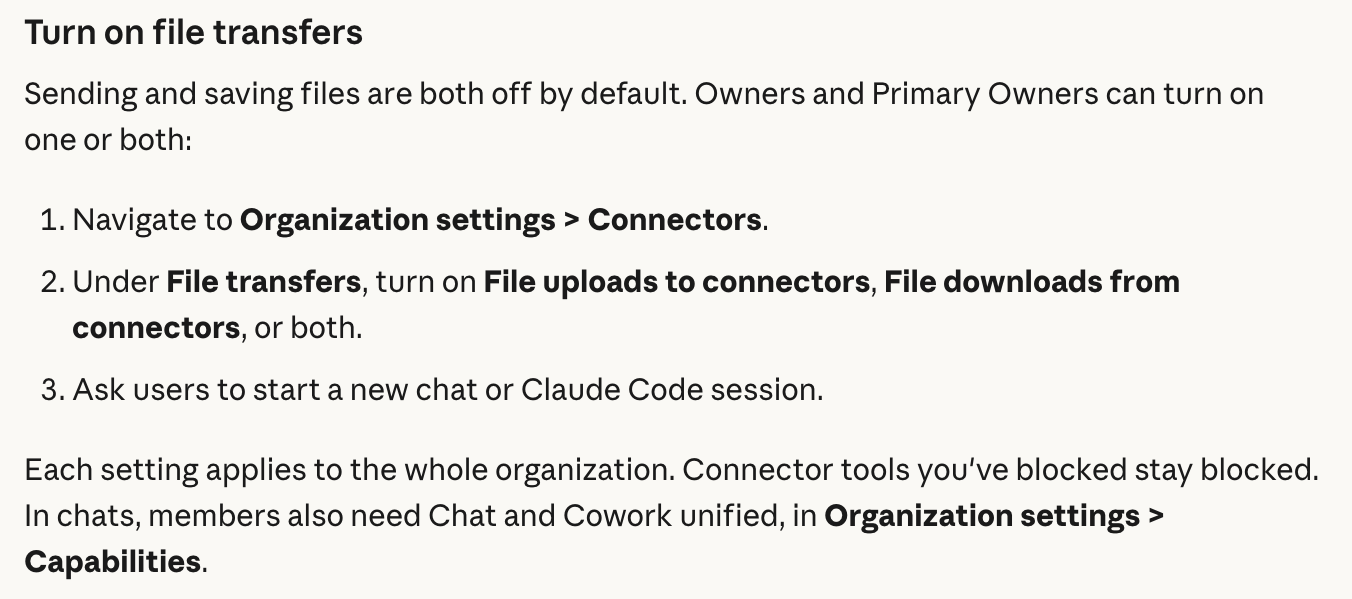
The help article says: "Sending and saving files are both off by default. Owners and Primary Owners can turn on one or both." The switches sit under Organization settings > Connectors, File transfers, as "File uploads to connectors" and "File downloads from connectors." Members then start a new chat or Claude Code session, and in chats they also need Chat and Cowork unified. The page adds: "Connector tools you've blocked stay blocked."
A short decision before the switch
| Question | Why it matters |
|---|---|
| Which connected apps are from the directory? | Only directory apps with file support work; custom connectors don't |
| Uploads, downloads or both? | Each is a separate switch for the whole organization |
| Who reviews the first send to each app? | Claude asks once per app, then may send without asking |
| Where do sent files end up? | Deleting the chat leaves the file in the app |
A seven-person accounting firm turns on Claude file transfers one way
For example, a seven-person accounting firm on a Team plan wants Claude to file finished client summaries into shared storage. The owner turns on "File uploads to connectors" only, and leaves downloads off for now, because client documents arrive from outside the firm. The owner also tells staff that the first send to each app is the one Claude always asks about, so that is the one to check closely.
Friday's view on files that leave the chat
In Friday's view, a file sent through a connector should be treated like a file sent by a person on your team: it lands in a system with its own access rules and its own retention. When we covered Claude computer use on Team plans, the setting to choose first was which apps the agent may open; the same question applies here.
Before you turn on Claude file transfers
Claude file transfers let Claude send files to connected apps and save files from them. The beta is rolling out gradually on Pro, Max and Ultra plans, and the Free plan will follow.
On Team and Enterprise plans, uploads and downloads stay off until an owner turns one or both on, and only directory apps whose developers added file support take part.
Decide which direction to allow, check the first file sent to each app, and remember that deleting a chat leaves the file in the app. This is general information, not advice for your setup. If you want help deciding which apps your team should connect, send us the tools you use.
Last checked: November 25, 2026.
Details come from the Claude release notes for November 24, 2026 and the Claude Help Center article "Send files to connected apps and save files from them," the primary sources, checked November 25, 2026. Beta features can change; check the article before you plan. Friday has no relationship with Anthropic. Statements marked as Friday's view are opinion.