
Google Workspace MCP Rule: What AI Agents Need by Feb 1
Google says AI agents must reach Workspace data through Google Workspace MCP servers from February 1, 2027. Scaled tier billing for heavier use starts April 1.
Google says over 99% of active developers work within the free Standard tier. In Friday's view, the work now is listing tools that reach your mail and files.
What Google announced about Google Workspace MCP
Google published the change on its Workspace Updates blog on November 24, 2026, with two developer guides that set the dates, the free limits and the prices for heavier use.
MCP servers and the CLI are generally available
Google's post says: "We are making Workspace Model Context Protocol (MCP) servers and the official Workspace CLI generally available alongside standardized usage tiers." The Google Workspace MCP servers cover "Gmail, Google Drive, Docs, Sheets, Slides, Calendar, Chat, and Tasks (with Keep coming soon)." The CLI is a command-line tool for agents that run in a terminal.
The MCP requirement for AI agents
The post states the rule in one line: "MCP requirement: AI agents or similar access tools must use MCP to access Workspace data, rather than calling Workspace REST APIs directly. Technical enforcement begins on February 1, 2027." Google does not list which products count as "AI agents or similar access tools," so the vendor of each tool is the one to ask.
Two usage tiers, starting with Gmail, Drive and Calendar
The Workspace APIs, "including MCP servers and CLI, will have two usage tiers, starting with Gmail, Drive, and Calendar." The Standard tier has "No cost, with published usage quotas." The Scaled tier is "Designed for projects that need higher usage quota." Google adds: "Over 99% of active developers currently operate within the Standard tier and will continue to access these APIs at no additional cost."
The two dates: February 1 and April 1, 2027
The announcement sets two deadlines, two months apart. The MCP requirement on February 1 changes how an agent connects, and April 1 changes what heavy use of the APIs costs.
February 1: agents move to Google Workspace MCP
From February 1, 2027, the blog post says agents "must use MCP." Google's usage tiers guide words the same date differently: "agents calling Google Workspace REST APIs directly are limited to Standard Tier quotas, regardless of the tier selected." The new Workspace AI Tools Addendum also takes effect that day. Read both lines before deciding what your tools need, and ask the vendor which one it is planning for.
April 1: Scaled tier billing begins
The post says: "Starting April 1, 2027, if you select the Scaled tier, you will be charged only for API or MCP usage above any daily free allowances." Scaled tier billing begins for the Gmail, Google Calendar and Google Drive APIs and the Workspace MCP servers; the pricing guide limits billed MCP servers to Gmail, Calendar and Drive. Google says billing admins and project owners with affected projects "will receive an email with project-specific details and next steps."
If you do nothing
A project that stays on the Standard tier is not billed. The post says: "If no action is taken before April 1, 2027, your project limits will automatically change to Standard tier rate limits, at no additional cost." For a project that already has higher limits, doing nothing means those limits drop.
What Google Workspace MCP costs on each tier
Google's prices apply only to Cloud projects that opt in to the paid tier. The Standard tier is "No cost" and needs no Cloud Billing account, so billing reaches only projects that choose Scaled.
Standard tier: free, with a 5,000-request cap
The usage tiers guide says that across the generally available Google Workspace MCP servers, "the Standard Tier is capped at 5,000 requests per day, per project, per product (in addition to per-minute rate limits)." It needs no billing account. Google adds a detail for planning: "Unlike single API calls, some MCP tools count as multiple requests because they make multiple API calls." It also expects "less than 1% of active Google Workspace developers will need to move beyond the Standard Tier."
Scaled tier: MCP is billed from the first request
In Friday's view, this is the rule recaps miss. REST APIs on the paid tier keep a daily no-charge allowance. Google Workspace MCP usage does not: "Scaled Tier Gmail, Calendar, and Drive MCP usage has no daily no-charge allowance and is billed from the first request." The pricing guide adds: "Switching from the Standard Tier to the Scaled Tier removes free MCP allowances." The tier applies to the whole Cloud project, and failed requests with 4xx errors are not billed.
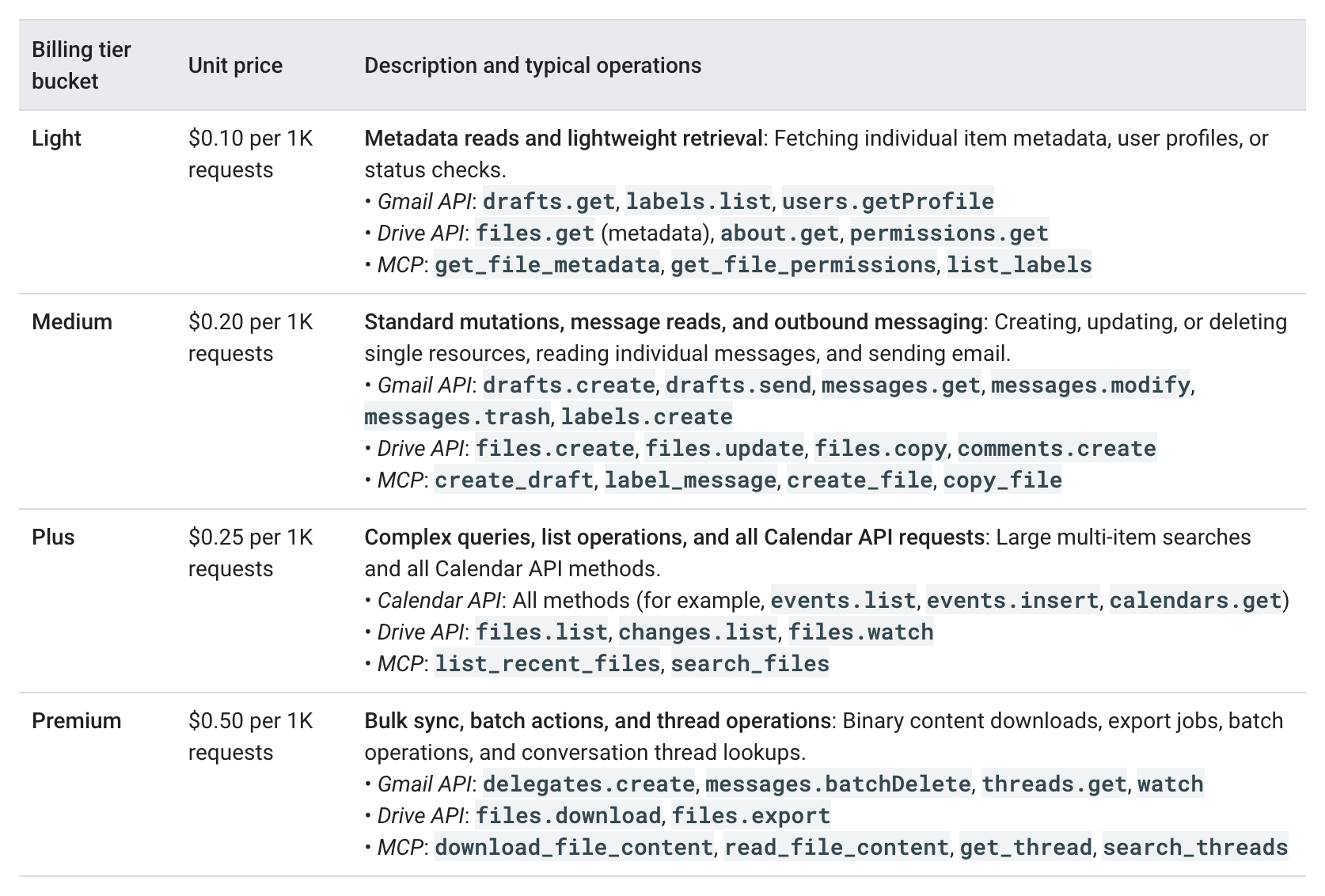
The four prices, with an arithmetic example
Google groups operations into four buckets. Light costs "$0.10 per 1K requests" and covers metadata reads such as get_file_metadata. Medium costs $0.20 and covers create_draft and create_file. Plus costs $0.25 and covers search_files and all Calendar API methods. Premium costs $0.50 and covers read_file_content, get_thread and search_threads. As plain arithmetic from those prices: an agent on the Scaled tier that makes 1,000 Premium MCP requests a day would cost $0.50 a day, or $15 over 30 days. A tool that counts as several requests costs more.
What the MCP requirement changes for Workspace admins
The MCP requirement is also a control point. Google says routing agents through Google Workspace MCP lets admins see and limit agent access the same way they manage other apps in the Admin console.
Agent access under API Controls
Google's post says admins can manage access for external AI tools, the Workspace MCP servers, the CLI and APIs, "set human-in-the-loop (HITL) confirmation rules; and view agent audit logs in the Admin console under Security > API Controls." It adds that "Requiring external AI agents to identify themselves in OAuth and connect through Workspace MCP servers allows admins to manage agent access in the admin console just like traditional apps."
Confirmations for sensitive actions
Google writes that "Routine actions like creating a draft stay seamless, while admins can set rules that prompt users to confirm sensitive actions in third-party AI tools, such as reading external files or sharing data." It also says existing user-level data loss prevention rules "apply automatically when someone uses an AI agent," and that audit logs "record agent actions and user confirmations."
The AI Tools Addendum
The new Workspace AI Tools Addendum takes effect on February 1, 2027, the same day as the MCP requirement. Google says it prohibits using agents for some activities, "including storing certain data derived from use of Workspace APIs for extended periods of time, or using AI agents to scrape Workspace APIs." Its full terms are in the addendum itself; ask the builder of each tool whether it has read them.
What a small team checks before February 1
Most of the work before the MCP requirement is a list: which tools reach Workspace data, who built them, and which Cloud project they use. Google's post gives three of these steps; the first is ours.
A checklist by role
| Who | What to check | Before |
|---|---|---|
| Owner | A list of every agent or automation that reads Gmail, Drive or Calendar, and who built it | This month |
| Whoever built the tool | Whether it calls Workspace REST APIs directly or uses MCP | Feb 1, 2027 |
| Project owner | The new usage dashboard in the Google Cloud console, against the Standard limits | Apr 1, 2027 |
| Workspace admin | Agent access and confirmation rules under Security > API Controls | When the rollout reaches you |
Check usage in the Cloud console
Google says to "Use the new Workspace API usage developer dashboard to view each project's usage against the Standard rate limits along with estimated costs. If every project is under the limits, you do not need to take any action." The rollout to Rapid and Scheduled Release domains takes about two weeks, so the dashboard may not be there yet.
Internal projects: higher REST limits only
The post says that if a project "is used only within your Workspace organization, administrators can mark the project as internal so higher limits remain included with your Workspace subscription." The usage tiers guide narrows it: under this exception, "MCP server quotas aren't eligible for increases." For an agent that needs more than the Standard MCP cap, that leaves the Scaled tier.
A nine-person property office with one inbox agent
For example, a nine-person property management office has an agent, built by a contractor last year, that reads the shared Gmail inbox and files invoices in Drive. This month, the owner asks the contractor whether the agent calls the Gmail and Drive REST APIs or uses MCP, and in which Cloud project. The answer is REST, so the contractor plans the move to MCP for January. After the rollout, the owner opens the usage dashboard and sees the project well under 5,000 requests a day, so it stays on the free tier.
Friday's view on metered access to your own data
In Friday's view, the rule moves control over how agents reach your mail and files to Google, with a meter attached for heavy use. That is a reason to know which tools reach your data, which Cloud project each one bills to, and who can switch that project's tier. Our guide to what an MCP server is explains the protocol in plain terms, and our MCP tools work covers the setup.
Before the Google Workspace MCP deadline on February 1
From February 1, 2027, Google says AI agents must use Google Workspace MCP to reach Workspace data. From April 1, paid-tier projects pay for Gmail, Calendar and Drive MCP requests from the first one.
The Standard tier stays free, up to 5,000 MCP requests a day, per project, per product, and Google expects nearly all developers to stay there.
List the tools that read Gmail, Drive or Calendar, ask each builder whether it uses REST or MCP, and check the usage dashboard once it reaches your domain. This is general information, not advice for your setup. If you want help listing which tools reach your Workspace data, send us the tools your team runs.
Last checked: November 25, 2026.
Details come from Google's Workspace Updates post of November 24, 2026 and its usage tiers and pricing guides, the primary sources, checked November 25, 2026. Dates and prices can change; check the guides before you plan. Friday has no relationship with Google. Statements marked as Friday's view are opinion.